If you’ve ever wondered “Where is the Learn button on Genie garage door opener?”, you’re not alone. Knowing the location of this button is essential for programming new remotes, keypads, or troubleshooting your opener.
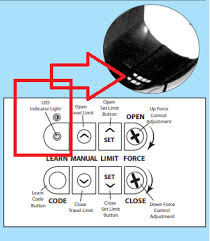
Understanding how to locate and use the Learn button can save you a service call, make adding a new remote simple, and ensure your garage remains secure.
Read too: Tc1 Tricode Garage Door Opener Remote W/ Clip Chamberlain: Complete Guide
What is the Learn Button and Why It Matters
The Learn button is a small, often colored, button on your Genie garage door opener that allows you to:
- Program new remotes
- Sync keypads
- Reset rolling codes for security
According to Genie Garage Door Openers official manuals, pressing the Learn button initiates a short window during which the opener can recognize a new signal from a remote or keypad.
Without knowing its exact location, programming new devices can become frustrating or impossible.
Where to Find the Learn Button on Genie Openers
The location depends on your Genie model, but most openers have it on the back or side panel near the light cover or motor head.
Common Positions:
- Overhead Motor Unit:
- Remove the light cover or access panel.
- Look for a small purple, yellow, or red button labeled “Learn.”
- Chain-Drive vs Screw-Drive Openers:
- Chain-drive models: typically on the back near the antenna.
- Screw-drive models: often on the side near the terminal connections.
- Wall-Mount Units:
- Some wall-mounted openers place the Learn button directly on the front face.
Tip: Use a flashlight to make small buttons easier to identify.
How to Program a Remote Using the Learn Button
Once you’ve located the Learn button, programming a remote is straightforward.
Step 1: Prepare the Remote
- Install fresh batteries.
- Ensure the remote is compatible with your Genie opener.
Step 2: Press the Learn Button
- Press and release the Learn button on the opener.
- The LED light near the button will blink, indicating the opener is in programming mode.
Step 3: Activate the Remote
- Within 30 seconds, press the button on the remote you want to program.
- The opener light will flash or you may hear a click, confirming the remote is synced.
Step 4: Test the Remote
- Stand clear of the door.
- Press the remote button to ensure the door responds correctly.
Note: Rolling code models may require multiple presses or reprogramming if the first attempt fails.
Troubleshooting Common Learn Button Issues
| Problem | Possible Cause | Solution |
|---|---|---|
| LED does not blink | Dead battery or faulty button | Check power and replace batteries |
| Remote not syncing | Wrong remote type | Ensure remote is Genie-compatible |
| Door opens then stops | Safety sensors misaligned | Realign sensors per manual |
| Learn button hard to press | Dust/debris buildup | Clean area and use gentle pressure |
Other Uses of the Learn Button
Besides syncing remotes, the Learn button is useful for:
- Keypad Programming – Adds or replaces wall-mounted keypads.
- Rolling Code Reset – Enhances security by removing all previous remotes from memory.
- System Diagnostics – Some models use LED flashes from the Learn button for error codes.
Tip: Always consult your Genie model manual for exact programming sequences.
Safety Precautions
Working with garage door openers can be risky. Follow these safety tips:
- Disconnect power when accessing internal wiring.
- Avoid standing under the door while testing remotes.
- Use a ladder safely, ensuring stability.
- Do not force buttons; gentle pressure is sufficient.
According to Consumer Product Safety Commission data, improper garage door maintenance causes over 20,000 injuries per year in the U.S., many preventable with safe practices.
Advantages of Knowing the Learn Button Location
- DIY Programming: Program remotes and keypads without a technician.
- Enhanced Security: Reset all devices if a remote is lost.
- Cost Savings: Avoid service fees that can range from $50–$100.
Disadvantages:
- Confusing if you have multiple models or older units.
- Some functions may require precise timing, which can be tricky on first attempt.
Tips for Maintaining Your Genie Opener
- Keep button area clean – Dust can obstruct contacts.
- Check batteries annually – Ensures remotes and keypads work reliably.
- Label remotes – Avoid confusion if you have multiple units.
- Test regularly – Open and close the door weekly to ensure consistent performance.
Real-Life Case Study
Scenario:
Mark, a homeowner in Florida, purchased a Genie remote for his chain-drive opener.
Solution:
- He located the Learn button under the light cover.
- Pressed it and activated the remote within 30 seconds.
- Tested multiple distances around his driveway.
Result: The door responded flawlessly, and Mark avoided a $75 service call.
Case studies show that understanding the Learn button location significantly reduces frustration and costs.
External Reference
For more details on garage door openers and remotes, visit Wikipedia: Garage Door.
FAQ: Where Is The Learn Button On Genie Garage Door Opener
Q1: What color is the Learn button on Genie openers?
A: It can be purple, red, yellow, or blue depending on the model.
Q2: Can I program multiple remotes using one Learn button press?
A: Typically, you press the Learn button separately for each remote within 30 seconds.
Q3: What if I cannot find the Learn button?
A: Check under light covers, side panels, or consult your Genie opener manual.
Q4: Does pressing the Learn button erase old remotes?
A: Pressing once for programming adds a remote. Holding it for 10 seconds typically erases all previous devices.
Q5: Can I program a keypad without a remote?
A: Yes, keypads can be programmed directly using the Learn button following the model’s manual.
Q6: Is it safe to press the Learn button while the door is moving?
A: No, always ensure the door is stationary and stand clear when programming.
Conclusion
Knowing where is the Learn button on Genie garage door opener is key to easy programming, adding remotes or keypads, and maintaining security. By locating the button, following step-by-step instructions, and testing your devices, you can manage your garage opener independently, safely, and cost-effectively.
Share this guide with friends or family to help them locate their Genie Learn button and program remotes with ease.
Leave a Reply