If you’re trying to program a remote or keypad, you’ve probably asked: Where Is The Learn Button On Garage Door Opener? This small but essential button is the key to syncing your devices—but it’s often hidden or hard to find.
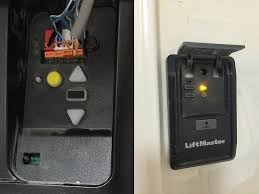
Don’t worry. In this guide, you’ll learn exactly where to locate it, what it looks like, and how to use it properly.
Read too: Tc1 Tricode Garage Door Opener Remote W/ Clip Chamberlain: Complete Guide
What Is The Learn Button On A Garage Door Opener?
The Learn button is a small control on your garage door opener motor that allows you to:
- Program remote controls
- Sync wireless keypads
- Connect smart home systems
- Reset security settings
It activates the opener’s programming mode, usually for about 30 seconds.
👉 Learn more about garage door openers here:
https://en.wikipedia.org/wiki/Garage_door_opener
Where Is The Learn Button On Garage Door Opener?
📍 Most Common Location
In most garage door openers, the Learn button is located:
- On the motor unit mounted on the ceiling
- Near the antenna wire (usually a hanging thin wire)
- Behind a light cover or plastic panel
👉 Quick Tip: If you don’t see it immediately, try removing the light lens cover—it’s often hidden behind it.
How Do I Find The Learn Button Quickly?
Follow these simple steps:
Step-by-Step Guide:
- Locate the motor unit
- Mounted on the ceiling above your garage door
- Look for a small colored button
- About the size of a fingertip
- Check near the LED indicator light
- Usually right next to the Learn button
- Remove the light cover if needed
- Some brands hide it inside
- Use a ladder safely
- Ensure stable positioning before inspecting
👉 Average search time: 2–5 minutes
What Does The Learn Button Look Like?
The Learn button is small but distinct.
Common Features:
- Round or square shape
- Bright color (yellow, purple, red, or green)
- Located next to a tiny LED light
Learn Button Color Guide (Very Important)
The color of the Learn button tells you compatibility and frequency.
| Color | Frequency | Technology | Common Brands |
|---|---|---|---|
| Yellow | 310/315/390 MHz | Security+ 2.0 | Newer models |
| Purple | 315 MHz | Security+ | Mid-range |
| Red/Orange | 390 MHz | Older Security+ | Older units |
| Green | 390 MHz | Billion Code | Very old models |
👉 Why it matters: You need a compatible remote for your opener’s frequency.
Why Can’t I Find The Learn Button?
If you’re struggling, here are common reasons:
Possible Issues:
- Hidden behind light cover
- Covered by dust or dirt
- Different brand design
- Older unit with faded color
- Installed in a tight or hard-to-see position
How To Use The Learn Button (Step-by-Step)
Once you find it, here’s how to use it.
To Program A Remote:
- Press and release the Learn button
- LED light turns on (you have 30 seconds)
- Press and hold the remote button
- Wait for the opener light to blink
- Test the remote
👉 Total time: under 2 minutes
To Reset The Opener:
- Press and hold the Learn button
- Hold for 6–10 seconds
- LED light turns off
- All remotes are erased
⚠️ Use reset only if necessary.
Common Brands & Learn Button Placement
1. Chamberlain / LiftMaster
- Behind light cover
- Near antenna wire
2. Genie
- On the back or side panel
- Labeled clearly as “Learn”
3. Craftsman
- Under light lens
- Near wiring terminals
Pros vs Cons of Using The Learn Button
✅ Advantages:
- Easy remote programming
- Enhances security (rolling code)
- Supports multiple devices
- Quick setup process
❌ Limitations:
- Requires ladder access
- Can reset all devices accidentally
- May be hard to locate in older units
Real-Life Example
A homeowner couldn’t connect their new remote for days. After removing the light cover, they discovered the Learn button hidden inside. Within 60 seconds, the remote was successfully programmed.
👉 Lesson: The button is often there—you just need to know where to look.
Safety Tips When Accessing The Learn Button
- Use a stable ladder
- Avoid touching wiring
- Keep hands dry
- Disconnect power if unsure
- Keep children away during setup
FAQ: Where Is The Learn Button On Garage Door Opener
1. Is the Learn button always visible?
Not always. It’s often hidden behind a light cover or panel.
2. Can I program a remote without the Learn button?
No, the Learn button is required for most modern openers.
3. How long does programming mode last?
Typically 30 seconds after pressing the Learn button.
4. What if my Learn button doesn’t work?
It may be faulty or the opener may need resetting.
5. Are all Learn buttons the same?
No, they vary in color and frequency depending on the model.
6. Do older garage door openers have Learn buttons?
Some very old models may use DIP switches instead.
Conclusion
Finding the Learn button doesn’t have to be frustrating. Once you know where to look—on the motor unit, near the antenna, or behind the light cover—you can quickly access it and program your devices.
By following this guide on Where Is The Learn Button On Garage Door Opener, you’ll save time, avoid confusion, and take full control of your garage system.
Leave a Reply