If you’re trying to program a remote or troubleshoot your opener, the first question is usually: where is the learn button on Craftsman garage door opener? You’re not alone—this small button plays a big role, yet it can be surprisingly hard to find.
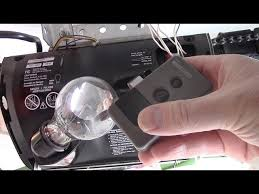
The good news is that once you know where to look (and what it looks like), you can complete most garage door tasks in just minutes.
Where Is The Learn Button On Craftsman Garage Door Opener? (Quick Answer)
The Learn button on a Craftsman garage door opener is typically located:
- On the back or side of the motor unit
- Near the antenna wire
- Under a light cover panel (in some models)
Read too: How Do You Change Code On Garage Door Keypad Fast?
👉 It is usually a colored square or round button labeled “Learn” or “Program.”
What Does the Learn Button Look Like?
The Learn button is easy to identify once you know the color coding system.
Common Learn Button Colors and Meanings
| Color | Technology Type | Approx. Year Range |
|---|---|---|
| Red/Orange | Security+ | 1997–2005 |
| Purple | Security+ 315 MHz | 2005–2014 |
| Yellow | Security+ 2.0 | 2011–Present |
| Green | Billion Code | Older models |
👉 These colors help determine compatibility with remotes and keypads.
Why Is the Learn Button Important?
The Learn button allows your garage opener to:
- Pair with remote controls
- Sync with car systems (HomeLink)
- Connect wireless keypads
- Reset stored codes for security
📊 Experts estimate that over 80% of garage door programming tasks rely on this single button.
For more technical background, visit:
https://en.wikipedia.org/wiki/Garage_door_opener
How Do I Access the Learn Button on My Craftsman Opener?
Step-by-Step Guide
Step 1: Locate the Motor Unit
- Look at the ceiling of your garage
- Identify the main opener box
Step 2: Find the Light Cover
- Many models hide the Learn button behind a plastic cover
- Gently pull or slide the cover open
Step 3: Look Near the Antenna
- The antenna is usually a thin hanging wire
- The Learn button is typically right next to it
Step 4: Identify the Button Color
- Match the color to the table above
- Confirm it’s labeled “Learn” or “Program”
How To Use the Learn Button (Programming Remote)
Once you’ve found it, here’s how to use it.
Step-by-Step Instructions
- Press and release the Learn button
- Wait for the LED light to turn on
- Within 30 seconds, press your remote button
- Wait for the opener light to blink
👉 That blink confirms successful programming.
How To Reset a Craftsman Garage Door Opener
Sometimes you may need to erase all codes.
Steps to Reset:
- Press and hold the Learn button
- Hold for 6–10 seconds
- Release when the LED turns off
👉 This clears all remotes and keypads.
What If You Can’t Find the Learn Button?
If you’re still struggling, here are possible reasons:
1. Hidden Behind Panel
Some models conceal it behind the light lens.
2. Older Model Differences
Older units may have different layouts or labels.
3. Dirt or Wear
Dust buildup can make the button hard to see.
4. User Manual Needed
Check your model number for exact diagrams.
Common Mistakes to Avoid
- ❌ Pressing and holding too long (resets system unintentionally)
- ❌ Confusing Learn button with light button
- ❌ Ignoring the 30-second programming window
- ❌ Not checking button color compatibility
Pros vs Cons of Using the Learn Button
Advantages
✔ Simple programming process
✔ No tools required
✔ Works with multiple devices
Disadvantages
✖ Easy to press incorrectly
✖ Can reset all devices accidentally
✖ Location may be hidden
Real-World Example
A homeowner couldn’t program their remote because they couldn’t find the Learn button.
Solution:
- Opened light cover panel
Result:
- Found yellow Learn button
- Completed setup in under 2 minutes
👉 Sometimes, it’s just about knowing where to look.
Safety Tips When Accessing the Learn Button
- Use a stable ladder
- Turn off power if inspecting wiring
- Avoid touching internal components
- Keep hands clear of moving parts
FAQ: Where Is The Learn Button On Craftsman Garage Door Opener
Q1: Is the Learn button always visible?
A: Not always. Some models hide it under a light cover or panel.
Q2: What color is the Learn button on Craftsman openers?
A: It can be red, yellow, purple, or green depending on the model.
Q3: Can I program a remote without the Learn button?
A: No. The Learn button is essential for pairing new devices.
Q4: Why does my Learn button not light up?
A: This could indicate a power issue or internal malfunction.
Q5: How long do I have after pressing the Learn button?
A: Usually 30 seconds to complete programming.
Q6: Does pressing the Learn button erase remotes?
A: Only if you hold it for several seconds. A quick press won’t erase anything.
Conclusion
So, where is the learn button on Craftsman garage door opener? In most cases, it’s on the back or side of the motor unit—often near the antenna or hidden behind a light cover. Once you find it, you unlock the ability to program remotes, keypads, and even your car system in minutes.
Understanding this small but powerful button can save you time, money, and frustration. If this guide helped you, share it with others—because sometimes, the simplest solutions make the biggest difference. 🚪
Leave a Reply