If you’re trying to program a remote or keypad, you’re probably asking: where is the learn button on Chamberlain garage door opener? It’s one of the most important parts of your system—but it’s not always easy to find.
Don’t worry. In this guide, you’ll learn exactly where to locate it, what it looks like, and how to use it correctly in just a few minutes.
Read too: How Do You Change Code On Garage Door Keypad Fast?
Where Is The Learn Button On Chamberlain Garage Door Opener?
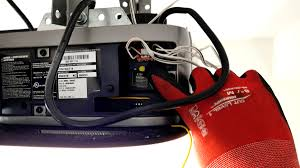
The Learn button is located on the main motor unit of your garage door opener.
Most Common Locations:
- On the back panel of the motor housing
- On the side of the unit, near the antenna wire
- Behind the light cover (you may need to open or remove it)
👉 Look for a small square or round button with an LED light next to it.
How To Identify the Learn Button Quickly
The Learn button is usually color-coded, making it easier to recognize.
Chamberlain Learn Button Colors:
| Color | Frequency | Year Range | Technology |
|---|---|---|---|
| Yellow | 310/315/390 MHz | Newer models | Security+ 2.0 |
| Purple | 315 MHz | 2005–2014 | Security+ |
| Red/Orange | 390 MHz | 1997–2005 | Older systems |
| Green | 390 MHz | Pre-1997 | Legacy systems |
👉 The color helps determine remote compatibility and programming steps.
Why Can’t I Find the Learn Button?
If you’re having trouble locating it, here are common reasons:
1. Hidden Behind Light Cover
- Many models hide the button inside the light compartment
- Open the plastic cover to access it
2. Mounted High on Ceiling
- Use a ladder to safely inspect the unit
3. Different Model Design
- Some newer smart openers have compact layouts
4. Confusing It With Other Buttons
- The Learn button is usually the only colored button
- Other buttons are typically black or neutral
What Does the Learn Button Do?
The Learn button is essential for programming and security.
Main Functions:
- Sync remotes
- Program keypads
- Connect wall controls
- Reset opener memory
👉 It enables communication between your opener and external devices.
How To Use the Learn Button (Step-by-Step)
Once you’ve found it, here’s how to use it.
Step 1: Press the Learn Button
- Press and release once
- LED light will turn on
⏱️ You have 30 seconds to complete the next step.
Step 2: Press Your Remote Button
- Hold the remote button for 2–3 seconds
- Release
👉 The opener light will blink or click.
Step 3: Test the Remote
- Press the remote again
- The door should operate normally
✅ Programming is complete.
How To Reset Using the Learn Button
You can also use the Learn button to reset your system.
Steps:
- Press and hold the Learn button for 6–10 seconds
- Release when the LED turns off
- All devices are erased
⚠️ You’ll need to reprogram all remotes afterward.
What If the Learn Button Is Not Working?
If pressing the button doesn’t respond:
Possible Causes:
- No power to the opener
- Faulty circuit board
- Worn-out button
- Internal wiring issue
👉 Try unplugging the unit for 30 seconds, then reconnect.
How Long Does It Take to Find and Use the Learn Button?
- Finding the button: 1–3 minutes
- Programming: 2–5 minutes
👉 Most users complete the process in under 10 minutes.
Common Mistakes to Avoid
Avoid these errors for a smoother experience:
- ❌ Pressing the Learn button multiple times
- ❌ Holding too long (accidental reset)
- ❌ Programming too far from the opener
- ❌ Ignoring button color compatibility
Learn Button vs Program Button: What’s the Difference?
Quick Comparison:
| Feature | Learn Button | Program Button |
|---|---|---|
| Common Brand | Chamberlain | Genie |
| Function | Sync & reset | Sync & settings |
| Location | Motor unit | Motor unit |
👉 They serve similar purposes but are labeled differently by brand.
How Chamberlain Technology Works
Chamberlain openers use secure communication systems.
👉 Most modern units rely on rolling code technology, which changes the signal every time you use the remote. Learn more here:
https://en.wikipedia.org/wiki/Rolling_code
Real-Life Example
A homeowner couldn’t program their remote because they couldn’t find the Learn button. After opening the light cover, they discovered it hidden inside. Within minutes, the remote was successfully synced.
👉 This shows how location can vary, but the solution is usually simple.
Best Tips for Finding the Learn Button Fast
- ✔️ Check behind the light cover first
- ✔️ Look for colored buttons
- ✔️ Follow the antenna wire
- ✔️ Use a flashlight for better visibility
FAQ: Where Is The Learn Button On Chamberlain Garage Door Opener
1. Is the Learn button always visible?
No. It’s often hidden behind the light cover or on the back panel.
2. What color is the Learn button?
It can be yellow, purple, red/orange, or green depending on the model.
3. Can I program my remote without the Learn button?
In most cases, no. The Learn button is required for syncing.
4. How do I know if I pressed the right button?
The LED light will turn on or blink when pressed.
5. Does the Learn button reset the opener?
Only if you hold it for 6–10 seconds.
6. What if my opener doesn’t have a Learn button?
Check inside the light cover or consult your manual—it may be hidden.
Conclusion
If you’ve been wondering where is the learn button on Chamberlain garage door opener, the answer is simple: it’s on the motor unit—often on the back, side, or hidden behind the light cover.
Once you find it, you can easily program remotes, reset your system, and manage your garage door securely in just a few minutes.
Leave a Reply