Power outage and your garage won’t open? That’s when the backup battery becomes essential. If you’re asking Where Is The Battery On A Liftmaster Garage Door Opener, you’re not alone—many homeowners don’t realize their opener even has one. In this guide, you’ll learn exactly where to find it, how it works, and how to replace it safely.
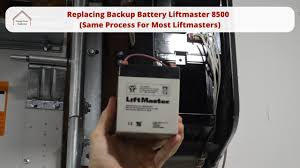
Where Is The Battery On A Liftmaster Garage Door Opener?
The battery is typically located inside the motor unit, which is mounted on the ceiling of your garage.
Read too: Tc1 Tricode Garage Door Opener Remote W/ Clip Chamberlain: Complete Guide
Common Locations:
- Behind the front light cover
- Inside a side panel compartment
- Behind a removable battery door
👉 Most LiftMaster models have a clearly labeled “Battery Backup” section.
Why Does a LiftMaster Garage Door Opener Have a Battery?
LiftMaster openers are designed with a backup battery system to ensure functionality during power outages.
Key Benefits:
- Opens/closes door during outages
- Maintains security access
- Prevents lockouts
📊 In the U.S., homes experience an average of 1–2 power outages per year, making backup batteries a critical feature.
For more technical background, visit:
https://en.wikipedia.org/wiki/Garage_door_opener
How To Find the Battery on Your Specific Model
Different LiftMaster models may vary slightly.
Step 1: Locate the Motor Unit
- Look at the ceiling-mounted opener
- Identify the main housing
Step 2: Check for a Battery Compartment
Look for:
- A small door labeled Battery
- Clips or screws securing a panel
Step 3: Open the Cover
- Slide or unscrew the cover
- The battery will be visible inside
💡 Tip: Most models use a 12V rechargeable battery.
How To Replace the Battery (Step-by-Step)
Replacing the battery is simple and takes about 10–15 minutes.
Step 1: Disconnect Power
- Unplug the opener for safety
Step 2: Open the Battery Compartment
- Remove the cover
- Take note of battery orientation
Step 3: Remove the Old Battery
- Disconnect wires carefully
- Remove battery from housing
Step 4: Install the New Battery
- Connect wires to the new battery
- Match polarity (+/-) correctly
Step 5: Close the Compartment
- Secure the cover
- Plug the opener back in
Step 6: Test the System
- Press the remote
- Ensure door operates normally
Signs Your LiftMaster Battery Needs Replacement
1. Beeping Sound from Opener
- Regular beeping every 30–60 seconds
- Indicates low battery
2. Door Won’t Open During Power Outage
- Battery no longer holds charge
3. Warning Light or Indicator
- Flashing LED on opener
4. Battery Age
- Most batteries last 1–2 years
📊 Replacing batteries on time can prevent unexpected lockouts.
LiftMaster Battery vs No Battery System
| Feature | With Battery Backup | Without Battery |
|---|---|---|
| Works during outage | ✅ Yes | ❌ No |
| Convenience | High | Low |
| Safety | Higher | Lower |
Common Mistakes to Avoid
Avoid these errors when replacing your battery:
- ❌ Installing wrong battery type
- ❌ Reversing polarity
- ❌ Ignoring warning beeps
- ❌ Forgetting to test after installation
How Long Does a LiftMaster Battery Last?
Typical Lifespan:
- 1–2 years (standard use)
- Shorter in extreme temperatures
Factors Affecting Lifespan:
- Frequency of power outages
- Temperature conditions
- Battery quality
Maintenance Tips for Longer Battery Life
- Test battery every 3 months
- Keep garage temperature stable
- Replace proactively before failure
- Use manufacturer-recommended batteries
Real-Life Scenario
A homeowner experienced a power outage and couldn’t open their garage. After checking, they discovered the backup battery was completely dead.
After replacing it, the system worked instantly during the next outage.
👉 Lesson: Regular battery checks prevent emergencies.
When Should You Call a Professional?
- Battery compartment damaged
- Wiring issues
- Opener not responding after replacement
FAQ: Where Is The Battery On A Liftmaster Garage Door Opener?
1. Do all LiftMaster openers have a battery?
No, only models with battery backup include one.
2. What type of battery does LiftMaster use?
Typically a 12V rechargeable battery.
3. How often should I replace the battery?
Every 1–2 years.
4. Can I use a third-party battery?
Yes, but ensure compatibility.
5. Why is my opener beeping?
It usually indicates a low or dead battery.
6. Will the opener work without a battery?
Yes, but not during power outages.
Conclusion
Knowing Where Is The Battery On A Liftmaster Garage Door Opener can save you from frustration during unexpected power outages. The battery is usually located inside the motor unit, easily accessible behind a panel or cover.
By understanding how to locate, replace, and maintain your backup battery, you ensure your garage door stays reliable when you need it most.
If this guide helped you, don’t forget to share it—because a prepared home is a smarter and safer home!
Leave a Reply