If you’re trying to set up a remote or troubleshoot your garage system, you’ve probably wondered, “Where is learn button on LiftMaster garage door opener?” You’re not alone—this is one of the most searched questions among homeowners. The Learn button is small, sometimes hidden, and varies by model, which makes it tricky to find. This comprehensive guide will walk you through everything you need to know—from locating it to using it like a pro.
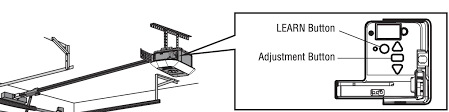
Where Is Learn Button On LiftMaster Garage Door Opener?
The Learn button on a LiftMaster garage door opener is located on the main motor unit, typically mounted on the ceiling of your garage.
Read too: How Do You Change Code On Garage Door Keypad Fast?
Most Common Locations:
- On the back panel of the opener housing
- On the side panel, near wiring terminals
- Under the light cover (requires opening or removing it)
- Next to the antenna wire (a thin hanging cable)
👉 In most cases, the Learn button is clearly labeled “LEARN” and is about the size of a small coin.
Why Is the Learn Button So Important?
The Learn button is essential because it acts as the control hub for programming and security settings.
Key Functions:
- Pair remote controls
- Connect wireless keypads
- Sync smart home devices
- Reset the opener system
Without the Learn button, you cannot configure or control your garage door opener remotely.
What Does the Learn Button Look Like?
The Learn button is color-coded, which helps identify compatibility with remotes and accessories.
Learn Button Color Guide
| Color | Frequency | Technology Type | Typical Age |
|---|---|---|---|
| Yellow | 390 MHz | Security+ 2.0 | Newest models |
| Purple | 315 MHz | Security+ | Mid-range |
| Red/Orange | 390 MHz | Billion Code | Older models |
| Green | 390 MHz | Billion Code | Very old units |
👉 The color directly impacts which remotes and keypads will work with your system.
How Do I Find the Learn Button Quickly?
If you’re standing in your garage right now, follow this simple checklist:
Step-by-Step Search Guide
Step 1: Look at the Motor Unit
- Mounted on the ceiling
- Connected to the garage door via a rail
Step 2: Check the Light Cover
- Most LiftMaster models hide the Learn button under the light lens
- Open or slide the cover carefully
Step 3: Locate the Antenna Wire
- A thin wire hanging down from the opener
- The Learn button is usually nearby
Step 4: Identify the Button
- Look for a colored square or round button
- Confirm it’s labeled “LEARN”
How To Use the Learn Button to Program a Remote
Once you’ve found the Learn button, programming is simple.
Step-by-Step Programming Instructions
Step 1: Press the Learn Button
- Press and release quickly
- Indicator light turns on
Step 2: Press Remote Button
- Within 30 seconds, press the button on your remote
Step 3: Wait for Confirmation
- Light blinks or you hear a click
Step 4: Test the Remote
- Press the remote again
- The door should open or close
👉 Total time: less than 1 minute
How To Program a Keypad Using the Learn Button
You can also connect a wireless keypad.
Steps:
- Press Learn button
- Enter a 4-digit PIN on the keypad
- Press Enter
- Wait for light confirmation
How To Reset LiftMaster Garage Door Opener
Sometimes you need to erase all programmed devices.
Reset Instructions:
- Press and hold Learn button for 6–10 seconds
- LED light turns off
- All remotes and keypads are erased
⚠️ Important: You’ll need to reprogram everything afterward.
Why Can’t I Find the Learn Button?
Common Reasons:
- Hidden under light cover
- Covered by dust or debris
- Different model design
- Misidentified as another button
Solution:
- Check user manual
- Look for colored button near wiring terminals
- Use a flashlight for better visibility
Common Problems When Using the Learn Button
1. Remote Won’t Pair
- Dead battery
- Wrong frequency
2. Learn Button Not Responding
- Power issue
- Faulty circuit board
3. Programming Fails Repeatedly
- Exceeded memory capacity
- Incorrect timing
Troubleshooting Checklist
Before calling a technician, try this:
- ✅ Ensure opener has power
- ✅ Replace remote batteries
- ✅ Press Learn button briefly (not too long)
- ✅ Stay within 30-second pairing window
- ✅ Check compatibility
Safety Considerations When Using the Learn Button
Garage door systems involve electrical and mechanical components.
Safety Tips:
- Keep children away during programming
- Ensure door area is clear
- Avoid holding button too long
- Do not tamper with wiring
Garage door openers operate using radio frequency systems and automated controls, as explained in Wikipedia, which require proper configuration for safe operation.
Learn Button vs Smart Garage Systems
Modern LiftMaster models integrate with smart home systems.
Comparison:
| Feature | Learn Button | Smart App |
|---|---|---|
| Setup | Manual | Digital |
| Speed | Fast | Instant |
| Accessibility | On-device | Remote access |
| Security | High | Very high |
Real-Life Example: Finding the Hidden Learn Button
A homeowner spent 20 minutes searching for the Learn button. It turned out to be hidden under the light cover. After opening it, they found a yellow button and successfully programmed their remote in under 30 seconds.
When Should You Call a Professional?
Call a Technician If:
- Learn button is missing or damaged
- Opener doesn’t respond
- Wiring issues are present
- System won’t reset
Typical repair cost: $100–$250
Tips to Make Programming Easier
- Keep your manual handy
- Label remotes after programming
- Test devices immediately
- Avoid programming multiple devices at once
Pros vs Cons of Using the Learn Button
Advantages
- ✅ Quick and easy setup
- ✅ No tools required
- ✅ Works with multiple devices
Disadvantages
- ❌ Can erase all settings accidentally
- ❌ Slightly different across models
- ❌ Requires physical access
Frequently Asked Questions (FAQ)
FAQ: Where Is Learn Button On LiftMaster Garage Door Opener
1. Where exactly is the Learn button located?
Usually on the back or side of the motor unit, often under the light cover.
2. What color is the Learn button on LiftMaster?
It can be yellow, purple, red/orange, or green depending on the model.
3. How do I know if I pressed it correctly?
The indicator light will turn on or blink.
4. Can I program multiple remotes?
Yes, most models support multiple remotes.
5. What happens if I hold the Learn button too long?
It will reset the system and erase all programmed devices.
6. Do older LiftMaster models have a Learn button?
Yes, but location and color may vary.
Expert Insight: Why the Learn Button Matters
Industry experts emphasize that proper programming ensures:
- Secure access control
- Reliable operation
- Reduced interference issues
Incorrect setup can lead to:
- Unauthorized access
- System malfunctions
- Remote pairing failures
Conclusion
Understanding where is learn button on LiftMaster garage door opener is the key to controlling and maintaining your garage system. While it may seem hard to find at first, it’s usually located on the motor unit—often under the light cover or near the antenna wire.
Once located, the Learn button allows you to program remotes, reset your system, and enhance your garage’s security in just minutes.
Leave a Reply