If you’re asking “Where Is Learn Button On Chamberlain Garage Door Opener”, you’re likely trying to program a remote or troubleshoot your system. It can be frustrating when you don’t know where to look—especially with different models having slightly different designs.
Don’t worry. This guide will help you quickly locate the Learn button and show you exactly how to use it, even if you’re a beginner.
Where Is Learn Button On Chamberlain Garage Door Opener?
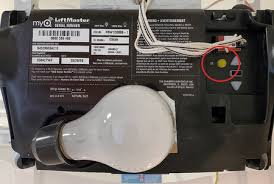
The Learn button is typically located on the motor unit of your garage door opener—the box mounted on the ceiling.
Read too: Tc1 Tricode Garage Door Opener Remote W/ Clip Chamberlain: Complete Guide
Common Locations:
- On the back panel of the motor unit
- Under the light cover
- Near the antenna wire (a thin hanging wire)
👉 In most cases, you’ll need a step ladder to access it safely.
What Does the Learn Button Look Like?
The Learn button is small but easy to identify once you know what to look for.
Key Features:
- Usually round or square
- Labeled “Learn” or “Program”
- Often brightly colored
Learn Button Colors and Their Meaning
| Color | Frequency Type | Typical Model Age |
|---|---|---|
| Yellow | Security+ 2.0 | Newer models (2011+) |
| Purple | Security+ | Mid-range models |
| Red/Orange | Billion Code | Older models |
| Green | Older systems | Pre-1997 |
👉 The color helps determine compatibility with remotes and accessories.
Why Is the Learn Button Important?
The Learn button is essential for:
- Programming remote controls
- Connecting keypads
- Syncing with car systems (HomeLink)
- Resetting your garage door opener
Without it, you cannot pair new devices.
How To Access the Learn Button Safely
Before you start, follow these safety precautions:
Safety Steps:
- Use a stable ladder
- Turn off the garage door opener (optional but safer)
- Ensure the door is fully closed
- Keep hands clear of moving parts
How To Use the Learn Button (Step-by-Step)
Once you’ve found the Learn button, here’s how to use it.
To Program a Remote:
- Press and release the Learn button
- A light will turn on or blink
- Within 30 seconds, press the remote button
- Wait for the opener light to flash
👉 This confirms successful pairing.
To Reset the Opener:
- Press and hold the Learn button
- Hold for 6–10 seconds
- Release when the LED turns off
👉 This erases all programmed remotes.
Why Can’t I Find the Learn Button?
If you’re struggling to locate it, here are common reasons:
Possible Issues:
- Hidden under a light cover
- Covered in dust or dirt
- Located on the back side facing away from you
Quick Fix:
- Use a flashlight
- Remove the light cover carefully
- Check both sides of the motor unit
Common Problems When Using the Learn Button
Even after finding it, you may run into issues.
Troubleshooting Table
| Problem | Cause | Solution |
|---|---|---|
| No LED light | Power issue | Check power supply |
| Remote won’t sync | Timing expired | Retry within 30 seconds |
| Button unresponsive | Faulty logic board | Replace or repair |
| Intermittent pairing | Signal interference | Reprogram codes |
How Does the Learn Button Work? (Simple Explanation)
The Learn button activates a receiver mode inside the opener.
What Happens:
- The opener listens for a signal
- Your remote sends a unique code
- The opener stores and recognizes it
Modern systems use rolling codes, which change every time you use the remote for better security.
For more details, see:
https://en.wikipedia.org/wiki/Garage_door_opener
Tips to Make Programming Easier
Here are some expert tips to simplify the process:
- Stand within 1–3 meters (3–10 feet)
- Use fresh batteries in your remote
- Avoid pressing multiple remotes at once
- Complete pairing within 30 seconds
👉 These small steps can improve success rates significantly.
When Should You Call a Professional?
Sometimes, the issue goes beyond the Learn button.
Call a technician if:
- The button doesn’t respond
- The opener doesn’t enter programming mode
- Electrical components appear damaged
Typical service cost: $75–$150.
FAQ: Where Is Learn Button On Chamberlain Garage Door Opener
Q1: Is the Learn button always visible?
Not always. It may be hidden under a light cover or on the back panel.
Q2: Can I program my garage door without the Learn button?
No, most modern systems require it for pairing.
Q3: How long do I have after pressing the Learn button?
Usually 30 seconds to complete programming.
Q4: What if my Learn button has no color?
It may be faded or covered in dust—clean it and check closely.
Q5: Can I reset my garage door using the Learn button?
Yes, holding it for 6–10 seconds clears all programmed devices.
Q6: Why is my Learn button not working?
Possible causes include power issues, worn components, or a faulty logic board.
Conclusion
Finding the Learn button doesn’t have to be difficult. Once you know where to look—on the motor unit, under the light cover, or near the antenna—you can quickly access it and start programming your devices.
Understanding Where Is Learn Button On Chamberlain Garage Door Opener not only helps with setup but also makes troubleshooting much easier. With the step-by-step guidance above, you can confidently program remotes, reset your system, and keep your garage door working smoothly.
If this guide helped you, feel free to share it on social media so others can easily find and use their Chamberlain Learn button too!
Leave a Reply