If you’ve ever opened your garage door opener and wondered, “What Is The Learn Button On Garage Door Opener?”, you’re not alone. This small button plays a big role in controlling your garage system. Whether you’re setting up a new remote or fixing a connection issue, understanding this feature can save you time and frustration.
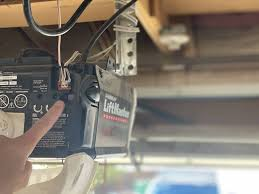
What Is The Learn Button On Garage Door Opener and What Does It Do?
The learn button is a small but essential component located on your garage door opener motor unit. Its primary function is to program and sync remote controls, keypads, and even smart home devices with your opener.
Read too: Tc1 Tricode Garage Door Opener Remote W/ Clip Chamberlain: Complete Guide
Key Functions of the Learn Button:
- Connects remote controls to the opener
- Programs wireless keypads
- Resets security codes
- Clears old device memory
Think of it as the “pairing button” for your garage door system.
Where Is the Learn Button Located?
One of the most common questions homeowners ask is where to find it.
Typical Locations:
- On the back or side of the motor unit
- Under a light cover panel
- Near the antenna wire
Common Colors and Their Meaning:
| Color | Frequency Type | Brand Compatibility |
|---|---|---|
| Yellow | Security+ 2.0 | Newer models |
| Purple | Security+ | Mid-range models |
| Red/Orange | Older systems | Legacy units |
| Green | Billion code | Older openers |
💡 Tip: The color often indicates the technology used for communication.
How Do I Use the Learn Button to Program a Remote?
Programming your remote is simple if you follow the right steps.
Step-by-Step Programming Guide
- Locate the Learn Button
- Remove the light cover if necessary
- Press the Learn Button
- A small LED light will turn on
- You have 30 seconds to complete the next step
- Press the Remote Button
- Hold for 2–3 seconds
- Wait for Confirmation
- The opener light will blink or click
- Test the Remote
- Press the button again to ensure it works
👉 That’s it—your remote is now synced.
How to Reset a Garage Door Opener Using the Learn Button
Resetting is useful when:
- You lose a remote
- Move into a new home
- Experience signal issues
Reset Instructions:
- Press and hold the learn button for 6–10 seconds
- Release when the LED light turns off
- All connected devices will be erased
⚠️ Important: You’ll need to reprogram all remotes afterward.
Why Is the Learn Button Not Working?
Sometimes things don’t go as planned.
Common Issues and Fixes:
1. LED Light Doesn’t Turn On
- Check power supply
- Inspect wiring
2. Remote Won’t Pair
- Replace batteries
- Move closer to the opener
3. Signal Interference
- Avoid nearby electronics
- Try reprogramming
4. Memory Full
- Reset the opener and try again
How Secure Is the Learn Button System?
Modern garage door openers use rolling code technology, which changes the access code every time you use the remote.
According to security insights referenced on Wikipedia
(https://en.wikipedia.org/wiki/Garage_door_opener), rolling codes significantly reduce the risk of unauthorized access.
Security Benefits:
- Prevents code hacking
- Limits unauthorized entry
- Enhances home safety
Learn Button vs Smart Garage Systems
With smart homes becoming popular, how does the learn button compare?
Comparison Table:
| Feature | Learn Button | Smart System |
|---|---|---|
| Setup | Manual | App-based |
| Security | High | Very high |
| Remote Access | No | Yes |
| Cost | Low | Higher |
Common Mistakes When Using the Learn Button
Avoid these errors to ensure smooth operation:
- Pressing the button too long (accidental reset)
- Waiting too long after pressing (timeout)
- Programming too far from the opener
- Ignoring battery replacement
When Should You Use the Learn Button?
You’ll need it in several situations:
- Setting up a new remote
- Adding a keypad
- Connecting a smart hub
- Resetting after a security concern
Advantages vs Disadvantages of Using the Learn Button
✅ Advantages
- Easy to use
- No technical skills required
- Quick setup process
- Works with most opener brands
❌ Disadvantages
- Requires physical access to the motor
- Limited to short programming window
- Can accidentally erase settings
FAQ Section
1. What happens if I press the learn button too long?
Holding it for more than 6 seconds will erase all programmed remotes and reset the system.
2. Can I program multiple remotes?
Yes, most systems allow 5–10 remotes depending on the model.
3. Does every garage door opener have a learn button?
Most modern openers do, but very old systems may not include one.
4. Why does my garage door opener light blink after pressing the learn button?
This indicates successful programming or pairing.
5. Can I use the learn button without a remote?
Yes, it can still reset the system or prepare it for new device pairing.
6. Is the learn button safe to use?
Yes, as long as you follow instructions and avoid accidental resets.
Conclusion
So, what is the learn button on garage door opener? It’s a simple yet powerful feature that allows you to control, program, and secure your garage system with ease. From syncing remotes to resetting access, it plays a key role in everyday convenience and safety.
By understanding how it works, you can troubleshoot issues quickly and keep your garage door running smoothly.
If you found this guide helpful, feel free to share it on social media and help others understand their garage systems better!
Leave a Reply