If you’ve ever struggled with your garage door remote, you might have seen the learn button on your opener. But what is a learn button on a garage door opener, and why is it so important? This small but powerful feature allows you to sync your remotes, keypads, and even smartphone apps with your garage door opener for seamless operation.
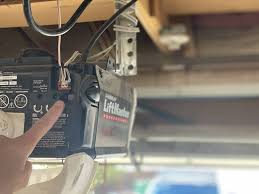
In this guide, we’ll explain its function, how it works, and provide a step-by-step tutorial on safely using it.
Read too: How Do You Change Code On Garage Door Keypad Fast?
What Is A Learn Button?
The learn button is a programming feature found on most modern garage door openers. Its primary purpose is to establish a secure connection between the opener and your remote control or keypad.
Key Points:
- Found on the motor unit, usually behind a panel
- Enables remote or keypad pairing in seconds
- Often color-coded for specific functions (e.g., red, yellow, or purple)
According to industry experts, the learn button is essential for secure garage access, as it allows users to reset or add remotes without affecting existing settings.
How Does the Learn Button Work?
When pressed, the learn button puts the opener into programming mode for a limited time (typically 30 seconds). During this window:
- Press the remote button you want to sync
- The opener recognizes the signal and pairs it
- The LED indicator on the opener confirms successful programming
Security Note: Many openers use rolling code technology. This ensures that each remote signal is unique, preventing hacking or unauthorized access.
Step-by-Step Guide: Using the Learn Button
Materials Needed:
- Garage door opener with learn button
- Remote control or keypad
Step 1: Locate the Learn Button
- Usually near the antenna wire on the motor unit
- May be under a small cover
Step 2: Prepare the Remote
- Have the battery installed and functioning
- Keep it ready for pairing
Step 3: Press the Learn Button
- Press and release the button
- LED will blink, indicating the opener is in programming mode
Step 4: Sync the Remote
- Press the remote button once within 30 seconds
- LED indicator will flash or stay solid to confirm pairing
Step 5: Test the Connection
- Press the remote button to ensure the door operates
- Repeat for additional remotes if needed
Common Uses of the Learn Button
- Adding a new remote: Pair additional family remotes without removing existing ones
- Reprogramming: Reset remotes after battery replacement or signal interference
- Security reset: Clear all previous codes in case of lost or stolen remotes
- Smart device integration: Some openers allow smartphone apps to sync via the learn button
Troubleshooting Learn Button Issues
| Problem | Solution |
|---|---|
| Remote not syncing | Check battery, press learn button again |
| LED not blinking | Ensure motor unit is powered |
| Door opens and closes randomly | Reset opener and reprogram all remotes |
Tip: Always consult the opener’s manual for model-specific instructions. Some manufacturers provide unique sequences for safety and compatibility.
FAQ Section
Q1: Can I use the learn button without a remote?
A: No, the learn button is designed to sync the opener with a remote, keypad, or smart device.
Q2: Is it safe to press the learn button?
A: Yes, pressing the learn button does not operate the door. It only puts the opener in programming mode.
Q3: How long does the programming mode last?
A: Usually 30 seconds, but some models may allow up to 60 seconds.
Q4: Can pressing it erase existing remotes?
A: Only if you use the erase function or reset all codes. Simply pressing once for pairing will not delete other devices.
Q5: What if the LED does not light up?
A: Check power supply and ensure the opener is functional. Consult the manufacturer’s manual if persistent.
Q6: Do all garage door openers have a learn button?
A: Most modern openers (post-1990s) have one, but older units may require manual programming.
Conclusion
The learn button on a garage door opener is a simple yet vital feature that ensures your garage remains secure, easily programmable, and compatible with multiple remotes or devices. By understanding its function and following the step-by-step guide, you can confidently sync, reset, or add new devices.
Share this guide with friends or family who struggle with remote programming – it’s the easiest way to take control of your garage access!
Leave a Reply