If you’ve opened your garage remote or older opener and noticed tiny switches inside, you might be wondering: What Is A DIP Switch On A Garage Door Opener? These small components play a big role in how your garage system communicates. Understanding them can help you fix connection issues, improve security, and even reprogram your opener without calling a technician.
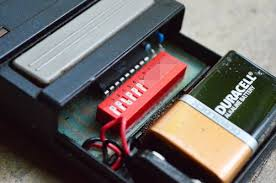
What Is A DIP Switch On A Garage Door Opener?
A DIP switch (Dual Inline Package switch) is a small manual switch used to configure electronic settings inside devices like garage door openers and remotes.
In older garage systems, DIP switches are used to create a unique access code between the opener and the remote.
Read too: Tc1 Tricode Garage Door Opener Remote W/ Clip Chamberlain: Complete Guide
According to general electronics concepts referenced in Garage Door Opener systems, DIP switches were widely used before modern rolling code technology became standard.
How Does a DIP Switch Work?
A DIP switch consists of a row of tiny switches that can be set to ON or OFF positions.
Basic Principle
- Each switch represents a binary value (1 or 0)
- The combination creates a unique code
- Both the remote and opener must match exactly
Example Configuration
| Switch | Position |
|---|---|
| 1 | ON |
| 2 | OFF |
| 3 | ON |
| 4 | OFF |
👉 This combination acts like a password for your garage door system.
Where Is the DIP Switch Located?
You can find DIP switches in two main places:
1. Inside the Remote Control
- Remove the battery cover
- Look for a row of tiny switches
2. Inside the Garage Door Opener Unit
- Located on the motor housing
- May require opening a panel
💡 Tip: Both locations must have identical switch positions to work properly.
Why Do Garage Door Openers Use DIP Switches?
DIP switches were the original method for programming garage door access.
Key Benefits
- Simple and reliable
- No need for software or apps
- Easy to manually configure
Limitations
- Limited number of code combinations
- Lower security compared to modern systems
- Susceptible to interference
📊 Security Insight:
Older DIP switch systems typically offer 256 to 4,096 combinations, while modern rolling codes generate billions.
How To Set or Change a DIP Switch Code (Step-by-Step)
If your remote isn’t working, you may need to adjust the DIP switches.
Step 1: Open the Remote
- Remove screws or slide open the cover
- Take out the battery if needed
Step 2: Locate the DIP Switch Panel
- Identify small switches labeled 1–8 or more
Step 3: Check Current Configuration
- Note the ON/OFF positions
- Take a photo for reference
Step 4: Match the Opener Settings
- Open the garage opener unit
- Set switches to the same pattern
Step 5: Test the Remote
- Replace battery and cover
- Press the remote button
- Check if the door responds
Common Problems with DIP Switches (And Fixes)
1. Remote Not Working
Cause: Mismatched switch positions
Fix: Ensure both devices match exactly
2. Interference from Other Devices
Cause: Same code used nearby
Fix: Change to a new switch combination
3. Worn-Out Switches
Cause: Age and usage
Fix: Replace remote or opener
4. Loose Battery Connection
Cause: Improper placement
Fix: Reinsert battery correctly
DIP Switch vs Rolling Code Technology
Modern systems have largely replaced DIP switches.
| Feature | DIP Switch System | Rolling Code System |
|---|---|---|
| Security | Low | High |
| Code Variations | Limited | Billions |
| Ease of Use | Manual | Automatic |
| Technology | Older | Modern |
👉 Recommendation: Upgrade to rolling code systems for better security.
Should You Still Use a DIP Switch Garage Door Opener?
It depends on your needs.
Keep It If:
- It still works reliably
- You don’t need advanced features
Upgrade If:
- Security is a concern
- You experience interference
- The system is over 10–15 years old
Real-Life Example
A homeowner experienced their garage door opening randomly. The cause? A neighbor’s remote had the same DIP switch code. After changing the switch configuration, the problem was resolved immediately.
👉 This highlights the importance of unique code settings.
How Many DIP Switch Combinations Are Possible?
The number depends on how many switches are available.
Examples
- 8 switches → 256 combinations
- 10 switches → 1,024 combinations
- 12 switches → 4,096 combinations
📊 Insight: While this was sufficient in the past, it’s limited compared to modern standards.
Pro Tips for Using DIP Switch Systems
- Always double-check switch alignment
- Avoid common patterns (all ON or all OFF)
- Change codes periodically
- Keep a record of your configuration
FAQ: What Is A DIP Switch On A Garage Door Opener
1. What does DIP stand for?
DIP stands for Dual Inline Package, referring to the switch design.
2. Can I still buy remotes with DIP switches?
Yes, but they are becoming less common as newer technology replaces them.
3. Why is my DIP switch remote not working?
Most likely due to mismatched switch settings or a dead battery.
4. Are DIP switch garage door openers secure?
They are less secure than modern systems because of limited code combinations.
5. Can I upgrade from DIP switch to modern system?
Yes. You can replace the opener or install a compatible receiver.
6. Do all garage door openers use DIP switches?
No. Most newer models use rolling code technology instead.
Conclusion
Understanding What Is A DIP Switch On A Garage Door Opener helps you troubleshoot issues, maintain compatibility, and improve your system’s reliability. While DIP switches were once the standard, they come with limitations—especially in terms of security.
If your system still uses DIP switches, consider updating your code regularly or upgrading to a modern opener for enhanced safety and convenience.
If you found this guide helpful, share it on social media to help others understand their garage door systems better! 🚪
Leave a Reply