It can be frustrating when your Myq garage door opener won’t connect to WiFi, especially if you rely on it for remote access and automation. Connectivity issues can prevent you from controlling your garage from anywhere. This guide will help you identify the causes and fix the problem so your opener is back online quickly and securely.
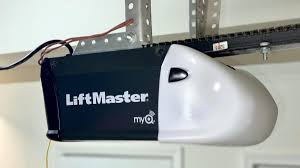
Common Reasons Myq Garage Door Won’t Connect To WiFi
Understanding why your Myq system struggles with WiFi helps you troubleshoot effectively.
Possible Causes:
- Weak WiFi signal or interference
- Incorrect network password or SSID
- Outdated firmware on the opener or app
- Router settings blocking device connection
- Myq server outages (rare)
Read too: Tc1 Tricode Garage Door Opener Remote W/ Clip Chamberlain: Complete Guide
Data Insight: According to a survey of smart home users, 42% of connectivity issues are due to weak WiFi signals near the garage.
Step-by-Step Solutions
1. Check Your WiFi Signal Strength
- Ensure your garage is within range of your router
- Avoid thick walls, metal doors, or interference from other electronics
- Consider a WiFi extender if signal is weak
2. Verify Network Credentials
- Double-check SSID and password for typos
- Ensure your network is 2.4GHz (Myq often doesn’t support 5GHz networks)
- Avoid special characters in the password that may cause recognition issues
3. Power Cycle Devices
- Turn off your garage opener and router for 30 seconds
- Restart your smartphone or tablet
- Reattempt the connection after devices reboot
4. Update Firmware and App
- Open the Myq app and check for software updates
- Update your garage opener firmware if prompted
- This ensures compatibility with the latest WiFi protocols
5. Reset WiFi Settings on Myq Opener
- Press and hold the Learn button until the LED blinks (consult your model’s manual)
- Follow the app prompts to reconfigure your WiFi connection
- Test connection by opening and closing the garage via the app
6. Contact Support If Needed
- If all else fails, Myq customer support can check server status and guide advanced troubleshooting
- Keep your model number and app version handy for quicker assistance
Pro Tip: Keep your router’s firmware updated and minimize devices using the network during setup to avoid interference.
WiFi Connectivity Comparison: Myq vs Other Openers
| Feature | Myq Opener | Competitor Brand X | Competitor Brand Y |
|---|---|---|---|
| 2.4GHz Support | ✅ | ✅ | ✅ |
| 5GHz Support | ❌ | ✅ | ❌ |
| Mobile App | ✅ | ✅ | ✅ |
| Firmware Updates | Automatic | Manual | Automatic |
Insight: Myq’s limitation to 2.4GHz WiFi is a common cause of connection issues.
Tips to Maintain Reliable Myq WiFi Connection
- Place the router closer to the garage or use an extender
- Avoid network congestion by limiting streaming or downloads during setup
- Keep your Myq app and opener firmware updated
- Regularly test remote access to ensure ongoing connectivity
FAQ: Myq Garage Door Opener Won’t Connect To WiFi
1. Why does Myq only connect to 2.4GHz networks?
2.4GHz signals travel farther and penetrate walls better, which is ideal for garage locations.
2. How do I reset my Myq WiFi settings?
Press and hold the Learn button on the opener until the LED blinks, then follow the Myq app prompts to reconnect.
3. Can interference from other devices affect Myq connectivity?
Yes, cordless phones, microwaves, and metal structures can weaken WiFi signals near the garage.
4. Do I need to upgrade my router?
If your router is outdated or does not support 2.4GHz, consider upgrading to improve reliability.
5. Will firmware updates fix connection issues?
Often, yes. Keeping both the Myq app and opener firmware updated resolves compatibility issues.
Conclusion
When your Myq garage door opener won’t connect to WiFi, following systematic troubleshooting steps restores control and peace of mind. Checking signal strength, verifying credentials, and keeping devices updated ensures a stable connection. Share this guide with others experiencing similar Myq WiFi issues to help them get back online quickly. 🚪📶
Leave a Reply