A sudden power outage can leave your Liftmaster garage door opener not working, creating frustration and inconvenience. Whether you rely on it for daily access or security, a non-functioning opener can disrupt your routine.
Understanding why your Liftmaster garage door opener stops working after a power outage is essential. With the right troubleshooting steps, you can restore functionality safely and prevent recurring issues. This guide covers causes, step-by-step solutions, preventive tips, and professional advice.
Read too: Tc1 Tricode Garage Door Opener Remote W/ Clip Chamberlain: Complete Guide
Common Causes of Liftmaster Opener Failure After a Power Outage
Power interruptions can affect garage door openers in multiple ways:
1. Electrical Surge Damage
- When electricity returns, voltage spikes may damage the logic board, motor, or internal circuits.
- Surge protectors for garage openers can prevent permanent damage.
According to electrical safety experts, up to 40% of appliance malfunctions after storms are caused by sudden voltage surges.
2. Tripped Circuit Breaker
- Outages often trip breakers or blow fuses.
- Check your home’s electrical panel for the garage circuit.
- Reset the breaker and test the opener.
3. Battery Backup Issues
Many Liftmaster models feature battery backup systems. After a power outage:
- Dead or weak backup batteries may prevent operation.
- Replace batteries if older than 3–5 years.
4. Remote or Wall Control Malfunction
- Power interruptions may reset or corrupt remote programming.
- The wall console may require a manual reset to reconnect to the opener.
5. Misaligned or Faulty Sensors
- Infrared safety sensors detect obstructions.
- Outages can reset the opener, requiring sensor recalibration.
- Check alignment: LED on both sensors should be solid, not blinking.
6. Opener Logic Board Reset
- Some models may lock or require manual reset after a power outage.
- A blinking light or unresponsive door often indicates the opener needs reprogramming.
Step-By-Step Troubleshooting
Here’s a comprehensive process to fix a Liftmaster opener after a power outage.
Step 1: Safety First
- Ensure the door is fully closed before troubleshooting.
- Keep children and pets away.
- Do not attempt internal repairs unless trained—garage door springs and motors are under high tension.
Step 2: Check Power Supply
- Confirm the outlet is working with a different device.
- Inspect wiring for loose connections or burn marks.
- Reset tripped breakers or replace blown fuses.
Step 3: Inspect Battery Backup
- Remove the battery backup and test it separately if possible.
- Replace with the recommended Liftmaster battery (typically 12V).
- Reinstall and test operation.
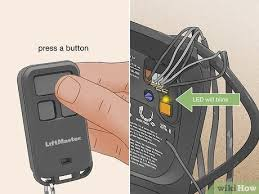
Step 4: Reset the Opener
- Locate the learn button on the motor unit.
- Press and hold the button for 6–10 seconds until the LED light turns off.
- Release and wait 30 seconds.
- Reprogram remotes and keypads individually.
This often resolves post-outage malfunctions caused by corrupted memory or errant signals.
Step 5: Check and Align Safety Sensors
- Ensure sensors are at the same height (usually 6 inches above the floor).
- Clean lenses with a soft, dry cloth.
- Observe LED: solid = aligned, blinking = adjustment needed.
Step 6: Test Door Manually
- Pull the manual release cord to operate the door by hand.
- Ensure smooth movement; any resistance may indicate mechanical issues requiring professional attention.
Step 7: Reconnect Power and Test
- Plug in the opener and try the wall console first.
- Then test each remote individually.
- Observe for irregular behavior.
Preventive Measures for Future Outages
- Install a surge protector specifically for your Liftmaster opener.
- Replace backup batteries every 3–5 years.
- Regular maintenance: check sensors, tracks, springs, and rollers annually.
- Keep remotes and wall controls properly programmed to prevent interference.
- Consider a UPS (Uninterruptible Power Supply) for garages with frequent outages.
According to the International Door Association, garages with surge protection and battery backup have a 60–70% lower risk of post-outage opener failure.
Troubleshooting Table: Common Problems vs Solutions
| Problem | Possible Cause | Solution |
|---|---|---|
| Opener unresponsive | Tripped breaker | Reset breaker, check wiring |
| Door opens but won’t close | Misaligned sensors | Align sensors, clean lenses |
| Remote fails to work | Battery or programming issue | Replace battery, reprogram remote |
| LED blinking after outage | Logic board requires reset | Reset learn button, reprogram remotes |
| Door moves erratically | Mechanical resistance | Inspect rollers, tracks, and springs |
| Opener motor hums but door doesn’t move | Broken gear or motor | Contact professional repair |
Common Mistakes to Avoid
- Ignoring safety sensors: Can cause accidents or damage.
- Using the door manually while motor is engaged: May damage the opener.
- Reprogramming all remotes at once: Leads to confusion and potential interference.
- Overlooking battery backup: Weak batteries often cause post-outage failures.
When to Call a Professional
If after troubleshooting, the opener still fails to operate:
- Logic board or motor may need replacement.
- Electrical issues beyond simple reset.
- Sensors or wiring damage from surges.
- Frequent outages causing repeated malfunctions.
Tip: Certified Liftmaster technicians ensure safe, accurate repairs and may offer warranty coverage on parts replaced.
FAQ Section
Q1: Can a power outage permanently damage my Liftmaster opener?
A1: Yes. Voltage surges can damage the logic board, motor, or circuit. Surge protection reduces but does not eliminate this risk.
Q2: How do I know if the battery backup is the problem?
A2: Remove the battery and test the opener with wall controls. If it works only on main power, the battery is likely faulty.
Q3: Will unplugging and plugging back in reset the opener?
A3: Sometimes, but for memory corruption or post-outage glitches, a full learn button reset is recommended.
Q4: How can I prevent future outages from affecting my opener?
A4: Use a surge protector, maintain battery backups, and perform yearly maintenance.
Q5: My door moves slowly after a power outage. What should I do?
A5: Check battery voltage, inspect tracks for obstruction, and ensure sensors are aligned. Persistent slowness may indicate motor or spring issues.
Q6: Can I reprogram my Liftmaster opener myself?
A6: Yes. Follow the manual to reset the learn button and pair each remote individually. For complex issues, professional help is safer.
Conclusion
Experiencing a Liftmaster garage door opener not working after a power outage can be frustrating, but most problems are easily diagnosable. Key steps include:
- Checking power supply and breakers
- Inspecting battery backup
- Resetting the logic board and remotes
- Aligning safety sensors
- Performing manual tests and preventive maintenance
Regular upkeep, surge protection, and proper battery replacement can prevent most post-outage failures. If issues persist, call a certified Liftmaster technician to ensure safe and reliable repair.
Sharing this guide with friends or family can help them troubleshoot similar problems safely, keeping garages functional and secure.
Remember: Never ignore safety warnings—garage doors are heavy, high-tension systems that can cause serious injury if mishandled.
Leave a Reply