Struggling to connect your car to your garage door opener? You’re not alone. Many drivers search for How To Sync Genie Garage Door Opener With Car but get stuck halfway through the process. The good news? With the right steps and a little patience, you can sync your system in just a few minutes.
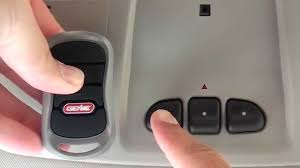
How To Sync Genie Garage Door Opener With Car (Quick Overview)
To sync your Genie garage door opener with your car, you’ll typically:
- Clear existing codes from your car’s system
- Program your car’s built-in remote (often called HomeLink)
- Sync it with the Genie opener motor unit
- Test and confirm operation
Read too: Tc1 Tricode Garage Door Opener Remote W/ Clip Chamberlain: Complete Guide
This process works for most vehicles equipped with built-in garage controls.
What Is HomeLink and How Does It Work?
Most modern vehicles use a system called HomeLink, a wireless control system built into your car.
It allows you to:
- Open/close garage doors
- Control gates
- Operate home lighting or security systems
Learn more here:
👉 https://en.wikipedia.org/wiki/HomeLink
How it works:
HomeLink copies the signal from your Genie remote and then pairs with the opener using rolling code technology for security.
What You Need Before You Start
Before syncing, prepare the following:
- Your Genie garage door remote
- Access to the garage door opener motor unit
- A ladder (if needed to reach the opener)
- Your car parked inside or near the garage
Pro Tip: Make sure your car is within 1–3 feet of the garage opener for best signal strength.
Step-by-Step: How To Sync Genie Garage Door Opener With Car
Follow these detailed steps carefully:
Step 1: Clear Previous Codes from Your Car
This ensures no interference from old signals.
- Press and hold the two outer HomeLink buttons
- Hold for 10–20 seconds until the indicator light flashes rapidly
- Release the buttons
Result: Your system is reset and ready to pair.
Step 2: Program Your Car with the Genie Remote
Now you’ll copy the signal.
- Hold your Genie remote 1–3 inches from the car’s HomeLink buttons
- Press and hold:
- The button on your Genie remote
- The desired HomeLink button in your car
- Hold both for 15–30 seconds
Watch the indicator light:
- Slow blink → learning
- Rapid blink → signal captured
Step 3: Sync with the Genie Opener (Learn Button)
This is the most critical step.
- Locate the “Learn” or “Program” button on your Genie opener
- Press it once (you’ll have about 30 seconds)
- Go back to your car
- Press the programmed HomeLink button 2–3 times
Result: The garage door should activate.
Step 4: Test the Connection
- Press the HomeLink button once
- The garage door should open/close smoothly
If it doesn’t work, repeat Step 3.
Why Won’t My Genie Garage Door Opener Sync?
This is one of the most common questions.
Possible Causes & Fixes
1. Rolling Code Not Synced
- Repeat the Learn button process
- Press the car button multiple times
2. Weak Signal
- Move the remote closer (1–3 inches)
- Replace remote battery
3. Incorrect Button Sequence
- Restart the process from Step 1
4. Compatibility Issues
- Older vehicles may need a HomeLink bridge
Genie vs Other Brands: Compatibility Overview
| Feature | Genie | LiftMaster | Chamberlain |
|---|---|---|---|
| HomeLink Support | Yes | Yes | Yes |
| Rolling Code Technology | Yes | Yes | Yes |
| Setup Difficulty | Easy–Moderate | Moderate | Moderate |
| Extra Bridge Needed | Rare | Sometimes | Sometimes |
Key Insight: Genie is generally easier to sync compared to some competitors.
How Long Does Syncing Take?
Most users complete the process in:
- 3–5 minutes (if done correctly)
- Up to 10 minutes for first-time users
According to industry estimates, over 70% of pairing failures happen due to skipping the Learn button step.
Expert Tips for a Smooth Sync Process
- Perform setup during daylight for better visibility
- Keep instructions nearby (vehicle manual helps)
- Use a fresh battery in your remote
- Avoid rushing the timing between steps
Common Mistakes to Avoid
- Skipping the reset step
- Holding buttons too briefly
- Standing too far from the opener
- Not pressing the Learn button
Advanced Troubleshooting (If It Still Doesn’t Work)
Reprogram Everything from Scratch
- Reset car system
- Re-sync remote
- Repeat Learn button process
Check Frequency Compatibility
Most Genie systems operate on 315 MHz or 390 MHz. Ensure your car supports it.
Use a HomeLink Compatibility Bridge
Some older vehicles require this add-on.
FAQ: How To Sync Genie Garage Door Opener With Car
1. Can I sync my Genie opener without a remote?
No. You need the original remote to transfer the signal to your car’s system.
2. How many buttons can I program in my car?
Most vehicles support 3 HomeLink buttons, allowing control of multiple doors or devices.
3. Why does my HomeLink light blink but not work?
This usually means the signal was copied but not synced with the opener. Repeat the Learn button step.
4. Do all cars support Genie openers?
Most modern cars do. Older models may need a compatibility bridge.
5. Is syncing safe?
Yes. Genie uses rolling code technology, which changes the signal each time for security.
6. How often do I need to re-sync?
Rarely. Only if:
- You reset your car system
- Replace the opener
- Experience connectivity issues
Conclusion
Now you know exactly How To Sync Genie Garage Door Opener With Car—and it’s much easier than it seems. By following the correct steps, especially using the Learn button properly, you can connect your system in minutes.
This simple setup improves convenience, eliminates the need for remotes, and enhances your daily routine. If you found this guide helpful, share it on social media—someone else might be struggling with the same issue!
Leave a Reply