Power outages can leave your garage door unresponsive or out of sync. If you’re wondering How To Reset Liftmaster Garage Door Opener After Power Outage, you’re not alone—this is a common issue many homeowners face after losing electricity.
The good news is that restoring your LiftMaster system is usually simple and can be done in just a few steps.
Why Does A Power Outage Affect Your Garage Door Opener?
A power outage can disrupt your garage door system in several ways:
Common Effects:
- Loss of remote synchronization
- Interrupted travel limits (open/close settings)
- Disconnected trolley (manual release triggered)
- Sensor misalignment
Read too: Tc1 Tricode Garage Door Opener Remote W/ Clip Chamberlain: Complete Guide
Modern LiftMaster systems rely on electronics and memory settings, which can reset or glitch when power is lost.
👉 Learn more about garage door opener systems:
https://en.wikipedia.org/wiki/Garage_door_opener
How To Reset Liftmaster Garage Door Opener After Power Outage
Let’s go step-by-step to restore your system.
Step 1: Check Power Supply
Before resetting anything, confirm power is fully restored.
Checklist:
- Outlet is working
- Breaker is not tripped
- Opener light turns on
👉 If no power, the issue is electrical—not the opener.
Step 2: Reconnect The Garage Door (Trolley Reset)
During outages, the door may have been manually disengaged.
How to reconnect:
- Pull the emergency release cord (red handle)
- Move the door manually until it clicks back into place
- Activate the opener using the wall button
👉 You should hear a click, indicating reconnection.
Step 3: Reset The Opener System
If the opener isn’t responding correctly, perform a reset.
Instructions:
- Locate the Learn button
- Press and hold for 6–10 seconds
- Release when LED turns off
👉 This clears stored settings and prepares for reprogramming.
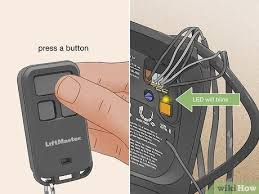
Step 4: Reprogram Remote Controls
After a reset, remotes must be reconnected.
Steps:
- Press and release the Learn button
- LED stays on for 30 seconds
- Press and hold remote button
- Wait for light to blink
- Test the remote
Step 5: Reset Travel Limits (Important)
Power outages can reset door travel limits.
Signs:
- Door doesn’t fully open/close
- Stops midway
How to fix:
- Locate adjustment screws or buttons on the opener
- Adjust up/down limits gradually
- Test after each adjustment
👉 Typical adjustment: ¼ turn at a time
Step 6: Check Safety Sensors
Sensors may become misaligned during outages.
What to check:
- Sensors facing each other
- LED lights are solid (not blinking)
- No dirt or obstruction
👉 Clean sensors with a soft cloth if needed.
Common Problems After Power Outage (And Fixes)
| Problem | Cause | Solution |
|---|---|---|
| Remote not working | Lost sync | Reprogram remote |
| Door won’t move | Disconnected trolley | Reconnect manually |
| Door stops halfway | Travel limits reset | Adjust limits |
| Blinking lights | Sensor issue | Realign sensors |
Do You Always Need A Full Reset?
Not always. Here’s a quick guide:
✅ Try simple fixes first:
- Reconnect trolley
- Check power
- Test wall button
❌ Use full reset if:
- Remote won’t sync
- System behaves erratically
- Multiple issues occur
Pros vs Cons Of Resetting After Power Outage
✅ Advantages:
- Restores normal operation
- Fixes most common issues
- Improves system reliability
- Quick DIY solution
❌ Disadvantages:
- Requires reprogramming remotes
- May reset custom settings
- Doesn’t fix hardware damage
Real-Life Example
After a storm caused a power outage, a homeowner found their LiftMaster door wouldn’t close fully. By resetting the opener and adjusting the travel limits, the issue was resolved in under 15 minutes.
👉 Key takeaway: Most post-outage issues are configuration-related—not mechanical.
Safety Tips When Resetting
- Use a stable ladder
- Keep hands away from moving parts
- Do not stand under the door during testing
- Ensure children and pets are clear
Maintenance Tips To Prevent Future Issues
Best Practices:
- Install a surge protector
- Test system after outages
- Inspect sensors regularly
- Replace remote batteries annually
- Keep tracks clean and lubricated
FAQ: How To Reset Liftmaster Garage Door Opener After Power Outage
1. Do I always need to reset after a power outage?
No, only if the system isn’t working properly.
2. Why is my garage door not responding after power returns?
It may be due to lost remote sync, disconnected trolley, or sensor issues.
3. How long does it take to reset the opener?
Typically 5–15 minutes, depending on adjustments needed.
4. Will resetting erase all remotes?
Yes, a full reset clears all programmed devices.
5. Can a power outage damage my opener?
Rarely, but power surges can affect electronics.
6. What if resetting doesn’t fix the issue?
You may need professional inspection for mechanical or electrical problems.
Conclusion
Knowing How To Reset Liftmaster Garage Door Opener After Power Outage can save you time, stress, and unnecessary repair costs. Most issues—like lost synchronization or misaligned settings—can be fixed quickly with a few simple steps.
By following this guide, you’ll be able to restore your garage door system and get everything working smoothly again.
Leave a Reply