Experiencing a power outage can leave your Liftmaster garage door inoperable, causing frustration and disrupting daily routines. After electricity returns, your garage opener may refuse to respond, lights may blink, or remotes might stop working.
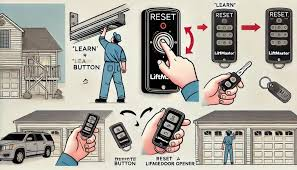
Knowing how to reset a Liftmaster garage door after a power outage is essential for homeowners who rely on their garage for security and convenience. This guide explains the causes, step-by-step reset procedures, troubleshooting tips, and preventive measures to ensure your opener works reliably.
Read too: Tc1 Tricode Garage Door Opener Remote W/ Clip Chamberlain: Complete Guide
Why Your Liftmaster Garage Door Fails After Power Outages
Understanding the reasons behind a non-working garage door opener can save time and prevent further damage:
1. Electrical Surges
- When power is restored, sudden voltage spikes may affect the opener’s logic board or motor.
- Surge protectors specifically rated for garage doors can prevent permanent damage.
2. Tripped Breakers or Blown Fuses
- Power interruptions often trip breakers or blow fuses, cutting electricity to the garage.
- Checking the panel and resetting the circuit is often the first troubleshooting step.
3. Battery Backup Interference
- Liftmaster models with battery backup may experience temporary shutdown if batteries are low or disconnected during the outage.
- Replace batteries every 3–5 years to ensure reliable operation.
4. Remote and Wall Console Reset
- Power interruptions can reset remote codes or corrupt wall console memory.
- A manual reset is often required to reconnect remotes and keypads to the opener.
5. Safety Sensor Misalignment
- Infrared sensors detect objects and prevent the door from closing.
- Power loss can require sensor recalibration or realignment.
Step-By-Step Guide: Resetting Your Liftmaster Garage Door
Follow these steps carefully to restore your opener after a power outage:
Step 1: Safety Precautions
- Ensure the garage door is fully closed.
- Keep children and pets away from the door during troubleshooting.
- Do not attempt spring or motor repairs unless you are certified.
Step 2: Verify Power Supply
- Plug a lamp or device into the garage outlet to confirm electricity is restored.
- Inspect wiring for visible damage.
- Reset tripped breakers or replace blown fuses if needed.
Step 3: Inspect Battery Backup
- Disconnect and test the battery.
- Replace with a compatible 12V Liftmaster battery if necessary.
- Reconnect and ensure terminals are secure.
Step 4: Reset the Logic Board
- Locate the learn button on your Liftmaster motor unit.
- Press and hold for 6–10 seconds until the LED turns off.
- Release the button and wait 30 seconds.
- Reprogram each remote and keypad individually.
This clears any corrupted memory caused by the outage and restores normal operation.
Step 5: Align and Test Safety Sensors
- Ensure sensors are installed 6 inches above the floor, facing each other.
- Clean the lenses with a soft cloth.
- Check LED indicators: solid = aligned, blinking = needs adjustment.
Step 6: Test Door Manually
- Pull the manual release cord to open and close the door by hand.
- Confirm smooth operation without resistance, which may indicate mechanical issues.
Step 7: Restore Full Functionality
- Reconnect power.
- Test the wall control first, then each remote.
- Observe for erratic behavior, unusual noises, or slow movement.
Troubleshooting Common Issues
| Problem | Cause | Solution |
|---|---|---|
| Opener unresponsive | Tripped breaker | Reset breaker, verify outlet |
| Door won’t close | Misaligned sensors | Adjust sensors, clean lenses |
| Remote not working | Battery or memory corruption | Replace battery, reprogram remote |
| LED blinks on motor unit | Logic board needs reset | Press learn button to reset |
| Door moves slowly | Weak battery or mechanical drag | Replace battery, lubricate rollers and tracks |
| Motor hums but door doesn’t move | Gear or motor damage | Contact professional repair |
Preventive Measures
- Install Surge Protection – Protect the opener from future voltage spikes.
- Replace Battery Backup Regularly – Prevent temporary shutdowns.
- Yearly Maintenance – Inspect tracks, rollers, springs, and sensors.
- Keep Remote Codes Updated – Prevent interference and maintain access.
- Consider a UPS System – Provides temporary power during outages.
According to the International Door Association, proper surge protection and battery maintenance reduce post-outage garage door failures by 60–70%.
Tips for Smooth Operation After Reset
- Avoid using the door manually while the motor is engaged.
- Reprogram remotes one at a time to prevent interference.
- Keep the garage clean from debris that can affect sensors and tracks.
- Lubricate moving parts twice a year to ensure smooth operation.
FAQ Section
Q1: Can a power outage permanently damage my Liftmaster opener?
A1: Yes. Voltage surges can affect the logic board, motor, or circuits. A surge protector minimizes risk.
Q2: How do I know if the battery backup is the problem?
A2: Disconnect the battery and test the opener with wall controls. If it works, replace the battery.
Q3: Will unplugging the opener reset it?
A3: Sometimes, but a learn button reset is more reliable for clearing corrupted memory.
Q4: How can I prevent future outages from affecting my opener?
A4: Use a surge protector, maintain battery backup, and schedule regular maintenance.
Q5: Door moves slowly after reset. What should I do?
A5: Check battery, inspect tracks, lubricate rollers, and verify sensor alignment.
Q6: Can I reprogram my Liftmaster opener myself?
A6: Yes. Follow the learn button procedure and program each remote individually. For complex issues, professional help is recommended.
Conclusion
Knowing how to reset your Liftmaster garage door after a power outage ensures your home stays secure and functional. Key steps include:
- Checking power supply and breakers
- Inspecting battery backup
- Resetting the logic board and remotes
- Aligning safety sensors
- Performing manual door tests
Routine maintenance, surge protection, and battery replacement reduce future malfunctions. If problems persist, contact a certified Liftmaster technician to safely restore full functionality.
Sharing this guide helps family and friends handle post-outage garage door issues efficiently, keeping homes safe and doors operational.
Safety Reminder: Never ignore safety warnings. Garage doors are heavy, high-tension systems that can cause serious injury if mishandled.
Leave a Reply