A sudden power outage can leave your garage door unresponsive, which is frustrating—especially when you’re trying to get in or out quickly. If you’re searching for how to reset Genie garage door opener after power outage, you’re not alone.
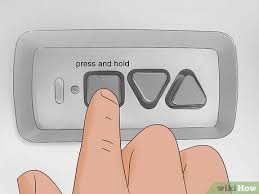
The good news is that most Genie openers can be reset in just a few minutes with simple steps—no professional required.
Read too: How Do You Change Code On Garage Door Keypad Fast?
How To Reset Genie Garage Door Opener After Power Outage (Step-by-Step)
Let’s walk through the exact process to restore your garage door opener.
Step 1: Check Power Supply
Before resetting, confirm:
- The opener is plugged in securely
- Circuit breaker hasn’t tripped
- Outlet is working properly
👉 Tip: Plug another device into the outlet to test it.
Step 2: Reconnect the Garage Door to the Opener
After a power outage, the opener may disconnect from the door.
- Pull the emergency release cord (usually red)
- Manually move the door until it clicks back into place
✅ You should feel the trolley reconnect.
Step 3: Reset the Opener System
Now reset the Genie opener:
- Locate the “Learn” or “Program” button
- Press and hold for 3–5 seconds
- Release when the LED light blinks
👉 This resets the internal system after power disruption.
Step 4: Reprogram the Remote
Power outages can erase remote settings.
- Press the Program button once
- LED light will start blinking
- Press your remote button within 30 seconds
- Wait for confirmation (light blink or click sound)
Step 5: Test the System
- Press the remote
- Ensure smooth opening and closing
If it works—your reset is complete.
Why Does a Power Outage Affect Garage Door Openers?
Modern garage door openers rely on electronic control boards.
Common Effects:
- Loss of memory (remote pairing)
- Sensor misalignment
- System glitches
👉 These issues happen because of voltage interruptions. Learn more about electrical disruptions here:
https://en.wikipedia.org/wiki/Power_outage
What If Your Genie Opener Still Doesn’t Work?
If resetting didn’t fix the issue, try these troubleshooting steps:
1. Check Safety Sensors
- Ensure sensors are aligned
- Look for blinking lights
- Clean lenses with a soft cloth
2. Inspect the Remote Battery
- Replace with a fresh battery
- Typical type: CR2032
3. Check Door Balance
- Disconnect opener
- Lift door manually
👉 If it’s heavy or uneven, the problem may be mechanical—not electrical.
4. Reset Travel Limits
Sometimes power outages affect door limits.
- Locate limit adjustment screws
- Adjust up/down travel gradually
- Test after each adjustment
How To Fully Factory Reset a Genie Garage Door Opener
If basic reset fails, perform a full reset.
Steps:
- Press and hold the Program button for 10–15 seconds
- Wait until LED turns off
- All remotes and settings are erased
- Reprogram everything from scratch
⚠️ Use this only if necessary.
Different Genie Models: Does Resetting Change?
Most Genie models follow similar steps, but slight variations exist.
Common Models:
- Genie Intellicode
- Genie Chain Drive
- Genie Belt Drive
👉 Regardless of model, the Program/Learn button method works in most cases.
How Long Does It Take to Reset a Genie Opener?
- Basic reset: 2–5 minutes
- Full reset + reprogram: 5–15 minutes
According to home maintenance data, over 70% of opener issues after outages are resolved with simple resets.
Common Mistakes to Avoid
Avoid these errors to save time:
- ❌ Holding the button too long (accidental full reset)
- ❌ Standing too far when syncing remote
- ❌ Ignoring sensor alignment
- ❌ Not checking power source first
Pros vs Cons of Resetting Yourself
Pros
- Fast solution
- No cost
- Easy to do
- No technician needed
Cons
- May require trial and error
- Model differences can confuse beginners
Prevent Future Issues After Power Outages
Here are simple ways to protect your system:
- Use a surge protector
- Install a battery backup system
- Regularly test your opener
- Keep remotes reprogrammed
👉 These steps reduce the risk of system failure during outages.
FAQ: How To Reset Genie Garage Door Opener After Power Outage
1. Why won’t my Genie garage door opener work after a power outage?
It may have lost programming, sensor alignment, or experienced a system glitch. Resetting usually fixes it.
2. Do I need to reprogram my remote after a power outage?
Sometimes yes. If the opener loses memory, you’ll need to sync the remote again.
3. Where is the Program button on a Genie opener?
It’s usually located on the motor unit, often behind a light cover or panel.
4. Can a power outage damage my garage door opener?
In rare cases, yes—especially without surge protection. Most issues are temporary.
5. How do I know if my opener needs a full reset?
If basic reset doesn’t work and the system remains unresponsive, try a full reset.
6. Is it safe to reset the opener myself?
Yes. As long as you follow instructions carefully, it’s safe and simple.
Conclusion
Knowing how to reset Genie garage door opener after power outage can save you time, money, and frustration. In most cases, a simple reset and remote reprogramming will get your system working again in minutes.
If problems persist, checking sensors, batteries, and door balance usually resolves the issue. And with a few preventive steps, you can avoid similar disruptions in the future.
Leave a Reply