If your Craftsman garage door keypad has stopped working or you’ve forgotten the access code, you may feel frustrated and locked out. Knowing how to reset Craftsman garage door keypad without code is crucial for regaining control without professional help.
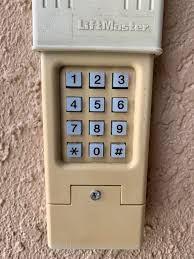
Many homeowners encounter this issue when moving into a new home or when the keypad malfunctions due to battery issues or wiring errors. Fortunately, resetting your keypad is straightforward and safe when following the proper steps.
Read too: How Do You Change Code On Garage Door Keypad Fast?
Understanding Craftsman Garage Door Keypads
Before performing a reset, it helps to understand how your keypad operates:
- Wireless vs Wired Keypads: Most Craftsman keypads are wireless and use a radio signal to communicate with the garage door opener motor. Some older models are wired.
- Learn Button Synchronization: Keypads require a “Learn” button on the garage opener to sync a new code.
- Battery-Powered Units: Check battery health regularly; weak batteries often mimic keypad failures.
Knowing these basics prevents mistakes during the reset process.
Why You Might Need to Reset the Keypad
Some common scenarios that require a reset include:
- Forgotten access code: The most frequent reason for keypad reset.
- Battery replacement: Some keypads need a reset after changing batteries.
- Signal interference: Radio frequency interference may require reprogramming.
- Malfunction or glitches: Occasionally, the keypad fails to send commands properly.
Step 1: Prepare Tools and Safety Precautions
Before resetting, make sure you have:
- Ladder (if the opener is mounted high)
- Screwdriver (if keypad requires disassembly)
- Fresh batteries for the keypad
- Your Craftsman garage door opener user manual
Safety Note: Avoid placing hands near moving door parts. Ensure the garage door is closed before programming.
Step 2: Locate the Learn Button on Your Craftsman Opener
The Learn button is essential for keypad reset:
- It’s typically on the back or side of the garage door motor head.
- The button may be yellow, red, or purple, depending on the model.
- Pressing it enables programming mode, allowing new codes to be accepted.
For more information, check the Garage Door Opener Wikipedia page.
Step 3: Clear the Existing Codes
To reset without the old code:
- Press and hold the Learn button for about 10 seconds.
- The indicator light will turn off or blink, signaling that all previous codes are erased.
- Release the button.
Now the opener will only accept new codes entered and synced through the keypad.
Step 4: Enter a New Code on the Keypad
- Choose a new 4-digit code that is easy to remember but not easily guessable.
- Press the Learn button briefly. The indicator light should blink.
- Within 30 seconds, press your new 4-digit code on the keypad and then press Enter.
- The garage door should respond (light blinks or door operates) to confirm the code is accepted.
Pro Tip: If your keypad has multiple doors, make sure to assign codes to the correct opener.
Step 5: Test the Keypad
After programming:
- Test the open/close function several times.
- Make sure the door stops when pressing Stop (if available).
- Ensure other safety features, like the light or automatic reverse, still work.
Step 6: Troubleshooting Common Issues
| Problem | Cause | Solution |
|---|---|---|
| Keypad not responding | Weak batteries | Replace with fresh batteries |
| Door doesn’t operate | Not synced | Repeat Learn button process |
| Indicator light doesn’t blink | Electrical issue | Check wiring and motor power |
| Multiple doors affected | Wrong code entry | Reset and assign separate codes |
Step 7: Additional Tips for Keypad Maintenance
- Check batteries every 6–12 months to avoid lockouts.
- Keep keypad clean; dirt or moisture can affect button response.
- Label your code list safely at home in case you forget.
- Secure the keypad outside your garage to prevent tampering.
- Reprogram after power outages or moving the opener.
FAQ Section
Q1: Can I reset my Craftsman keypad without the old code?
A: Yes. Press and hold the Learn button on the motor to clear all codes, then program a new one.
Q2: How long does it take to reset the keypad?
A: Usually under 5 minutes, including clearing old codes and setting a new 4-digit code.
Q3: Do I need to replace the keypad if it fails to reset?
A: Not necessarily. Most issues are battery or wiring related. Replacement is only needed if the unit is physically damaged.
Q4: Can I program multiple keypads to the same opener?
A: Yes, each keypad must be synced separately using the Learn button.
Q5: Is it safe to reset the keypad myself?
A: Yes, following safety precautions and keeping hands away from moving parts ensures a safe DIY reset.
Q6: What if my keypad doesn’t sync after resetting?
A: Check batteries, ensure proper proximity to the opener, and repeat the Learn button process within 30 seconds.
Conclusion
Knowing how to reset Craftsman garage door keypad without code is a crucial skill for homeowners. By following these step-by-step instructions—clearing old codes, using the Learn button, entering a new 4-digit code, and testing—you can regain access quickly and safely.
Regular maintenance, proper battery care, and understanding programming methods ensure your garage door keypad remains reliable for years.
Share this guide with friends or family who may face keypad lockouts, so they can also restore secure and convenient access to their garages.
Leave a Reply