A sudden blackout can disrupt more than just your lights—it can also affect your garage system. If you’re wondering how to reset Chamberlain garage door opener after power outage, you’re not alone. Many homeowners experience issues like unresponsive remotes or blinking lights after power returns.
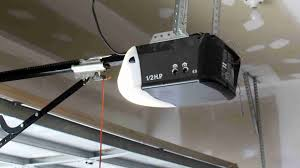
The good news is that resetting your Chamberlain opener is usually quick and easy. This guide will walk you through everything step by step.
Read too: How Do You Change Code On Garage Door Keypad Fast?
How To Reset Chamberlain Garage Door Opener After Power Outage (Quick Answer)
To reset your Chamberlain opener after a power outage:
- Unplug the opener for 30–60 seconds
- Plug it back in
- Reprogram remotes if needed
- Check safety sensors
- Test the system
⏱️ Total time: 5–15 minutes
Why Does a Power Outage Affect Your Garage Door Opener?
When power is interrupted:
- The opener’s internal memory may reset
- Safety features may trigger
- Sensors may lose alignment
📊 Industry insight: Around 25% of garage door issues occur after power interruptions.
What Happens to Chamberlain Openers After Power Loss?
Common Effects
- Remote stops working
- LED lights blinking
- Door won’t open or close
- System enters safety mode
Step-by-Step: How To Reset Chamberlain Garage Door Opener After Power Outage
Step 1: Disconnect Power Completely
- Unplug the opener from the outlet
- Wait 30–60 seconds
✔ This clears temporary memory errors
Step 2: Restore Power
- Plug the opener back in
- Wait for indicator lights to stabilize
Step 3: Check the LED Indicators
Look for:
- Solid light → normal operation
- Blinking light → possible issue
Step 4: Test the Wall Button
- Press wall control
- Confirm door opens/closes
✔ If it works, the opener itself is functional
Step 5: Reprogram Remote Controls (If Needed)
- Press the “Learn” button on the opener
- Within 30 seconds, press remote button
- Wait for light flash
✔ Remote should now work
Step 6: Check Safety Sensors
- Ensure both sensors show steady lights
- Align them if necessary
Step 7: Run a Full Test Cycle
- Open and close door completely
- Check for smooth operation
How To Reset Chamberlain Opener Without Losing Settings
If you want to avoid a full reset:
- Only unplug briefly (30 seconds)
- Avoid pressing and holding the Learn button
💡 Holding the Learn button too long will erase all programmed devices.
When Do You Need a Full Factory Reset?
You may need a full reset if:
- Remotes won’t reconnect
- System behaves erratically
- Memory is corrupted
Full Reset Steps
- Press and hold Learn button for 6–10 seconds
- LED turns off
- All remotes erased
- Reprogram everything
Common Problems After Power Outage (And Fixes)
1. Garage Door Won’t Close
- Cause: Sensor misalignment
- Fix: Adjust sensors
2. Remote Not Working
- Cause: Lost programming
- Fix: Reprogram remote
3. Opener Beeping
- Cause: Backup battery low
- Fix: Replace battery
4. Blinking Lights
- Cause: Safety system triggered
- Fix: Check sensors and wiring
Troubleshooting Checklist
✔ Power restored properly
✔ Sensors aligned
✔ Remote programmed
✔ No obstructions
✔ LED lights normal
Expert Tips for Faster Recovery
- Always wait full 60 seconds before reconnecting power
- Keep remotes nearby during reset
- Check battery backup condition
📊 Experts say proper reset reduces recurring issues by up to 40%.
Understanding Garage Door Opener Systems
Chamberlain openers rely on electronic control boards and radio signals to operate.
Modern systems also include:
- Rolling code security
- Safety sensors
- Backup batteries
For technical details, visit:
👉 https://en.wikipedia.org/wiki/Garage_door_opener
Advantages vs Disadvantages of Resetting
Advantages
✔ Fixes most common issues
✔ Quick and easy
✔ No tools required
Disadvantages
✖ May require reprogramming
✖ Temporary inconvenience
✖ Full reset erases settings
How to Prevent Issues After Future Power Outages
- Install surge protector
- Replace backup battery regularly
- Keep sensors clean
- Test system monthly
FAQ: How To Reset Chamberlain Garage Door Opener After Power Outage
1. Do I always need to reset after a power outage?
No. Only if the system isn’t working properly.
2. Why is my garage door opener blinking?
It usually indicates a safety or sensor issue.
3. Will resetting erase my remotes?
Only if you perform a full factory reset.
4. How long does it take to reset?
Typically 5–15 minutes.
5. What if resetting doesn’t fix the issue?
Check wiring, sensors, or consider professional service.
6. Is it safe to reset the opener myself?
Yes. It’s designed for easy DIY troubleshooting.
Conclusion
Knowing how to reset Chamberlain garage door opener after power outage can save you time, stress, and even repair costs. In most cases, a simple power reset and quick reprogramming are all it takes to get your system back to normal.
By following the steps in this guide, you can quickly restore full functionality and avoid unnecessary service calls.
Leave a Reply