If your Genie garage door opener keypad isn’t responding or you’ve forgotten the code, it can be frustrating. Knowing how to reset a Genie garage door opener keypad is essential for quick troubleshooting and restoring secure access. This guide will walk you through the process step by step, so you can regain full control of your garage safely and efficiently.
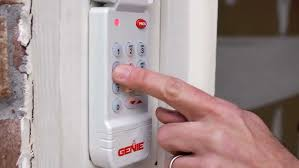
Understanding Genie Keypads
Before resetting, it helps to understand how your keypad works.
Read too: Tc1 Tricode Garage Door Opener Remote W/ Clip Chamberlain: Complete Guide
Key Features:
- Wireless keypad allows convenient garage entry
- Compatible with most Genie screw, chain, and belt-drive openers
- Security code protects against unauthorized access
Tip: Always keep your keypad batteries fresh to avoid sudden malfunctions.
Why Resetting Might Be Necessary
Resetting your keypad can resolve several common problems.
Common Reasons:
- Forgotten access code
- Keypad not responding to input
- Installing a new garage door opener
- Security concerns requiring a new code
Statistic: Research from home improvement surveys indicates that over 40% of garage keypad issues arise from forgotten codes or battery failures.
Step-by-Step Guide: How To Reset A Genie Garage Door Opener Keypad
Resetting is straightforward if done carefully.
Materials Needed:
- Genie keypad
- Ladder (if needed)
- Fresh 9V battery (if keypad uses one)
Steps:
- Turn Off Power – Disconnect the garage door opener from the main power supply to prevent accidental activation.
- Locate the “Learn” Button – Usually found on the back or side of the Genie opener motor unit.
- Press and Hold the Learn Button – Hold until the LED light on the motor blinks or turns off (typically 6–10 seconds).
- Clear Old Codes – This action erases all existing codes stored in the opener’s memory.
- Install Batteries in Keypad – Ensure proper polarity. Use fresh batteries for best results.
- Program New Code:
- Press the “Program” button on the keypad
- Enter your desired 4-digit code
- Press and hold the ENTER key until the LED blinks
- Test the code by pressing it to open/close the door
Pro Tip: Keep a record of your new code in a safe place to prevent future lockouts.
Common Issues and Troubleshooting
Even after resetting, you may encounter minor problems.
Problem Checklist:
| Issue | Possible Cause | Solution |
|---|---|---|
| Keypad won’t respond | Dead battery | Replace with fresh battery |
| Door doesn’t operate | Incorrect code entry | Reprogram code and test |
| LED not blinking | Power issue | Ensure opener is plugged in and operational |
| Remote still works but keypad fails | Interference | Move keypad closer or reset opener memory |
Safety Considerations
Resetting your keypad affects garage access and security.
- Always disconnect power before touching the motor unit
- Keep children away during programming
- Do not share your code publicly
- Regularly test safety sensors to prevent accidental closure
Expert Advice: After resetting, always verify that all users have access and that safety features are functioning properly.
Maintaining Your Genie Keypad
Proper maintenance keeps your keypad working smoothly.
Tips:
- Replace batteries annually or when low
- Clean keypad surface with a soft, damp cloth
- Keep keypad sheltered from direct sunlight and moisture
- Test the keypad monthly to ensure proper operation
FAQ: How To Reset A Genie Garage Door Opener Keypad
1. Can I reset the keypad without unplugging the opener?
It’s not recommended. Disconnecting power ensures safety and prevents accidental door movement.
2. How long does the reset process take?
Typically 5–10 minutes, including programming a new code.
3. Will resetting delete remote controls too?
No, resetting the keypad only clears keypad codes. Remote controls remain programmed unless you press the Learn button long enough to clear all codes.
4. My keypad LED doesn’t blink—what should I do?
Check the batteries and ensure the motor unit is powered. If the LED still fails, you may need a replacement keypad.
5. How many codes can a Genie keypad store?
Most Genie keypads store up to 8 codes, allowing multiple users access.
Conclusion
Knowing how to reset a Genie garage door opener keypad ensures you can regain control of your garage quickly and securely. Regular maintenance and careful programming prevent lockouts and enhance safety. Share this guide with friends or family to help them reset their Genie keypads efficiently and confidently. 🚪
Leave a Reply