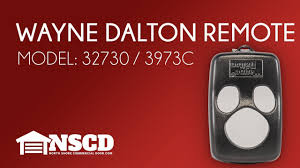
If your Wayne Dalton garage door opener remote or keypad suddenly stopped working, you’re probably wondering How To Reprogram A Wayne Dalton Garage Door Opener without calling a technician. Mis‑programmed remotes and keypads are a common hassle, especially after power outages, battery changes, or new devices. This guide breaks the process down into clear, beginner‑friendly steps so you can fix it quickly and confidently.
Why Garage Door Reprogramming Is Necessary
Reprogramming a garage door opener restores communication between your remote or keypad and the opener’s receiver. Over time or after a reset, the opener may “forget” paired devices — leaving your remote or keypad unresponsive.
Read too: Tc1 Tricode Garage Door Opener Remote W/ Clip Chamberlain: Complete Guide
🔹 Industry data suggests that remote and keypad programming issues account for nearly 25% of non‑mechanical garage door complaints nationally (source: Home Maintenance Reports).
Reprogramming ensures your system is secure and works reliably every time you press a button.
Understanding Wayne Dalton Garage Door Systems
Before reprogramming, it helps to know how the system works:
- Opener unit: the motor assembly mounted on your garage ceiling
- Remotes: handheld devices that send a wireless signal
- Keypads: wall‑mounted numeric pads for code access
- Safety sensors: prevent the door from closing on obstructions
Garage door mechanisms like tracks and springs are covered in detail on Wikipedia’s garage door page — a helpful authoritative resource: https://en.wikipedia.org/wiki/Garage_door
Reprogramming focuses only on the remote/keypad communication, not the door’s physical operation.
What You’ll Need to Reprogram Your Wayne Dalton Opener
✔ Your remote(s)
✔ The garage door opener unit
✔ Access to the opener motor control panel or “Learn” button
✔ Optional: a ladder for easy access
Most reprogramming steps take 2–5 minutes once you locate the buttons.
How To Reprogram a Wayne Dalton Garage Door Opener — Step‑by‑Step
Here’s how to reprogram both remotes and keypads on most Wayne Dalton models.
Step 1 — Locate the “Learn” Button
Every Wayne Dalton opener has a Learn/Program button on the main motor housing.
📍 It’s usually behind a small plastic panel near the antenna wire.
- Some buttons are labeled “Learn,” “Program,” or “PRGM”
- Others use a colored button (e.g., red/yellow)
Knowing its location is key to reprogramming quickly.
Step 2 — Prepare Your Remote or Keypad
Before pressing any buttons:
- Ensure the remote battery is fresh
- Have the keypad close by
- Stand within 5 feet of the opener unit
Good signal range prevents misreads during programming.
Step 3 — Press the “Learn” Button
- Press and release the Learn button
- The indicator light next to it will illuminate
- You have about 30 seconds to complete the next step
The opener is now in “listening” mode for new devices.
Step 4 — Sync Your Remote
Within 30 seconds:
- Press any button on your remote
- The opener light will flash or beep to confirm
- Repeat for additional remotes as needed
✔ You can program multiple remotes using the same Learn button activation.
Step 5 — Program the Wireless Keypad
After remote programming:
- Press the Learn button again
- Enter your desired PIN on the keypad
- Press Enter
- The opener will flash or beep to confirm
Your new keypad code is now synced!
What If It Doesn’t Program? Common Tips
If the remote won’t sync:
- Replace the remote battery
Weak batteries often fail during programming. - Ensure correct model compatibility
Some universal remotes require special steps. - Check distance from opener
Too far can prevent signal pickup.
These small checks alone fix many programming hiccups.
Reprogramming vs. Resetting: What’s the Difference?
Reprogramming
- Syncs a specific remote or keypad
- Keeps existing remotes stored
- Quick button steps
Full Reset (Clearing All Codes)
- Erases all stored remotes/keypads
- Often used when remotes are lost or sold
- Requires re‑programming all devices afterward
To clear all codes:
- Press and hold the Learn button for 10 seconds
- Indicator light goes out
- All remotes/keypads are erased
Then reprogram devices as shown above.
Quick Comparison: Universal vs. Original Remotes
Some homeowners use universal remotes with Wayne Dalton openers — here’s how they stack up:
| Feature | Original Wayne Dalton | Universal Remote |
|---|---|---|
| Compatibility | Guaranteed | Varies by model |
| Programming | Simple | May require extra steps |
| Features | Full support | Basic functions only |
| Cost | Medium | Often cheaper |
Universal remotes can be a good budget solution, but always confirm they explicitly support Wayne Dalton systems.
Troubleshooting Common Programming Problems
Here are real‑world issues users often face — and how to fix them:
1. Remote Programmed but Doesn’t Work
✔ Replace batteries
✔ Re‑sync with Learn button within 30 seconds
2. Keypad Refuses to Accept Code
✔ Confirm correct PIN format
✔ Clear old PINs and retry steps
3. Light Flashes But No Sync
✔ Move closer to opener
✔ Eliminate interference (LED lights, metal obstruction)
4. Opener Made No Sound
✔ Check power to opener motor
✔ Ensure antenna wire is hanging freely
These quick checks save time before deeper troubleshooting.
Safety Tips Before You Reprogram
Working with garage door openers is mostly electronic, but basic safety matters:
✔ Unplug the opener motor power if you’re accessing other parts
✔ Keep children away while programming
✔ Avoid touching other internal wires or components
Garage door systems contain moving parts and stored energy — treat them with respect.
FAQ — How To Reprogram a Wayne Dalton Garage Door Opener
1. How long does reprogramming take?
Reprogramming usually takes 2–5 minutes once you locate the Learn button and have fresh batteries.
2. Do I need to reprogram after a power outage?
Sometimes yes — if your opener loses memory during a surge or reset. Re‑programming restores remote/keypad sync.
3. Can I reprogram multiple remotes at once?
Yes. Activate the Learn button and press each remote button within the programming window.
4. What if my remote still won’t program?
Try:
- New batteries
- Clearing existing codes and starting fresh
- Using a universal remote known to support Wayne Dalton
If problems persist, opener hardware could need inspection.
5. Do all Wayne Dalton openers use the same programming steps?
Most modern models follow the Learn button process, but consult your manual for specific model details.
6. Is it safe to program with the door open?
Yes — programming doesn’t move the door. Just stand clear while pressing buttons.
Tips to Maintain Your Garage Door Opener
Keeping your opener in good shape makes programming reliable over time:
- Replace remote batteries annually
- Keep opener area clean and dry
- Test remotes monthly
- Check antenna wire for damage
Routine care prevents many common frustration points.
Conclusion
Learning How To Reprogram A Wayne Dalton Garage Door Opener empowers you to solve remote and keypad issues quickly — without a service call. With easy steps for locating the Learn button, syncing remotes, and programming keypads, this guide helps you get back to reliable garage access in minutes.
🔹 Pro tip: Save or print this guide for future reference — it’s handy when remotes need reprogramming again!
📣 Found it helpful? Share it with friends or on your social media to help others troubleshoot their Wayne Dalton openers!
Leave a Reply