Forgetting your keypad code or dealing with a malfunction can be frustrating. If you’re wondering how to reprogram a LiftMaster garage door opener keypad, you’re in the right place. The process is simpler than most people think—and you can usually complete it in just a few minutes without professional help.
What Is a LiftMaster Garage Door Opener Keypad?
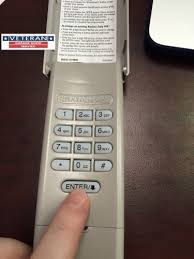
A LiftMaster keypad is a wireless device mounted outside your garage that allows keyless entry using a PIN code. It communicates directly with your garage door opener.
Read too: Tc1 Tricode Garage Door Opener Remote W/ Clip Chamberlain: Complete Guide
👉 Learn more about how garage door systems work: https://en.wikipedia.org/wiki/Garage_door_opener
Key Benefits
- No need for a remote
- Easy access for family members
- Temporary codes for guests
Why Would You Need to Reprogram Your Keypad?
Understanding how to reprogram a LiftMaster garage door opener keypad starts with knowing why it’s necessary.
Common Reasons
- Forgotten PIN code
- Security concerns (e.g., after moving homes)
- Keypad not responding
- Adding a new user
📊 According to home security data, over 30% of homeowners reset access codes after moving into a new property.
What You Need Before You Start
Before reprogramming, gather:
- Access to your garage motor unit
- A ladder (if opener is mounted high)
- A new 4-digit PIN (easy to remember but secure)
Step-by-Step: How To Reprogram A LiftMaster Garage Door Opener Keypad
Follow this exact process to successfully reset and program your keypad.
Step 1: Locate the “Learn” Button
- Found on the back or side of the motor unit
- Usually colored (yellow, red, orange, or purple)
👉 This button activates programming mode.
Step 2: Press the “Learn” Button
- Press and release the button
- A small LED light will turn on
⏱ You now have 30 seconds to complete the next step.
Step 3: Enter a New PIN on the Keypad
- Go to your keypad
- Enter your desired 4-digit PIN
- Press and hold the ENTER button
Step 4: Wait for Confirmation
- The garage light will blink
- Or you’ll hear a clicking sound
👉 This means the keypad has been successfully programmed.
Step 5: Test the Keypad
- Enter your new PIN
- Press ENTER
- Ensure the garage door opens or closes
How to Reset the Keypad Completely
If your keypad isn’t responding, a full reset may help.
Reset Process
- Press and hold the “*” and “#” buttons together
- Hold for 5–10 seconds until the keypad light stops blinking
- Release buttons
👉 This clears all previous codes.
Common Problems and Fixes
Even when following how to reprogram a LiftMaster garage door opener keypad, issues can arise.
Troubleshooting Table
| Problem | Cause | Solution |
|---|---|---|
| Keypad not responding | Dead battery | Replace battery |
| Code not saving | Timing issue | Repeat steps quickly |
| No light on opener | Power issue | Check power supply |
| Door not opening | Signal not synced | Reprogram again |
Tips for Successful Programming
To improve your success rate:
- Stand within 3–5 feet of the opener
- Complete steps within 30 seconds
- Use fresh batteries in the keypad
- Avoid interference from nearby electronics
Pro Tip
Garage door experts recommend testing your keypad at least 3 times after setup to ensure consistent performance.
Security Best Practices
Reprogramming isn’t just about functionality—it’s also about safety.
Smart Security Tips
- Avoid simple codes like “1234”
- Change your PIN every 6–12 months
- Do not share codes publicly
- Use temporary codes when possible
LiftMaster Keypad Features You Should Know
Modern LiftMaster systems offer:
- Temporary PINs for guests
- Backlit keypads for night use
- Compatibility with smart home systems
How Long Does Reprogramming Take?
- Basic setup: 2–5 minutes
- Full reset + setup: 5–10 minutes
👉 If it takes longer, recheck each step carefully.
When Should You Call a Professional?
You may need expert help if:
- The opener doesn’t respond at all
- Wiring issues are suspected
- The system is very old (10+ years)
Advantages vs Disadvantages of DIY Reprogramming
Pros
- Quick and easy
- No cost
- No special tools required
Cons
- Requires access to opener
- May take multiple attempts
- Limited support for older models
FAQ: How To Reprogram A LiftMaster Garage Door Opener Keypad
1. How do I change my LiftMaster keypad code without the old code?
Use the “Learn” button method. It overrides the old code and allows you to set a new one.
2. Why is my LiftMaster keypad blinking but not working?
This usually indicates a low battery or incomplete programming. Replace the battery and try again.
3. Can I program multiple keypads?
Yes. Most LiftMaster systems support multiple keypads and remotes.
4. What if I miss the 30-second window?
Simply press the “Learn” button again and restart the process.
5. Do I need to reset before reprogramming?
Not always. Only reset if the keypad isn’t responding or has errors.
6. Does reprogramming erase all remotes?
No. It only affects the keypad unless you perform a full system reset.
Conclusion
Now you know exactly how to reprogram a LiftMaster garage door opener keypad—and it’s much easier than it might seem. With just a few simple steps, you can restore access, improve security, and get your garage system working smoothly again.
Whether you’re resetting a forgotten code or setting up a new one, this quick process saves time and eliminates the need for professional help in most cases.
Leave a Reply