If your garage door suddenly stops responding or works inconsistently, the problem might be as simple as a dead battery. Knowing how to replace battery in Craftsman garage door opener can save you time, money, and frustration. This guide walks you through the process in a clear, beginner-friendly way so you can get your garage door working again quickly.
Why Does Your Craftsman Garage Door Opener Battery Matter?
Your garage door opener relies on a battery backup system to function during power outages and ensure smooth operation. According to industry estimates, over 70% of garage door issues are related to power or battery problems, making it one of the most common maintenance tasks.
A properly functioning battery ensures:
- Reliable operation during outages
- Consistent remote response
- Protection for your home and belongings
Without it, your opener may fail when you need it most.
Read too: How Do You Change Code On Garage Door Keypad Fast?
What Type of Battery Does a Craftsman Garage Door Opener Use?
Before replacing the battery, it’s important to identify the correct type.
Common Battery Types
| Model Type | Battery Type | Voltage |
|---|---|---|
| Newer models (with backup) | Sealed Lead Acid (SLA) | 12V |
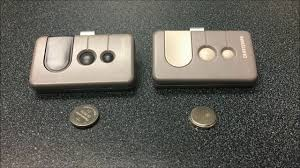
| Remote controls | Coin cell (CR2032) | 3V |
| Keypad entry | Alkaline (AA/AAA) | 1.5V |
Tip: Check your model number (usually found on the motor unit or manual) to confirm compatibility.
How To Replace Battery In Craftsman Garage Door Opener (Step-by-Step)
Step 1: Gather Your Tools
You’ll need:
- Replacement battery (correct type)
- Screwdriver (usually Phillips)
- Gloves (optional for safety)
Step 2: Disconnect Power
Unplug the garage door opener from the outlet. This reduces the risk of electrical shock.
Step 3: Locate the Battery Compartment
- Typically found on the back or side of the motor unit
- Some models have a sliding panel, others require unscrewing
Step 4: Remove the Old Battery
- Carefully disconnect the red and black wires
- Take note of the polarity (+ and -)
Step 5: Install the New Battery
- Connect the wires to the new battery terminals
- Ensure correct polarity to avoid damage
Step 6: Secure the Compartment
- Close the panel or screw it back in place
- Make sure everything is tightly secured
Step 7: Restore Power and Test
- Plug the unit back in
- Test using the remote or wall control
Expected result: The opener should function smoothly, and any warning beeps should stop.
How Often Should You Replace the Battery?
Most backup batteries last 1–3 years, depending on usage and environment.
Signs You Need a Replacement:
- Beeping every 30–60 seconds
- Weak or delayed door response
- Battery warning light
According to general battery lifecycle data from Wikipedia, rechargeable batteries degrade over time due to repeated charge cycles, which explains performance decline.
Craftsman Battery Replacement: Pros vs Cons
Advantages
- ✅ Low cost (typically $15–$40)
- ✅ Easy DIY process (under 15 minutes)
- ✅ Prevents costly repairs
Disadvantages
- ❌ Requires correct battery type
- ❌ Improper installation may cause issues
- ❌ Needs periodic replacement
Common Mistakes to Avoid
Avoid these common errors to ensure a smooth replacement:
- Using the wrong battery type
- Reversing polarity connections
- Skipping safety steps (not unplugging unit)
- Forgetting to test after installation
Troubleshooting After Battery Replacement
If your opener still doesn’t work:
Quick Fix Checklist
- Check power connection
- Confirm battery is fully connected
- Inspect wiring for damage
- Reset the opener system
If issues persist, the problem might be with the circuit board or motor—not the battery.
Expert Tips for Better Performance
- Replace batteries before they fully die
- Store spare batteries in a cool, dry place
- Clean battery terminals every 6–12 months
- Test your opener monthly
Home maintenance experts recommend proactive replacement to avoid unexpected failures—especially during extreme weather.
FAQ: How To Replace Battery In Craftsman Garage Door Opener
1. How long does it take to replace the battery?
Typically, it takes 10–15 minutes, even for beginners.
2. Can I use any 12V battery?
No. You must use a compatible sealed lead-acid battery recommended for your model.
3. Why is my opener still beeping after replacement?
This may indicate:
- Incorrect installation
- Low-quality battery
- System needing a reset
4. Do all Craftsman openers have backup batteries?
No. Only newer models include battery backup systems.
5. Is it safe to replace the battery myself?
Yes, as long as you:
- Disconnect power
- Follow instructions carefully
6. How do I reset my Craftsman garage door opener?
Press and hold the reset or learn button until the indicator light changes, then reprogram your remote.
Conclusion
Replacing the battery is one of the simplest yet most important maintenance tasks you can perform. By following this guide on how to replace battery in Craftsman garage door opener, you can restore functionality quickly and avoid unnecessary repair costs.
Regular maintenance ensures reliability, safety, and peace of mind—especially during power outages.
If you found this guide helpful, feel free to share it on social media to help others keep their garage doors running smoothly! 🚪🔧
Leave a Reply