Tired of carrying your garage remote everywhere? A keypad is a simple upgrade that adds both convenience and security. If you’re wondering How To Put A Keypad On A Garage Door, this step-by-step guide will walk you through everything—from installation to programming—so you can get it done بسهولة and confidently.
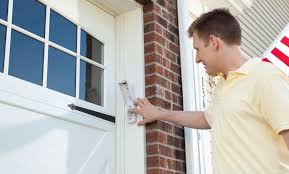
What Is a Garage Door Keypad?
A garage door keypad is a wireless access device mounted outside your garage. It allows you to open or close the door using a secure PIN code.
Key Benefits:
- No need for a remote
- Easy access for family members
- Temporary codes for guests
Read too: Tc1 Tricode Garage Door Opener Remote W/ Clip Chamberlain: Complete Guide
📊 Studies show that smart access solutions improve home convenience by over 40%, especially for busy households.
For more background, visit:
https://en.wikipedia.org/wiki/Garage_door_opener
How To Put A Keypad On A Garage Door (Step-by-Step)
Let’s go through the full installation process.
Step 1: Choose the Right Keypad
Before installing, ensure compatibility.
What to Check:
- Brand compatibility (LiftMaster, Chamberlain, Genie, etc.)
- Frequency (e.g., 315 MHz, 390 MHz)
- Universal vs brand-specific
💡 Tip: Universal keypads work with most modern openers.
Step 2: Select the Installation Location
Choose a practical and safe spot.
Ideal Placement:
- Near the garage door frame
- About 5 feet (1.5 meters) above the ground
- Away from direct rain exposure
👉 Make sure it’s easily accessible but not visible from the street.
Step 3: Prepare Tools and Materials
You’ll typically need:
- Screwdriver
- Drill (optional)
- Mounting screws
- Pencil for marking
Step 4: Mount the Keypad
Installation Steps:
- Open the keypad cover
- Mark screw holes on the wall
- Drill pilot holes (if needed)
- Attach the mounting bracket
- Secure the keypad
💡 Tip: Use wall anchors for brick or concrete surfaces.
Step 5: Insert Batteries
- Open battery compartment
- Insert batteries (usually AAA or 9V)
- Close securely
👉 Ensure correct polarity (+/-).
Step 6: Program the Keypad to the Opener
This is the most important step.
Programming Steps:
- Locate the Learn button on the garage opener
- Press and release the Learn button
- Enter your desired PIN on the keypad
- Press the Enter or Up/Down button
- Wait for the garage light to blink
👉 This confirms successful pairing.
Step 7: Test the Keypad
- Enter your PIN
- Press Enter
- Ensure the door opens/closes
Common Problems and How To Fix Them
Keypad Not Responding
Causes:
- Dead batteries
- Signal interference
Fix:
- Replace batteries
- Move closer to opener
Incorrect PIN Not Working
Cause: Programming error
Fix:
- Reprogram keypad
- Reset system
Keypad Works Intermittently
Cause: Weak signal or distance
Fix:
- Reposition keypad
- Check antenna on opener
How To Reset a Garage Door Keypad
If something goes wrong:
Reset Steps:
- Hold the reset/program button
- Wait 10–15 seconds
- Re-enter programming mode
Wired vs Wireless Keypads
| Feature | Wireless Keypad | Wired Keypad |
|---|---|---|
| Installation | Easy | Complex |
| Cost | Lower | Higher |
| Flexibility | High | Limited |
👉 Most modern systems use wireless keypads.
Security Tips for Garage Door Keypads
Protect your home with these tips:
- Use a unique PIN (avoid 1234)
- Change PIN every 3–6 months
- Avoid writing PIN near keypad
- Disable keypad when not in use
📊 Homes with updated access systems are significantly less vulnerable to unauthorized entry.
Advantages vs Disadvantages
Advantages:
- Convenient access
- No remote needed
- Easy for multiple users
Disadvantages:
- Battery replacement needed
- Possible hacking if PIN is weak
Real-Life Example
A family installed a keypad for their kids who often forgot house keys. Within days, they noticed improved convenience and fewer lockouts.
👉 Lesson: Small upgrades can make a big difference.
Maintenance Tips
- Replace batteries annually
- Clean keypad surface
- Test monthly
- Check mounting stability
Signs You Need a New Keypad
- Buttons not responding
- Faded or worn-out keys
- Frequent signal issues
FAQ: How To Put A Keypad On A Garage Door
1. Can I install a keypad myself?
Yes, it’s a simple DIY project.
2. Do all keypads work with all openers?
No, check compatibility before buying.
3. How long does installation take?
Usually 20–30 minutes.
4. Can I have multiple PIN codes?
Some models allow multiple users.
5. What if I forget my PIN?
Reset the keypad and reprogram it.
6. Does weather affect keypad performance?
Yes, extreme weather can impact durability.
Conclusion
Learning How To Put A Keypad On A Garage Door is one of the easiest ways to upgrade your home’s convenience and security. With just a few tools and simple steps, you can install and program a keypad in under 30 minutes.
Whether you’re tired of carrying remotes or want easier access for your family, a keypad is a practical solution that delivers immediate benefits.
If this guide helped you, don’t forget to share it—because a smarter garage makes everyday life easier and more secure!
Leave a Reply