If you’re tired of juggling multiple remotes, you’re probably wondering How To Program The Garage Door Opener On A Mercedes. Most modern Mercedes-Benz vehicles come equipped with a built-in system that lets you control your garage door directly from your car.
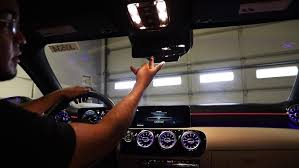
The best part? Once it’s set up, you can open and close your garage with just one button—no extra remote needed.
Read too: Tc1 Tricode Garage Door Opener Remote W/ Clip Chamberlain: Complete Guide
What Is The Mercedes Garage Door Opener System?
Mercedes vehicles typically use a built-in system called HomeLink, which integrates your garage door opener into your car.
What HomeLink Does:
- Replaces handheld remotes
- Controls garage doors, gates, and lighting
- Stores multiple codes (usually up to 3 devices)
👉 Learn more about the system here:
https://en.wikipedia.org/wiki/HomeLink
How To Program The Garage Door Opener On A Mercedes
Let’s walk through the exact steps to get your system working.
Step 1: Locate The HomeLink Buttons
In most Mercedes models, the buttons are located:
- On the overhead console near the interior lights
- Sometimes on the rearview mirror
👉 You’ll typically see 3 small buttons labeled or unmarked.
Step 2: Clear Existing Codes (Important)
Before programming, erase old settings.
Instructions:
- Press and hold the first and third buttons
- Hold for about 10–20 seconds
- Release when the indicator light flashes rapidly
👉 This resets the system.
Step 3: Program Using Your Remote
Instructions:
- Hold your garage remote 1–3 inches from the HomeLink buttons
- Press and hold:
- The desired HomeLink button
- The remote button
- Keep holding for 10–30 seconds
- Wait until the indicator light changes from slow to rapid blinking
👉 This means the signal has been copied.
Step 4: Sync With The Garage Door Opener (Learn Button)
For newer openers with rolling code technology, this step is required.
Instructions:
- Go to your garage motor unit
- Press the Learn button
- You have 30 seconds
- Return to your car
- Press the programmed HomeLink button 2–3 times
👉 The garage door should respond.
Step 5: Test The System
Press the programmed button:
- If the door opens/closes → success
- If not → repeat Step 4
Why Doesn’t My Mercedes Garage Opener Work?
Here are the most common issues and solutions.
🔧 Troubleshooting Tips:
- Weak remote battery → Replace battery
- Wrong distance → Keep remote within 1–3 inches
- Missed Learn button timing → Retry within 30 seconds
- Incompatible opener → Check frequency compatibility
Compatibility Guide: Does Your Garage Opener Work?
Most modern systems are compatible, but here’s a quick overview.
| Opener Type | Compatibility | Notes |
|---|---|---|
| Rolling Code | Yes | Requires Learn button sync |
| Fixed Code | Yes | Easier setup |
| Very Old Systems | Limited | May need adapter |
Benefits Of Using Mercedes HomeLink
✅ Advantages:
- No need for separate remote
- Cleaner, clutter-free interior
- Supports multiple devices
- Secure rolling code technology
❌ Limitations:
- Setup can be tricky for beginners
- Requires manual syncing
- Older openers may not work
Real-Life Example
A Mercedes owner struggled with multiple remotes for their garage and gate. After programming HomeLink, they were able to control both systems directly from their car—saving time and eliminating clutter.
👉 Result: Faster access and improved convenience.
Safety Tips During Programming
- Park your car outside the garage during setup
- Ensure the garage door path is clear
- Keep children and pets away
- Avoid pressing buttons randomly
Maintenance Tips For Long-Term Use
Keep your system working smoothly:
- Replace remote batteries annually
- Reprogram after changing garage opener
- Clean buttons and console regularly
- Test system every few months
FAQ: How To Program The Garage Door Opener On A Mercedes
1. Do all Mercedes cars have HomeLink?
Most modern models do, but availability depends on trim and year.
2. How long does programming take?
Usually 5–10 minutes.
3. Why is my HomeLink light not blinking?
This could indicate:
- Dead battery in remote
- Incorrect button sequence
4. Can I program multiple garage doors?
Yes, most systems support up to 3 devices.
5. Do I need the original remote?
Yes, for initial programming.
6. What if my garage door doesn’t respond?
Repeat the Learn button sync process or check compatibility.
Conclusion
Learning How To Program The Garage Door Opener On A Mercedes is a simple upgrade that makes your daily routine smoother and more convenient. With just a few steps, you can eliminate the need for extra remotes and control your garage directly from your car.
Whether you’re setting it up for the first time or troubleshooting an issue, this guide gives you everything you need to succeed.
Leave a Reply