Lost your remote or just bought a used car? Many drivers search for how to program Nissan garage door opener without remote when they need quick access to their garage. The process may seem tricky at first, but with the right steps, you can connect your vehicle to your garage door opener safely and efficiently—no remote required.
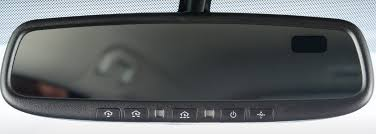
How To Program Nissan Garage Door Opener Without Remote
Programming your Nissan garage door opener without a remote typically involves using the built-in HomeLink system and syncing it directly with your garage door opener’s Learn button.
Read too: How Do You Change Code On Garage Door Keypad Fast?
👉 This method works for most modern Nissan vehicles equipped with HomeLink.
What Is HomeLink and How Does It Work?
HomeLink is a built-in wireless control system found in many vehicles, including Nissan.
Key Features:
- Controls garage doors, gates, and lighting
- Uses radio frequency signals
- Eliminates need for separate remotes
Garage door openers rely on radio communication systems, as explained in Wikipedia, to transmit secure signals between devices.
Can You Program Nissan Garage Door Opener Without a Remote?
Yes—you can program it directly using the garage door opener motor unit.
Requirements:
- Access to the garage opener
- Ladder (if needed)
- Vehicle parked inside or near garage
👉 No handheld remote is required for this method.
Step-by-Step: How To Program Nissan Garage Door Opener Without Remote
Follow these steps carefully for best results:
Step 1: Clear Existing HomeLink Settings
- Turn ignition to ON (do not start engine)
- Press and hold the two outer HomeLink buttons
- Hold for 10–20 seconds until LED flashes rapidly
👉 This resets previous programming.
Step 2: Locate the Learn Button on Garage Opener
- Found on the motor unit (ceiling-mounted)
- Usually behind light cover
- Colors may vary (yellow, purple, red, green)
Step 3: Press the Learn Button
- Press once
- LED light turns on
- You now have 30 seconds to sync
Step 4: Return to Your Nissan Vehicle
- Press and hold desired HomeLink button
- Hold for 2–5 seconds, release, repeat
👉 Repeat 3–5 times until the garage door activates.
Step 5: Test the Connection
- Press the programmed HomeLink button
- Confirm door opens and closes
Alternative Method: Rolling Code Sync
If your system uses rolling code (most modern openers):
Steps:
- Press Learn button
- Press HomeLink button in car
- Repeat until door responds
How Long Does Programming Take?
- Setup time: 5–10 minutes
- Sync process: 1–2 minutes
👉 Most users complete it in under 10 minutes.
Common Problems and Fixes
1. HomeLink Not Responding
- Reset system again
- Ensure ignition is ON
2. Garage Door Not Activating
- Missed 30-second window
- Repeat Learn button step
3. Weak Signal
- Move car closer
- Check antenna alignment
Troubleshooting Checklist
- ✅ Reset HomeLink
- ✅ Press Learn button correctly
- ✅ Stay within time limit
- ✅ Ensure opener power is ON
- ✅ Repeat steps if needed
Nissan Models That Support HomeLink
Most modern Nissan vehicles include this feature.
Examples:
- Altima
- Rogue
- Pathfinder
- Maxima
👉 Check your owner’s manual for confirmation.
Pros vs Cons of Programming Without Remote
Advantages
- ✅ No remote needed
- ✅ Quick setup
- ✅ Saves money
Disadvantages
- ❌ Requires access to opener unit
- ❌ May need ladder
- ❌ Slight learning curve
Real-Life Example
A Nissan Rogue owner lost their garage remote but still needed access. Using the Learn button method, they successfully programmed their HomeLink system in under 7 minutes, restoring full functionality without purchasing a replacement remote.
Safety Tips During Programming
- Use a stable ladder
- Avoid touching moving parts
- Keep hands clear of door
- Ensure good lighting
When Should You Use a Remote Instead?
Consider a Remote If:
- You cannot access the opener unit
- System fails to sync
- Older opener without Learn button
Tips for Better Performance
- Keep opener antenna straight
- Replace opener batteries if needed
- Avoid signal interference
- Reprogram periodically for security
FAQ: How To Program Nissan Garage Door Opener Without Remote
1. Can I program my Nissan garage opener without a remote?
Yes, using the Learn button on the garage opener.
2. What is the Learn button used for?
It allows devices like HomeLink to sync with the opener.
3. How long does programming take?
Usually 5–10 minutes.
4. Why is my HomeLink not working?
It may need resetting or proper timing during setup.
5. Do all Nissan cars have HomeLink?
Most newer models do, but check your manual to confirm.
6. Can I program multiple doors?
Yes, each HomeLink button can control a different door.
Conclusion
Learning how to program Nissan garage door opener without remote is a practical skill that saves time, money, and frustration. With just a few simple steps—resetting HomeLink, pressing the Learn button, and syncing your car—you can regain full garage access in minutes.
This method is safe, efficient, and works for most modern systems.
Leave a Reply