Programming your car to operate a LiftMaster garage door opener can seem confusing at first. Many homeowners struggle with syncing their vehicle’s built-in system with the garage door. This guide explains how to program LiftMaster garage door opener with car in simple steps, ensuring you can enjoy hands-free garage access safely and efficiently.
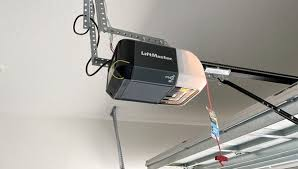
Understanding LiftMaster and HomeLink Systems
Most modern cars use HomeLink or compatible integrated garage door systems. LiftMaster openers utilize a rolling code technology, which enhances security by changing the access code each time the door is used.
Read too: How Do You Change Code On Garage Door Keypad Fast?
Key Advantages:
- Reduces the need for multiple remotes
- Improves home security with rolling codes
- Streamlines everyday access to your garage
According to Wikipedia, HomeLink systems are widely used in automotive integration to safely control garage doors and gates.
Tools and Requirements
Before programming, make sure you have:
- Vehicle with HomeLink or compatible system
- LiftMaster garage door opener with accessible “Learn” button
- Ladder (if your opener is mounted high)
- Owner’s manuals for both your car and LiftMaster opener
Tip: Verify your vehicle’s HomeLink system is active and not locked by a dealer restriction.
Step-by-Step Guide: How To Program LiftMaster With Car
Step 1: Clear Previous Memory (If Needed)
- Press and hold the HomeLink button for 10–20 seconds until the indicator light changes.
- This clears old codes and ensures no conflicts with other devices.
Step 2: Locate the Learn Button on Your Opener
- On your LiftMaster motor head, find the “Learn” button (usually near the antenna wire).
- Press and release the button; the indicator light should begin blinking, indicating the opener is ready to pair.
Step 3: Program the Car Button
- Within 30 seconds of pressing the Learn button, press and hold the desired HomeLink button in your car.
- Hold until the garage opener responds (light flashes or beeps).
- Release the button; test by pressing again to ensure the door opens and closes.
Step 4: Test Multiple Doors (If Applicable)
- Assign different HomeLink buttons for each door to prevent conflicts.
- Confirm consistent operation from inside and outside the vehicle.
Troubleshooting Common Issues
| Issue | Cause | Solution |
|---|---|---|
| Door doesn’t respond | Out of range or incorrect timing | Repeat programming within 30 sec of Learn button |
| Car button works intermittently | Weak signal or outdated HomeLink | Update car firmware or repeat sync |
| Multiple doors conflict | Same button used for multiple doors | Assign unique buttons per door |
| Opener beeps but doesn’t move | Opener misaligned or safety sensors triggered | Check sensor alignment and path clearance |
Pro Tip: Always keep your car stationary during programming to avoid accidental door operation.
Tips for Safe and Efficient Programming
- Wear safety glasses and gloves if accessing high-mounted openers
- Avoid programming during high traffic or in poor lighting
- Label your car buttons for clarity if syncing multiple doors
- Use short, steady presses instead of long holds when testing
Benefits of Programming LiftMaster With Car
| Benefit | Explanation |
|---|---|
| Hands-free access | Operate your garage door from inside the car |
| Increased security | Rolling code prevents unauthorized entry |
| Convenience | No need for separate handheld remotes |
| Multi-door control | Easily assign each button to a different door |
Homeowners who program their car typically report faster and safer garage access, especially during bad weather or nighttime.
FAQ Section
Q1: Can all cars program LiftMaster openers?
A: Most vehicles with HomeLink or similar systems are compatible. Always check the car manual for supported models.
Q2: Do I need to press the Learn button every time?
A: No. The Learn button is only used during initial programming.
Q3: Can one HomeLink button control multiple doors?
A: It’s not recommended. Assign separate buttons for each door to avoid conflicts.
Q4: What if the garage door doesn’t respond after syncing?
A: Ensure the car is within range, repeat programming, or consult the LiftMaster manual.
Q5: Is it safe to program while the car is moving?
A: No. The car must be stationary to prevent accidental door operation.
Conclusion
Learning how to program LiftMaster garage door opener with car provides convenience, security, and hands-free operation. By following these clear steps, you can integrate your vehicle with your garage seamlessly.
Share this guide on social media to help friends and family enjoy the benefits of safe and easy garage access!
Leave a Reply