If your remote suddenly stops working or you’ve just bought a new one, figuring out the setup can feel confusing. Many homeowners struggle with syncing older systems correctly. This guide on How To Program Garage Door Opener Overhead Door Legacy will walk you through the process step-by-step—so you can get your garage working smoothly again without stress.
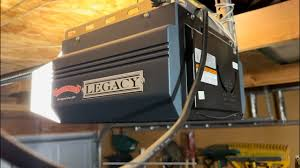
What Is an Overhead Door Legacy Garage Door Opener?
The Overhead Door Legacy series is a popular residential garage door opener known for its reliability and long lifespan. These systems typically use CodeDodger® rolling code technology, which enhances security by changing the access code every time the remote is used.
Read too: How Do You Change Code On Garage Door Keypad Fast?
📊 According to industry estimates, over 80% of modern garage openers use rolling code technology, making them far more secure than older fixed-code systems.
For more background on garage opener systems, visit:
https://en.wikipedia.org/wiki/Garage_door_opener
How To Program Garage Door Opener Overhead Door Legacy (Step-by-Step)
Let’s go through the exact steps to program your remote successfully.
Step 1: Locate the “Learn Code” Button
Find the Learn Code button on the motor unit.
Common locations:
- Under the light cover
- On the back panel
- Near the antenna wire
💡 Tip: The button is often labeled “Learn Code” or simply “Program.”
Step 2: Press the Learn Code Button
- Press and release the button once
- A small LED light will begin blinking
👉 This means the opener is in programming mode, which lasts about 30 seconds.
Step 3: Press the Remote Button
- Press the button on your remote
- Hold for 1–2 seconds, then release
Step 4: Confirm the Programming
- The opener light will blink
- Or you may hear a clicking sound
👉 This confirms the remote has been successfully programmed.
Step 5: Test the Remote
- Press the remote again
- The garage door should open or close
How To Program a Keypad for Overhead Door Legacy
If you’re using a wireless keypad, follow these steps.
Step-by-Step Keypad Programming:
- Press the Learn Code button on the opener
- Enter your desired PIN (3–8 digits)
- Press the Up/Down button
- Wait for the opener light to blink
💡 Example: Use a PIN like 2580 (avoid simple patterns like 1111).
How To Reset Overhead Door Legacy Opener
If programming fails, resetting the system often fixes the issue.
Reset Instructions:
- Press and hold the Learn Code button
- Hold for 8–10 seconds
- Release when the LED turns off
👉 This clears all stored remotes and keypads.
⚠️ You’ll need to reprogram all devices afterward.
Why Is My Overhead Door Legacy Not Programming?
Here are the most common problems and solutions.
1. Remote Not Responding
Causes:
- Dead battery
- Out of range
- Incorrect timing
Fix:
- Replace battery
- Stand within 1–2 meters (3–6 feet)
- Repeat programming steps
2. Learn Button Not Working
Causes:
- Power issue
- Faulty logic board
Fix:
- Check power supply
- Inspect wiring
3. Door Doesn’t Move After Programming
Causes:
- Safety sensors misaligned
- Motor issue
Fix:
- Check sensor alignment
- Ensure nothing blocks the door
Overhead Door Legacy vs Other Garage Openers
| Feature | Overhead Door Legacy | LiftMaster | Chamberlain |
|---|---|---|---|
| Security | Rolling Code | Rolling Code | Rolling Code |
| Ease of Programming | Very Easy | Easy | Easy |
| Reliability | High | High | High |
Tips for Successful Programming
Make the process smoother with these tips:
- Replace batteries before starting
- Complete steps within 30 seconds
- Avoid interference from nearby electronics
- Use original or compatible remotes
How Many Remotes Can You Program?
Most Overhead Door Legacy models support:
- 5–7 remotes
- 1–2 keypads
📊 Exceeding memory capacity may require resetting the system.
Security Tips After Programming
Protect your garage and home:
- Change keypad PIN every 3–6 months
- Reset system after moving into a new home
- Avoid leaving remotes in visible areas
📊 Rolling code systems reduce hacking risks by over 90% compared to older systems.
Maintenance Tips for Long-Term Performance
- Test remotes monthly
- Replace batteries annually
- Clean keypad regularly
- Inspect opener every 6 months
Signs You Need to Reprogram Your Opener
- Remote suddenly stops working
- New remote added
- After power outage
- After resetting system
FAQ: How To Program Garage Door Opener Overhead Door Legacy
1. How long does programming take?
Usually under 2 minutes.
2. Can I program multiple remotes?
Yes, most systems support multiple devices.
3. What if my remote won’t sync?
Check battery, distance, and timing.
4. Do I need a professional?
No, this is a simple DIY process.
5. Can I use a universal remote?
Yes, but ensure compatibility with Overhead Door systems.
6. Why does my opener light blink but not work?
This may indicate sensor or programming issues.
Conclusion
Learning How To Program Garage Door Opener Overhead Door Legacy gives you full control over your garage access—without needing professional help. With just a few simple steps, you can sync your remote, troubleshoot issues, and improve your home’s security.
If this guide helped you, don’t forget to share it with friends or family—because a properly working garage door makes everyday life easier and safer!
Leave a Reply