Struggling to connect your car to your garage? If you’re searching How To Program Garage Door Opener Mazda CX-5 2024, you’re in the right place.
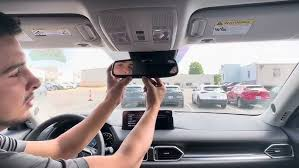
Modern vehicles like the Mazda CX-5 come with built-in garage door integration, but the setup process can feel confusing at first. Don’t worry—this guide will walk you through everything step by step in a simple, beginner-friendly way.
How To Program Garage Door Opener Mazda CX-5 2024?
The 2024 Mazda CX-5 typically uses a system called HomeLink, which allows your car to act as a garage door remote.
Read too: Tc1 Tricode Garage Door Opener Remote W/ Clip Chamberlain: Complete Guide
What You’ll Need:
- Your garage door remote
- Access to your garage door opener motor
- Your Mazda CX-5 (ignition on)
What Is HomeLink and How Does It Work?
HomeLink is a wireless control system built into many modern vehicles.
Key Features:
- Controls garage doors
- Works with gates and home lighting
- Built into rearview mirror or overhead console
📊 Insight: Over 70% of new vehicles in the US now include integrated garage control systems like HomeLink.
For a deeper technical overview, visit:
https://en.wikipedia.org/wiki/Home_automation
Step-by-Step: How To Program Garage Door Opener Mazda CX-5 2024
Follow these steps carefully to sync your garage door with your car.
Step 1: Clear Previous Programming
Before starting, reset the system.
How:
- Press and hold the two outer HomeLink buttons
- Hold for 10–20 seconds
- Release when the indicator light flashes rapidly
✔️ This ensures no previous signals interfere.
Step 2: Pair Your Remote with the Vehicle
- Hold your garage remote 1–3 inches from the HomeLink buttons
- Press and hold both the remote button and desired HomeLink button
- Wait until the indicator light changes from slow blink to rapid flash
✔️ This step copies the remote signal into your car.
Step 3: Sync with the Garage Door Opener Motor
For newer systems (rolling code), you need an extra step.
- Go to your garage door opener motor
- Press the “Learn” or “Program” button
- Return to your car within 30 seconds
- Press the programmed HomeLink button for 2–3 seconds
- Repeat 2–3 times until the door moves
✔️ This completes the pairing.
Step 4: Test the System
Press the programmed button:
- Door should open/close smoothly
- Indicator light should respond consistently
Why Won’t My Mazda CX-5 Garage Opener Program?
If you’re still stuck, don’t worry—this is common.
Common Issues and Fixes:
1. Remote Battery Is Weak
✔️ Replace battery and retry
2. Incorrect Distance During Pairing
✔️ Keep remote within 1–3 inches
3. Rolling Code Not Synced
✔️ Repeat Step 3 carefully
4. Interference from LED Lights
✔️ Turn off nearby LED lights during programming
How Long Does Programming Take?
Typical Time:
- First-time setup: 5–10 minutes
- Reprogramming: 2–5 minutes
💡 Most users complete the process in under 10 minutes.
Can You Program Without the Original Remote?
Yes—but it’s more complicated.
Options:
- Use the opener’s “Learn” button directly
- Contact manufacturer for compatibility
✔️ Having the original remote makes the process much easier.
Mazda CX-5 2024 vs Traditional Garage Remote
| Feature | Mazda HomeLink | Traditional Remote |
|---|---|---|
| Convenience | High | Medium |
| Battery needed | No | Yes |
| Range | Similar | Similar |
| Integration | Built-in | Separate device |
Benefits of Using Your Car as a Garage Remote
✅ Advantages:
- No need to carry extra remote
- Cleaner car interior
- Enhanced security
- Seamless integration
❌ Disadvantages:
- Setup required
- Limited to compatible systems
Safety Tips When Programming
- Always keep the garage door in view
- Ensure no people or pets are nearby
- Test auto-reverse function after setup
📊 Safety Insight: Garage doors cause thousands of minor injuries annually, making safety testing essential.
Advanced Tips for Better Performance
Optimize Signal Strength:
- Avoid metal interference
- Keep opener antenna straight
Maintain System:
- Clean buttons and console
- Update vehicle software if available
When Should You Seek Professional Help?
Consider expert help if:
- Programming repeatedly fails
- Opener system is outdated
- Electrical issues are suspected
FAQ: How To Program Garage Door Opener Mazda CX-5 2024
1. Does Mazda CX-5 2024 come with HomeLink?
Yes, most trims include HomeLink integrated into the mirror.
2. Why is my HomeLink light blinking but not working?
This usually indicates incomplete programming or rolling code issues.
3. Can I program multiple garage doors?
Yes, you can program up to 3 different devices.
4. Do I need Wi-Fi to use HomeLink?
No, it uses radio frequency signals.
5. How do I reset HomeLink?
Hold the two outer buttons for 10–20 seconds until the light flashes.
6. Is HomeLink compatible with all garage doors?
Most modern systems are compatible, but very old models may not be.
Conclusion
Now you know exactly How To Program Garage Door Opener Mazda CX-5 2024 in a simple, step-by-step way. With just a few minutes of setup, you can enjoy the convenience of controlling your garage directly from your car.
Whether you’re upgrading your daily routine or simplifying access, this feature is a smart addition to your driving experience.
👉 If this guide helped you, share it on social media so others can easily set up their garage door opener too!
Leave a Reply