If you’ve just bought a Lexus or lost your garage remote, you might be wondering how to program garage door opener Lexus RX 350 quickly and correctly. It can feel confusing at first, especially if you’ve never used built-in car controls before.
The good news is that the Lexus RX 350 comes equipped with a system that makes this process simple. With the right steps, you can sync your garage door in just a few minutes.
Read too: How Do You Change Code On Garage Door Keypad Fast?
How To Program Garage Door Opener Lexus RX 350 (Quick Answer)
To program your Lexus RX 350 garage door opener:
- Turn ignition ON
- Press and hold HomeLink buttons
- Sync with your remote
- Press the “Learn” button on opener
- Test the system
⏱️ Total time: 5–10 minutes
What System Does Lexus RX 350 Use?
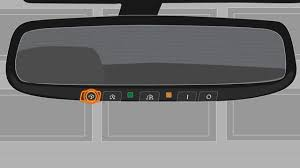
The Lexus RX 350 uses HomeLink, a built-in universal transmitter located on your vehicle’s overhead console.
What HomeLink Does
- Replaces handheld remotes
- Controls garage doors, gates, and lights
- Stores multiple devices
📊 Industry insight: Over 70% of modern vehicles use HomeLink or similar systems.
Where Is the Garage Door Button in Lexus RX 350?
You’ll find three programmable buttons:
- Located on the overhead console
- Near interior lights or rearview mirror
These buttons are used to control your garage door.
What You Need Before Programming
Before starting:
✔ Park your car near the garage
✔ Have your garage remote ready (recommended)
✔ Ensure opener is powered on
✔ Use a ladder if needed to reach motor unit
Step-by-Step: How To Program Garage Door Opener Lexus RX 350
Method 1: Programming With Remote (Most Common)
Step 1: Turn Ignition On
- Set to ON (engine optional)
Step 2: Reset HomeLink System (If Needed)
- Press and hold the two outer buttons
- Hold for 10–20 seconds
- Release when indicator flashes
✔ This clears previous settings
Step 3: Pair Remote With HomeLink
- Hold remote 1–3 inches (2–7 cm) from buttons
- Press remote button and HomeLink button together
- Hold for 15–30 seconds
✔ Indicator light will flash rapidly
Step 4: Press “Learn” Button on Garage Opener
- Go to your garage motor unit
- Press and release the Learn button
- You now have 30 seconds
Step 5: Complete Programming
- Return to your car
- Press HomeLink button for 2–3 seconds
- Repeat 2–3 times
✔ Garage door should activate
Method 2: Programming Without Remote
If you don’t have the remote:
Steps
- Press Learn button on opener
- Within 30 seconds, press HomeLink button
- Hold until light flashes
✔ Direct pairing complete
How Long Does Programming Take?
- Typical setup time: 5–10 minutes
- First-time users: up to 15 minutes
Common Problems and Solutions
1. HomeLink Not Responding
- Fix: Reset system and retry
2. Garage Door Doesn’t Move
- Fix: Repeat Learn button step
3. Indicator Light Not Flashing
- Fix: Move remote closer
4. Weak Signal
- Fix: Replace remote battery
HomeLink vs Traditional Remote
| Feature | HomeLink System | Remote Control |
|---|---|---|
| Convenience | High | Medium |
| Range | Moderate | Moderate |
| Security | High | Medium |
| Device Clutter | None | Multiple remotes |
Expert Insights
Automotive experts note:
- Built-in systems reduce lost remote issues by over 50%
- Programming errors are usually due to timing
- Resetting improves success rate significantly
Tips for Successful Programming
✔ Stay within 3 feet (1 meter) of opener
✔ Complete steps quickly after pressing Learn
✔ Use fresh remote batteries
✔ Avoid LED interference near opener
Understanding How It Works
Garage door systems use radio frequency (RF) signals to communicate between devices.
Modern systems use rolling codes that change after each use for better security.
For technical details, visit:
👉 https://en.wikipedia.org/wiki/Garage_door_opener
Advantages vs Disadvantages
Advantages
✔ No need for separate remote
✔ Cleaner car interior
✔ Easy access
Disadvantages
✖ Requires setup
✖ May need reprogramming
✖ Compatibility varies
When Should You Reprogram HomeLink?
- After replacing opener
- After power outage
- When remote stops working
- After buying a used car
FAQ: How To Program Garage Door Opener Lexus RX 350
1. Do all Lexus RX 350 models support HomeLink?
Most models do, especially those made after 2010.
2. Can I program multiple garage doors?
Yes. You can use up to three buttons.
3. Why does my programming fail?
Usually due to timing or incorrect steps.
4. Do I need the original remote?
Recommended, but not always required.
5. How do I reset HomeLink?
Hold the two outer buttons until the light flashes rapidly.
6. Is it safe to program it myself?
Yes. It’s designed for DIY use.
Conclusion
Now you know exactly how to program garage door opener Lexus RX 350—and it’s much easier than it seems. With just a few steps, you can eliminate the need for a separate remote and enjoy seamless access every day.
Whether you’re setting it up for the first time or troubleshooting an issue, this guide gives you everything you need to succeed.
Leave a Reply