Struggling with How To Program Garage Door Opener In Lexus RX350? You’re not alone—many drivers find the process confusing at first. The good news is that once you understand the steps, programming your garage opener takes just a few minutes and saves you from carrying extra remotes.
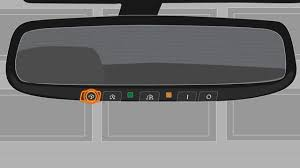
What Is HomeLink in Lexus RX350?
The Lexus RX350 comes equipped with a built-in system called HomeLink.
Read too: How Do You Change Code On Garage Door Keypad Fast?
What HomeLink Does:
- Connects your car to garage door openers
- Replaces handheld remotes
- Stores multiple devices (usually up to 3)
This system uses radio frequency signals, similar to the technology explained in this Wikipedia article on https://en.wikipedia.org/wiki/Remote_control.
How To Program Garage Door Opener In Lexus RX350 (Step-by-Step)
Let’s go through the exact process.
Step 1: Clear Existing Codes (Important First Step)
Before programming, clear any old codes.
How to Reset:
- Turn your ignition to ON (engine can be off)
- Press and hold the two outer HomeLink buttons
- Hold for about 10–20 seconds
- Release when the indicator light flashes rapidly
👉 This ensures no interference from previous programming.
Step 2: Position Your Remote Correctly
You’ll need your original garage door remote.
Proper Position:
- Hold remote 1–3 inches from HomeLink buttons
- Aim directly at the panel
Step 3: Program the Signal
Now, sync your remote with the car.
Instructions:
- Press and hold the desired HomeLink button
- At the same time, press and hold the garage remote button
- Keep holding both for 15–30 seconds
- Watch for the indicator light:
- Slow blink → learning
- Rapid blink → signal captured
👉 Once it flashes rapidly, the basic programming is complete.
Step 4: Sync With Garage Door Opener Motor (Rolling Code Systems)
Most modern systems use rolling codes for security.
Additional Steps:
- Go to your garage door opener motor unit
- Locate the “Learn” or “Smart” button
- Press it once (you have ~30 seconds)
- Return to your car
- Press the programmed HomeLink button 2–3 times
👉 Your garage door should now move.
How Long Does Programming Take?
- Initial setup: 2–5 minutes
- Rolling code sync: 1–2 minutes
Total time: Under 10 minutes
Types of Garage Door Openers Compatible with RX350
| Type | Compatibility | Notes |
|---|---|---|
| Fixed Code | Yes | Easier to program |
| Rolling Code | Yes | Requires extra step |
| Smart Openers | Yes | May need app integration |
Common Problems and Fixes
1. HomeLink Light Won’t Flash
Cause:
- Buttons not held long enough
Fix:
- Hold for full 20 seconds
2. Garage Door Doesn’t Respond
Cause:
- Rolling code not synced
Fix:
- Repeat Step 4
3. Weak Signal or Intermittent Operation
Cause:
- Low remote battery
Fix:
- Replace remote battery
4. Programming Fails Completely
Possible Issues:
- Incompatible opener
- Interference
- Faulty HomeLink system
Expert Tips for Successful Programming
1. Use Fresh Batteries
Weak signals often cause failure.
2. Stay Close to the Opener
Distance can affect signal strength.
3. Follow Timing Carefully
Rolling code systems require quick action.
4. Check Owner’s Manual
Different model years may vary slightly.
Real-Life Example
A Lexus RX350 owner struggled to program their opener.
Issue:
- Door wouldn’t respond after syncing
Solution:
- They skipped the “Learn” button step
After completing Step 4, the system worked instantly.
👉 Lesson: Rolling code step is essential.
Advantages of Using HomeLink
Benefits:
- No need for separate remotes
- Cleaner car interior
- Increased convenience
- Enhanced security
Safety Considerations
- Never program while driving
- Keep children away during setup
- Ensure door area is clear before testing
When Should You Reprogram HomeLink?
You may need to reset and reprogram if:
- You move to a new home
- Replace your garage opener
- Lose your remote
- Experience signal issues
Troubleshooting Checklist
Before calling a professional, check:
- ✅ Remote battery
- ✅ Correct button used
- ✅ Learn button pressed
- ✅ Distance from opener
Advanced Tip: Programming Without Remote
If you don’t have a remote:
- Use the Learn button directly
- Press HomeLink button within 30 seconds
- Repeat until synced
👉 Not all systems support this method.
Maintenance Tips
- Clean HomeLink buttons regularly
- Test system monthly
- Replace opener batteries yearly
FAQ Section
Frequently Asked Questions
1. Can I program multiple garage doors?
Yes, HomeLink supports up to 3 different devices.
2. Why is my HomeLink blinking slowly?
It means it’s still learning the signal.
3. Do I need a remote to program it?
Usually yes, but some systems allow programming via the Learn button.
4. How do I reset HomeLink completely?
Hold the two outer buttons for 10–20 seconds until the light flashes rapidly.
5. Is HomeLink compatible with all garage doors?
Most modern openers are compatible, especially rolling code systems.
6. What if programming still fails?
Check compatibility or contact a technician.
Conclusion
Learning How To Program Garage Door Opener In Lexus RX350 is easier than it seems once you understand the steps.
By:
- Clearing old codes
- Syncing your remote
- Completing the rolling code process
You can enjoy seamless, remote-free access to your garage in just minutes.
Leave a Reply