Many Ford Explorer owners wonder how to program garage door opener in Ford Explorer. Whether you’ve replaced your garage opener or purchased a new vehicle, syncing it with your car’s HomeLink or built-in system ensures convenience and security.
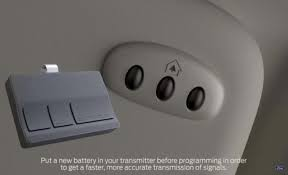
This guide will show step-by-step instructions, tips for troubleshooting, and expert advice to get your garage door opener working seamlessly with your Ford Explorer.
Understanding Ford Explorer Garage Door Opener System
Ford Explorer models typically use HomeLink or integrated garage door systems. These systems allow drivers to:
- Open or close garage doors without a handheld remote
- Control multiple garage doors or gates
- Integrate with home automation systems for smart control
Read too: How Do You Change Code On Garage Door Keypad Fast?
According to Ford’s official manual, properly programming your vehicle’s system ensures maximum security and functionality, reducing risk of accidental activation.
Step-by-Step Guide: Programming Your Garage Door Opener
Follow these detailed steps for a successful setup:
Step 1: Prepare Your Tools and Environment
- Ensure your vehicle is parked outside the garage for safety
- Have your original garage door remote handy
- Turn the ignition to ON but do not start the engine
Step 2: Clear Previous Programming (Optional)
- Press and hold the two outer buttons on the HomeLink system until the indicator light blinks (approx. 20 seconds)
- Release the buttons. Your system is now cleared
Step 3: Program Your Garage Door Opener
- Hold the garage door remote 1–3 inches from the vehicle’s HomeLink buttons
- Press and hold both the remote button and desired HomeLink button simultaneously
- Wait until the HomeLink indicator light changes from slow to fast blinking, indicating programming success
Step 4: Sync With the Garage Door Motor
- Locate the “Learn” or “Smart” button on your garage door motor (usually near the antenna)
- Press the button once; you typically have 30 seconds to return to the vehicle
- Press and hold the programmed HomeLink button until the garage door activates
Step 5: Test the Operation
- Press the programmed button to ensure the door opens and closes smoothly
- Repeat for additional garage doors if needed
Troubleshooting Common Issues
Even after following the steps, some users face issues. Here’s how to resolve them:
- Button Doesn’t Respond – Ensure the battery in the original remote is not depleted
- Indicator Light Blinks Slowly – Move the remote closer to the HomeLink system or retry Step 3
- Motor Doesn’t Learn – Check for older garage door systems; some require repetitive presses or additional steps
- Multiple Doors Confused – Clear all previous programming and start fresh
| Problem | Solution |
|---|---|
| Indicator blinking slowly | Move remote closer, retry syncing |
| Door doesn’t respond | Replace remote battery, repeat programming |
| Motor fails to recognize | Press “Learn” button again, ensure 30-second window |
Safety Tips
- Never stand under the garage door during testing
- Keep remote and programming buttons out of reach of children
- Avoid programming while vehicle is moving
For general information about garage door openers, see Wikipedia: Garage Door Opener.
FAQ Section
Q1: Can I program multiple garage doors in my Ford Explorer?
A: Yes. HomeLink supports up to three garage doors or gates. Repeat programming steps for each button.
Q2: Will programming in one Ford Explorer affect other cars?
A: No. Each vehicle’s HomeLink system is independent.
Q3: My garage door is old; will it work with HomeLink?
A: Some older systems may require additional steps or a HomeLink compatibility kit.
Q4: How long does the programming take?
A: Typically 5–10 minutes if following instructions carefully.
Q5: Can I clear all programmed garage doors?
A: Yes. Hold the two outer HomeLink buttons for ~20 seconds until the indicator blinks rapidly.
Conclusion
Learning how to program garage door opener in Ford Explorer simplifies daily life and enhances security. Following the steps above ensures a reliable connection between your vehicle and garage system.
Share this guide with friends or family who own a Ford Explorer to help them set up their garage opener quickly and safely!
Leave a Reply