If you own a 2025 Chevy Silverado, programming your garage door opener is essential for convenience and safety. Many drivers struggle with connecting their vehicle’s HomeLink system to garage doors, especially with modern smart openers.
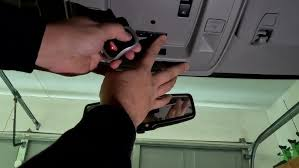
Understanding how to program garage door opener 2025 Chevy Silverado allows you to operate your garage seamlessly from your truck, reducing the need for extra remotes and enhancing security. This guide walks you step by step, even if you’re a beginner.
Understanding the HomeLink System in Chevy Silverado
The HomeLink system in the 2025 Chevy Silverado is designed to integrate with most major garage door openers. Key features include:
- Three programmable buttons for multiple garage doors or gates.
- Built-in rolling code technology for secure operation.
- Battery-free functionality – powered by your truck’s electrical system.
- Compatibility with smart and traditional garage openers.
Read too: Tc1 Tricode Garage Door Opener Remote W/ Clip Chamberlain: Complete Guide
According to HomeLink, over 99% of garage door openers manufactured after 1996 are compatible with their system, including LiftMaster, Chamberlain, and Genie brands.
Step-by-Step Guide: How To Program Garage Door Opener
Follow these steps to program your 2025 Chevy Silverado safely and efficiently.
Step 1: Prepare the Garage Door Opener
- Locate the “Learn” or “Smart” button on your garage door opener motor (usually on the back or side).
- Keep a ladder handy to reach the button safely.
- Ensure the garage door is closed before starting the programming process.
Step 2: Clear Previous HomeLink Settings (Optional)
If your HomeLink buttons were previously programmed:
- Turn your vehicle ignition on but do not start the engine.
- Press and hold both the first and third HomeLink buttons until the indicator light blinks rapidly (usually 20 seconds).
- Release the buttons – your HomeLink is now cleared.
Step 3: Program the HomeLink Button
- Choose the button you want to program (1, 2, or 3).
- Press and hold the chosen button while simultaneously pressing your garage door remote within 1–3 inches of HomeLink.
- Continue holding both buttons until the indicator light changes from slow to fast blinking (approx. 20–30 seconds).
- Release both buttons. The indicator light should remain solid or blink rapidly, depending on the garage door model.
Step 4: Sync With Garage Door Opener
- Press the “Learn” button on your garage door opener motor for 30 seconds.
- Return to your Silverado and press the programmed HomeLink button three times in succession.
- The garage door should now respond to the HomeLink button.
Pro Tip: If using a rolling code opener, completing Step 4 is essential for security.
Troubleshooting Common Issues
Even with careful programming, some users encounter problems. Here’s how to solve them:
Issue 1: Button Doesn’t Respond
- Check the garage door battery in the remote.
- Make sure the HomeLink indicator light is blinking correctly.
- Reposition the remote closer to the HomeLink sensor.
Issue 2: Rolling Code Conflicts
- Ensure the garage opener is compatible with rolling codes.
- Repeat programming with correct timing between remote and HomeLink.
Issue 3: Multiple Garage Doors
- Use different HomeLink buttons for each door.
- Program one door at a time to prevent interference.
Issue 4: Older Garage Door Openers
- Some openers require HomeLink compatibility bridges.
- Check HomeLink Compatibility for updated devices.
Safety Tips
- Keep hands clear of moving doors.
- Do not program while vehicle is in motion.
- Ensure children are not in the garage during programming.
- Always use a sturdy ladder when accessing the garage door motor.
Advantages of Using HomeLink in Chevy Silverado
| Feature | Benefit |
|---|---|
| Integrated Buttons | No extra remotes needed |
| Rolling Code Security | Prevents code theft |
| Works With Multiple Doors | One vehicle controls all doors |
| Battery-Free Operation | No maintenance for power supply |
| Remote Programming | Compatible with smart garage systems |
Additional Tips for 2025 Chevy Silverado Owners
- Update Firmware: Some 2025 Chevy Silverado models have HomeLink firmware updates via Chevrolet MyLink or dealer service.
- Use Multiple Vehicles: Program each driver’s HomeLink button for convenience.
- Label Buttons: Mark buttons for each garage door or gate to prevent confusion.
- Maintenance: Regularly inspect your garage door opener and HomeLink connection for smooth operation.
FAQ Section
Q1: Can I program my Chevy Silverado without the original garage remote?
A1: No. Most openers require the remote for the initial programming step.
Q2: Does programming affect my warranty?
A2: No. Programming HomeLink is standard and supported by Chevrolet.
Q3: Can I program more than one door?
A3: Yes, each HomeLink button can control a separate door.
Q4: My garage door is smart-enabled. Will it still work?
A4: Yes. HomeLink is compatible with most smart openers, but follow rolling code procedures carefully.
Q5: How long does programming take?
A5: Typically 10–15 minutes if following steps precisely.
Q6: What if programming fails repeatedly?
A6: Contact HomeLink support or your Chevrolet dealer for troubleshooting and firmware updates.
Conclusion
Learning how to program garage door opener 2025 Chevy Silverado ensures convenience, security, and smooth operation.
- Follow the step-by-step programming guide for quick setup.
- Use safety precautions to prevent accidents during programming.
- Troubleshoot rolling codes and multiple doors carefully.
With proper programming, your 2025 Chevy Silverado becomes a smart hub for controlling your garage doors, gates, and other compatible devices. Share this guide with friends and family who drive Silverado trucks to make their garage access effortless and safe.
Leave a Reply