Lost your garage remote or never had one to begin with? You’re probably wondering How To Program Chevy Tahoe Garage Door Opener Without Remote—and yes, it’s absolutely possible.
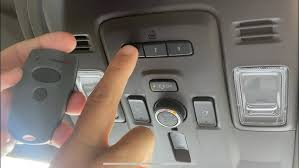
Many Chevy Tahoe models come with a built-in system that lets you sync directly with your garage door opener, even without the original remote.
Read too: Tc1 Tricode Garage Door Opener Remote W/ Clip Chamberlain: Complete Guide
What System Does Chevy Tahoe Use?
Most Chevrolet Tahoe models are equipped with the HomeLink system, a built-in transmitter that replaces traditional remotes.
What HomeLink Can Do:
- Open/close garage doors
- Control gates and lighting
- Store multiple devices (usually up to 3)
👉 Learn more about this system:
https://en.wikipedia.org/wiki/HomeLink
Can You Program Chevy Tahoe Garage Door Opener Without Remote?
✅ Short Answer: Yes
You can program it without a remote by using the Learn button on your garage door opener motor.
👉 This method is especially useful if:
- You lost the original remote
- You moved into a new home
- You’re setting up a new vehicle
How To Program Chevy Tahoe Garage Door Opener Without Remote
Follow this exact step-by-step method.
Step 1: Locate The HomeLink Buttons In Your Tahoe
In most Tahoe models, the buttons are located:
- On the overhead console
- Near the rearview mirror
👉 You’ll see 3 buttons used for programming.
Step 2: Clear Previous Programming
This ensures a clean setup.
Instructions:
- Press and hold the first and third buttons
- Hold for 10–20 seconds
- Release when the indicator light flashes rapidly
Step 3: Find The Learn Button On Your Garage Opener
Go to your garage and locate the opener motor.
Look for:
- A small button labeled “Learn”
- Usually near the antenna wire
- Often colored (yellow, purple, red, or green)
Step 4: Activate Programming Mode
- Press and release the Learn button
- LED light turns on
- You now have 30 seconds
Step 5: Program The Tahoe HomeLink Button
Quickly return to your vehicle and:
- Press and hold the desired HomeLink button
- Hold for 5–10 seconds
- Release and press again
- Repeat 2–3 times
👉 The garage door should respond (open/close).
Step 6: Test The System
Press the programmed button:
- If the door moves → success
- If not → repeat Step 4 and Step 5
Why This Works Without A Remote
Modern garage openers use rolling code technology, allowing direct pairing with vehicle systems like HomeLink.
👉 This eliminates the need for copying signals from a handheld remote.
Common Problems & Fixes
🔧 Troubleshooting Guide:
| Problem | Cause | Solution |
|---|---|---|
| No response | Missed timing | Retry within 30 seconds |
| Light not flashing | Not cleared memory | Reset HomeLink |
| Door doesn’t move | Incomplete sync | Repeat steps |
| Weak signal | Too far away | Stay inside vehicle |
Compatibility Guide
Most Tahoe models work with:
| Opener Type | Compatibility | Notes |
|---|---|---|
| Rolling Code | Yes | Requires Learn button |
| Fixed Code | Yes | Easier setup |
| Older Systems | Limited | May need remote |
Pros vs Cons Of Programming Without Remote
✅ Advantages:
- No need for original remote
- Quick setup (5–10 minutes)
- Saves money
- Works with most modern systems
❌ Limitations:
- Requires access to opener motor
- Timing-sensitive process
- Older openers may not support it
Real-Life Example
A Tahoe owner moved into a new home without receiving a garage remote. By using the Learn button method, they successfully programmed their vehicle in under 10 minutes, avoiding the cost of buying a new remote.
👉 Lesson: You don’t need extra hardware—just the right steps.
Safety Tips During Programming
- Park your vehicle outside the garage
- Ensure door path is clear
- Keep children and pets away
- Use a stable ladder when accessing opener
Maintenance Tips For Long-Term Use
Best Practices:
- Reprogram after replacing opener
- Test system every few months
- Keep opener firmware updated (if smart system)
- Clean HomeLink buttons occasionally
FAQ: How To Program Chevy Tahoe Garage Door Opener Without Remote
1. Can I really program it without a remote?
Yes, by using the Learn button on the garage opener.
2. How long does programming take?
Usually 5–10 minutes.
3. Why is my Tahoe not connecting?
It could be due to timing issues or incomplete pairing.
4. Do all Tahoe models support HomeLink?
Most modern models do, but availability depends on trim and year.
5. What if my garage opener is very old?
You may need a compatible remote or adapter.
6. How many devices can I program?
Typically up to 3 garage doors or devices.
Conclusion
Learning How To Program Chevy Tahoe Garage Door Opener Without Remote is a simple and practical solution for modern drivers. With just a few steps, you can connect your vehicle directly to your garage system—no extra remote required.
This not only saves money but also adds convenience and security to your daily routine.
Leave a Reply