Losing your remote can be frustrating, especially when you still need easy access to your garage. If you’re wondering How To Program Car Garage Door Opener Without Remote, you’re not alone—this is a common issue many homeowners face.
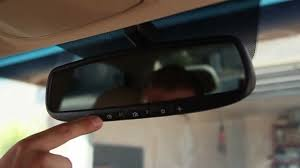
The good news is that you can still program your car’s built-in garage door opener using alternative methods, even without the original remote.
What Is a Car Garage Door Opener System?
Most modern vehicles come equipped with built-in garage door opener systems, often referred to as HomeLink or Car2U. These systems allow your car to communicate directly with your garage door opener using radio frequencies.
Read too: Tc1 Tricode Garage Door Opener Remote W/ Clip Chamberlain: Complete Guide
According to general information on wireless control systems from Wikipedia (https://en.wikipedia.org/wiki/Garage_door_opener), garage door openers use rolling code or fixed code technology to ensure secure communication between devices.
Main components include:
- Vehicle-integrated buttons (usually on visor or mirror)
- Garage door opener motor unit
- Receiver system inside the opener
How To Program Car Garage Door Opener Without Remote (Step-by-Step)
Method 1: Using the “Learn” Button (Most Effective)
This is the most reliable method when you don’t have a remote.
Step-by-Step Instructions:
- Locate the Learn Button
- Found on the garage door opener motor
- Usually behind a light cover
- Colors may include red, yellow, purple, or green
- Press the Learn Button
- Press and release it
- A small LED light will turn on
- You have 30 seconds to complete the next steps
- Go to Your Car
- Sit inside your car with ignition on
- Hold the desired HomeLink button
- Press and Hold the Car Button
- Hold for 10–20 seconds
- Watch for the garage light to blink or hear a click
- Test the System
- Press the car button again
- The garage door should open or close
Can You Program Without a Learn Button?
Yes—but it depends on your opener type.
Older Systems (Dip Switch Method)
Some older garage door openers use dip switches instead of digital programming.
Steps:
- Open the garage opener unit
- Locate dip switches inside
- Match the same switch pattern inside your car system (if supported)
⚠️ Note: Many newer cars do not support dip switch systems.
How to Program HomeLink Without Remote
HomeLink systems are common in brands like Honda, Toyota, Ford, and BMW.
Steps:
- Press and hold the two outer HomeLink buttons
- Hold for 20 seconds until LED flashes rapidly
- Press the Learn button on the garage opener
- Return to the car within 30 seconds
- Press and hold the desired HomeLink button
Repeat if necessary until successful.
Common Problems When Programming Without Remote
1. Car Button Not Responding
Cause: System not reset
Fix: Reset HomeLink before programming
2. Garage Door Doesn’t Move
Cause: Missed timing window
Fix: Repeat steps quickly after pressing Learn button
3. Weak Signal
Cause: Distance or interference
Fix: Park closer to the garage
Programming Time and Difficulty
| Task | Time Required | Difficulty |
|---|---|---|
| Basic Programming | 2–5 minutes | Easy |
| HomeLink Setup | 5–10 minutes | Medium |
| Troubleshooting | 10–15 minutes | Medium |
Advantages vs Disadvantages
Advantages
- No need to buy a new remote
- Saves money ($20–$80)
- Works with most modern systems
Disadvantages
- Requires access to opener unit
- Timing-sensitive process
- Not compatible with very old models
Expert Tips for Better Results
- Always press the Learn button right before programming
- Keep your car within 5–10 feet of the opener
- Use a fresh car battery for best signal strength
- Avoid programming near strong wireless interference
Industry experts estimate that over 60% of failed attempts happen due to incorrect timing between the Learn button and car button.
When You Should Consider Buying a Remote
Sometimes, programming without a remote may not work.
Consider buying a remote if:
- Your opener is very old
- Your car system isn’t compatible
- Programming fails repeatedly
Universal remotes are widely available and easy to set up.
Security Considerations
Programming your car opener directly improves convenience, but security is just as important.
Best Practices:
- Reset old codes if you moved into a new home
- Avoid sharing access codes
- Reprogram periodically for safety
FAQ: How To Program Car Garage Door Opener Without Remote
1. Can I program my car garage opener without any remote at all?
Yes, you can use the Learn button on the garage door opener to sync directly with your car.
2. Why is my HomeLink not working?
It may need to be reset, or your garage opener might use incompatible technology.
3. How long does programming take?
Usually between 2–10 minutes, depending on the system.
4. Do all cars support garage door programming?
No. Only vehicles with built-in systems like HomeLink or Car2U support it.
5. What if my opener doesn’t have a Learn button?
You likely have a dip switch system, which may not be compatible with newer cars.
6. Is it safe to program without a remote?
Yes, as long as you follow proper steps and reset old codes if necessary.
Conclusion
Now you know exactly How To Program Car Garage Door Opener Without Remote using simple, practical methods. Whether you’re using the Learn button or troubleshooting compatibility issues, you can regain control of your garage quickly without extra costs.
If this guide helped you, share it on social media so others can solve their garage door problems just as easily.
Leave a Reply