Losing or not having a remote can be frustrating when trying to control your garage door. Knowing how to program a car garage door opener without a remote ensures you can still operate your garage efficiently.
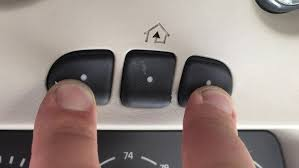
This guide will show you step by step how to program your vehicle’s built-in garage door system, even if the original remote is unavailable. With clear instructions and tips, you can restore convenience without hassle.
Understanding Car Garage Door Openers
Many modern vehicles come with integrated garage door openers, often referred to as HomeLink or Car2U systems. These allow your car to open compatible garage doors without a separate remote.
Read too: Tc1 Tricode Garage Door Opener Remote W/ Clip Chamberlain: Complete Guide
Key points to consider:
- Compatibility: Ensure your garage opener is compatible with your car’s built-in system.
- Frequency: Most openers use 300–390 MHz frequencies. Check your garage opener manual for specifications.
- Safety: Always program while the car is parked, and ensure the garage area is clear.
According to HomeLink experts, programming without a remote is possible for over 90% of vehicles, provided the garage opener has a “learn” button.
Step-by-Step Guide: Programming Without a Remote
Step 1: Locate the Learn Button
- Find the learn or program button on your garage door opener motor unit, usually mounted on the ceiling.
- It is often a red, yellow, purple, or green button depending on the brand.
Step 2: Prepare Your Vehicle
- Turn your ignition to accessory mode.
- Make sure your car’s garage opener system is reset (hold down all buttons until LED flashes, if required).
Step 3: Activate the Learn Mode
- Press and release the learn button on the garage opener motor.
- The LED light will blink, indicating the opener is ready to accept a new signal.
Step 4: Program the Car
- Within 30 seconds of activating the learn mode, press and hold the desired button in your car.
- Hold until the garage opener light blinks or you hear a click.
- Release the button and test the function by pressing it once to open the garage door.
Tips for Successful Programming
- Patience is key: Some garage doors require up to 3 attempts for programming.
- Battery check: Ensure your car system’s battery is fully functional for a strong signal.
- Avoid interference: Stand away from metal objects or other electronic devices during programming.
- Consult your car manual: Different makes may have slight variations in steps.
Troubleshooting Common Issues
| Problem | Cause | Solution |
|---|---|---|
| Door does not respond | Time window expired | Repeat steps, press car button immediately after learn mode |
| LED does not blink | Faulty motor or button | Reset opener and retry |
| Multiple doors respond | Signal interference | Reprogram car button, clear old codes |
| Programming fails repeatedly | Incompatible vehicle or older opener | Use an external remote as intermediary |
For more details on garage door systems, see the Garage Door Opener Wikipedia Page.
FAQ: How To Program Car Garage Door Opener Without A Remote
Q1: Can I program my car without pressing the garage motor’s learn button?
A: No, the learn button is essential to link your car’s built-in system with the opener.
Q2: How long does programming take?
A: Usually under 5 minutes once you locate the learn button and follow the steps.
Q3: What if my car doesn’t have a built-in opener?
A: You will need an external remote or third-party system compatible with your garage opener.
Q4: Will programming multiple cars interfere with each other?
A: No, each vehicle can be programmed to a unique button on the same garage opener.
Q5: Can I reprogram without erasing other devices?
A: Yes, programming a new car usually does not erase existing devices.
Conclusion
Programming your car garage door opener without a remote is simple if you follow the correct steps. By locating the learn button, using your vehicle’s built-in system, and following the timing instructions, you can regain seamless access to your garage.
This process saves time, reduces clutter, and ensures reliable operation even without a separate remote. Share this guide with friends and family to help them program their cars easily and safely.
Leave a Reply