Losing your garage remote can be frustrating—especially when you rely on your car for convenient access. If you’re wondering How To Program Acura Garage Door Opener Without Remote, you’re not alone. Many Acura owners face this situation, but the good news is that you can still program your system using the built-in HomeLink feature and your garage door opener unit.
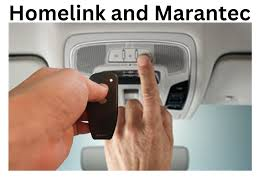
Can You Program an Acura Garage Door Opener Without a Remote?
Yes, you can program your Acura’s built-in system without a handheld remote.
Most Acura vehicles come equipped with HomeLink, a wireless control system integrated into your car. Instead of using a remote, you’ll sync directly with the garage door opener motor.
Read too: Tc1 Tricode Garage Door Opener Remote W/ Clip Chamberlain: Complete Guide
According to general system explanations like Garage Door Opener, modern systems use a “learn” button that allows new devices to connect securely.
What You Need Before Programming
Before you start, make sure you have:
- Access to your garage door opener motor unit
- A ladder (if the opener is ceiling-mounted)
- Your Acura vehicle parked nearby
- A working garage door system
💡 Tip: Programming works best when your car is within 3–5 feet of the opener.
How To Program Acura Garage Door Opener Without Remote (Step-by-Step)
Follow these steps carefully:
Step 1: Clear Existing HomeLink Codes
- Turn your car ignition to ON
- Press and hold the first and third HomeLink buttons
- Hold for 10–20 seconds until the indicator light flashes
👉 This resets the system.
Step 2: Locate the “Learn” Button on the Opener
- Go to your garage door opener unit
- Find the Learn button (usually colored: red, yellow, purple)
- Press and release it
⚠️ You now have 30 seconds to complete the next step.
Step 3: Return to Your Acura Vehicle
- Quickly go back to your car
- Press and hold the desired HomeLink button
Step 4: Watch for Indicator Light Changes
- The HomeLink light will blink slowly, then rapidly
- This indicates successful programming
Step 5: Test the System
- Press the programmed button
- The garage door should open or close
What If It Doesn’t Work? (Troubleshooting Guide)
Here are common issues and solutions:
1. No Response from Garage Door
Cause: Timing issue
Fix: Repeat steps within the 30-second window
2. Light Doesn’t Flash Rapidly
Cause: Incomplete sync
Fix: Press and hold the button longer (up to 30 seconds)
3. Opener Not Compatible
Cause: Older system without learn button
Fix: Use a universal receiver upgrade
4. Weak Signal
Cause: Distance or interference
Fix: Move closer to the garage
HomeLink vs Remote Programming
| Feature | Without Remote (HomeLink) | With Remote |
|---|---|---|
| Convenience | High | Medium |
| Setup Difficulty | Moderate | Easy |
| Security | High | Medium |
| Required Device | Car + opener | Remote + opener |
How Long Does Programming Take?
- Average time: 3–7 minutes
- Skill level: Beginner to intermediate
👉 Most users complete the process on the first or second attempt.
Which Acura Models Support This Feature?
Most modern Acura vehicles include HomeLink.
Popular Models
- Acura MDX
- Acura RDX
- Acura TLX
- Acura ILX
💡 Note: Availability may vary by model year and trim.
Benefits of Programming Without a Remote
Advantages
- No need to buy replacement remotes
- Cleaner, built-in control
- Improved security
Disadvantages
- Requires access to opener unit
- Slightly more complex setup
Real-Life Scenario
A homeowner lost their garage remote while traveling. Instead of buying a replacement, they used their Acura’s HomeLink system and programmed it directly via the opener.
👉 Result: Saved $30–$80 and restored access within minutes.
When Should You Reprogram Your Acura Garage Opener?
- After moving into a new home
- After replacing the opener
- If your system stops responding
- For security updates
📊 Security Insight:
Reprogramming ensures old devices can no longer access your garage.
Pro Tips for Successful Programming
- Keep your car engine ON during setup
- Press buttons firmly and steadily
- Avoid interference from Wi-Fi routers or LED lights
- Repeat the process if unsure
Advanced Option: Using a Smart Garage System
If your opener supports smart technology:
- Connect via mobile app
- Sync directly with your car system
- Monitor access remotely
👉 This adds another layer of convenience and security.
FAQ: How To Program Acura Garage Door Opener Without Remote
1. Can I program my Acura garage opener without a remote?
Yes, using the HomeLink system and the opener’s Learn button.
2. Where is the Learn button located?
On the garage door opener motor unit, usually behind a light cover.
3. Why is my Acura HomeLink not working?
Common reasons include:
- Timing issues
- Weak signal
- Compatibility problems
4. Do I need to reset HomeLink before programming?
Yes, clearing previous codes ensures a successful setup.
5. Can I program multiple garage doors?
Yes, most HomeLink systems support 3 different devices.
6. Is it safe to program without a remote?
Yes. The Learn button ensures secure pairing with your vehicle.
Conclusion
Learning How To Program Acura Garage Door Opener Without Remote is a valuable skill that can save you time and money. With just a few simple steps, you can connect your vehicle directly to your garage system and regain full control.
Whether you’ve lost your remote or want a more convenient setup, this method is reliable, secure, and beginner-friendly.
If this guide helped you, share it on social media to help other Acura owners solve the same problem quickly! 🚗🚪
Leave a Reply