If you’re struggling to access your garage without a remote, learning How To Program A LiftMaster Garage Door Opener Keypad can be a game-changer. Whether you’ve just installed a new keypad or need to reset an old one, this guide will walk you through the process step by step—quickly and safely.
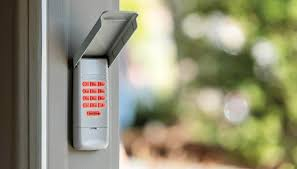
What Is a LiftMaster Garage Door Keypad?
A LiftMaster keypad is a wireless, wall-mounted device that allows you to open and close your garage door using a PIN code instead of a remote.
According to general information about garage door opener systems (see: https://en.wikipedia.org/wiki/Garage_door_opener), modern devices use rolling code technology to enhance security and prevent signal theft.
Read too: Tc1 Tricode Garage Door Opener Remote W/ Clip Chamberlain: Complete Guide
Key Benefits
- Keyless convenience
- Enhanced home security
- Easy access for family members
- No need to carry remotes
How To Program A LiftMaster Garage Door Opener Keypad (Step-by-Step)
Step 1: Locate the Learn Button
The Learn button is essential for programming.
Where to find it:
- On the back or side of the motor unit
- Mounted on the garage ceiling
- Behind a light cover in some models
Learn Button Colors and Meaning
| Color | Frequency Type |
|---|---|
| Yellow | Security+ 2.0 |
| Purple | 315 MHz |
| Red/Orange | 390 MHz |
| Green | 390 MHz (older) |
Step 2: Clear Existing Codes (Optional)
If you’re setting up a new keypad or want to remove old access:
- Press and hold the Learn button
- Hold for 6–10 seconds
- LED turns off → memory cleared
👉 This removes all previously programmed remotes and keypads.
Step 3: Enter Programming Mode
- Press and release the Learn button
- LED indicator turns on
- You now have 30 seconds to complete setup
Step 4: Enter a New PIN on the Keypad
- Go to your keypad
- Enter a 4-digit PIN (e.g., 2580)
- Press and hold the ENTER button
Step 5: Wait for Confirmation
- Garage opener light blinks
- Or you hear a clicking sound
👉 This confirms successful programming.
Step 6: Test the Keypad
- Enter your PIN
- Press ENTER
- The garage door should open or close
Quick Setup Overview
| Step | Action | Time |
|---|---|---|
| Find Learn button | Locate motor unit | 1 min |
| Activate Learn mode | Press button | 10 sec |
| Enter PIN | Input code on keypad | 10 sec |
| Confirm | Wait for light blink | 5 sec |
Why Your LiftMaster Keypad Isn’t Programming
1. Missed 30-Second Window
Fix: Repeat process and act quickly
2. Weak Keypad Battery
Fix: Replace battery (usually 9V)
3. Incorrect PIN Entry
Fix: Re-enter carefully and hold ENTER longer
4. Signal Interference
Fix: Stand closer to garage door
5. Full Memory Capacity
Fix: Reset opener and reprogram
How To Change Your LiftMaster Keypad Code
Changing your PIN regularly improves security.
Steps to Update Code
- Press Learn button
- Enter new 4-digit PIN
- Press ENTER
- Wait for confirmation
💡 Tip: Avoid obvious codes like “1234” or “0000”.
Security Tips for Garage Keypads
Best Practices
- Use unique PIN codes
- Change codes every 3–6 months
- Avoid sharing codes publicly
- Install keypad out of direct visibility
📊 Security Insight: Homes with upgraded garage security systems are significantly less likely to experience break-ins, according to industry safety reports.
LiftMaster Keypad vs Remote Control
| Feature | Keypad | Remote |
|---|---|---|
| Access Method | PIN code | Button press |
| Convenience | No device needed | Must carry remote |
| Security | High | Moderate |
| Risk of loss | None | High |
Real-Life Example
A homeowner installed a LiftMaster keypad for family access. By following the Learn button method, they programmed a secure PIN in under 3 minutes—eliminating the need for multiple remotes.
Common Mistakes to Avoid
- ❌ Not holding ENTER long enough
- ❌ Entering wrong PIN
- ❌ Waiting too long after pressing Learn
- ❌ Ignoring battery replacement
Pro Tips for Faster Setup
- Keep a ladder nearby for easy access
- Perform setup during daylight
- Write down your PIN securely
- Test at least 2–3 times
When Should You Call a Professional?
Consider expert help if:
- Learn button is not working
- Keypad won’t sync after multiple attempts
- Opener is older than 20 years
- Wiring or motor issues are suspected
FAQ: How To Program A LiftMaster Garage Door Opener Keypad
1. How long does it take to program a LiftMaster keypad?
Usually 2–5 minutes if done correctly.
2. Do I need a remote to program the keypad?
No, you only need access to the Learn button.
3. Can I use any PIN I want?
Yes, as long as it’s a 4-digit code.
4. Why is my keypad blinking but not working?
This may indicate a battery issue or incorrect programming sequence.
5. How often should I change my keypad code?
Every 3–6 months for better security.
6. Can multiple users share the same keypad?
Yes, but it’s safer to change codes regularly.
Conclusion
Understanding How To Program A LiftMaster Garage Door Opener Keypad empowers you to control your garage access with ease and security. With just a few simple steps, you can set up or update your keypad in minutes—no technical expertise required.
This method improves convenience, reduces reliance on remotes, and enhances your home’s overall safety.
👉 If you found this guide helpful, share it on social media so others can quickly and safely program their garage keypad too! 🚪🔐
Leave a Reply