If you’re searching for “How To Program A Genie Garage Door Remote Control”, chances are your remote isn’t working—or you’ve just bought a new one. The good news is that programming a Genie remote is simpler than it looks.
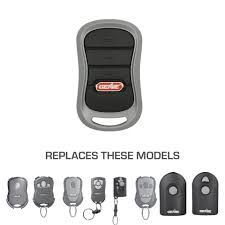
With just a few steps, you can sync your remote and get your garage door working smoothly again—no technical skills required.
Read too: Tc1 Tricode Garage Door Opener Remote W/ Clip Chamberlain: Complete Guide
How To Program A Genie Garage Door Remote Control (Step-by-Step Guide)
Programming a Genie remote usually takes 5–15 minutes. Follow these steps carefully for the best results.
Step 1: Locate the Learn Button on Your Genie Opener
The Learn (or Program/Set) button is the key to syncing your remote.
Where to find it:
- On the motor unit (ceiling-mounted opener)
- Under the light cover
- Near the antenna wire
Important Tip:
The button color (red, green, or purple) may vary depending on your Genie model.
Step 2: Prepare Your Remote Control
Before programming:
- Insert fresh batteries
- Stand within 1–2 meters (3–6 feet) of the opener
- Make sure no one else is using another remote nearby
Step 3: Enter Programming Mode
- Press and hold the Learn/Program button
- Wait until the LED light begins blinking
- Release the button
👉 The opener is now ready to pair with your remote.
Step 4: Program the Remote
- Press the button on your Genie remote
- Hold it for 2–3 seconds, then release
- Watch for the opener light to blink or click
Repeat this step 2–3 times if needed until the pairing is successful.
Step 5: Test the Remote
- Press the remote button again
- The garage door should open or close
If it doesn’t respond, repeat the process slowly.
How Do You Program a Genie Remote Without a Learn Button?
Some older Genie models use DIP switches instead of smart programming.
Steps for DIP Switch Systems:
- Open the remote battery compartment
- Locate the small switches inside
- Match them exactly with the switches on the opener
- Close the remote and test
👉 Both sets must have identical positions (ON/OFF).
What Is Genie Intellicode and Why Does It Matter?
Most modern Genie openers use Intellicode technology, which improves security.
How It Works:
- The access code changes every time you use the remote
- Prevents hacking and signal copying
For a technical explanation of this system, visit:
https://en.wikipedia.org/wiki/Garage_door_opener
Common Programming Problems (And How to Fix Them)
Even simple setups can run into issues. Here’s how to solve them quickly.
Troubleshooting Table
| Problem | Cause | Solution |
|---|---|---|
| Remote not working | Dead batteries | Replace batteries |
| No response from opener | Out of range | Move closer |
| Programming fails | Timing issue | Repeat steps slowly |
| Door opens randomly | Signal interference | Reset opener codes |
| Remote partially works | Weak signal | Replace battery or reposition |
How to Reset a Genie Garage Door Opener
Resetting clears all previous remotes and is useful when troubleshooting.
Steps:
- Press and hold the Learn button
- Hold for 8–10 seconds
- Wait until the LED turns off
👉 All remotes are now erased. You’ll need to reprogram them.
How to Program Multiple Genie Remotes
You can connect several remotes to one opener.
How it works:
- Press the Learn button once
- Program each remote within 30 seconds
- Repeat for additional remotes
Capacity:
Most Genie systems support up to 7 remotes.
Programming a Genie Remote to Your Car (HomeLink)
Many vehicles include built-in garage controls.
Steps:
- Turn ignition to ON
- Hold your Genie remote near the car console
- Press both buttons simultaneously
- Wait for rapid flashing
- Press the Learn button on the opener
- Press the car button again to sync
DIY vs Professional Setup
DIY Advantages:
- Saves money
- Fast and convenient
- Easy for beginners
DIY Challenges:
- Confusing model variations
- Troubleshooting may take time
Call a Professional If:
- The opener doesn’t enter programming mode
- Wiring or sensors are faulty
- The remote still won’t sync after multiple attempts
Typical service costs range from $80–$150.
Safety Tips When Programming Your Genie Remote
Safety is critical when working with garage doors.
Best Practices:
- Keep children and pets away
- Ensure the door path is clear
- Test auto-reverse function after setup
- Never stand under a moving door
Important Insight:
Garage door accidents cause thousands of injuries annually—most are preventable with proper setup and maintenance.
Maintenance Tips for Long-Term Performance
To keep your Genie system running smoothly:
- Replace remote batteries every 12–18 months
- Clean sensors regularly
- Lubricate moving parts twice a year
- Test system monthly
👉 Regular maintenance can reduce system failures by up to 60%.
FAQ: How To Program A Genie Garage Door Remote Control
Q1: How long does it take to program a Genie remote?
Typically 5–15 minutes, depending on your experience and model.
Q2: Why won’t my Genie remote program?
Common causes include dead batteries, incorrect timing, or signal interference.
Q3: Can I program a Genie remote without the opener?
No, you need access to the opener’s Learn button or DIP switches.
Q4: How many remotes can a Genie opener support?
Most models support 5–7 remotes at the same time.
Q5: Do Genie remotes work with all garage door openers?
Not always. Compatibility depends on the opener model and frequency.
Q6: What should I do if my remote suddenly stops working?
Replace the battery first, then reprogram if needed.
Conclusion
Learning How To Program A Genie Garage Door Remote Control doesn’t have to be complicated. With just a few simple steps—locating the Learn button, pairing your remote, and testing—you can have your garage door working perfectly in minutes.
Whether you’re setting up a new remote or fixing an old one, this guide gives you everything you need to do it confidently and safely.
If you found this guide helpful, share it on social media so others can easily program their Genie garage door remote too!
Leave a Reply