Struggling to get your garage door remote working? You’re not alone. Many homeowners find the setup process confusing, especially with universal remotes. This guide on How To Program A Chamberlain Universal Garage Door Remote will walk you through every step in a clear and simple way—so you can get your garage door opening smoothly again in minutes.
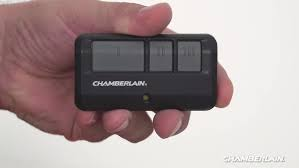
What Is a Chamberlain Universal Garage Door Remote?
A Chamberlain universal remote is designed to work with multiple garage door opener brands, not just Chamberlain. It supports most major manufacturers like LiftMaster, Craftsman, Genie, and more.
According to industry data, over 70% of U.S. homes use automatic garage door openers, making universal remotes a convenient solution for households with multiple systems.
Read too: How Do You Change Code On Garage Door Keypad Fast?
👉 These remotes typically operate on frequencies like 315 MHz or 390 MHz and use rolling code technology for enhanced security (learn more about it on Wikipedia: https://en.wikipedia.org/wiki/Rolling_code).
What Do You Need Before Programming?
Before starting, make sure you have everything ready:
Checklist
- Your Chamberlain universal remote
- Access to your garage door opener unit
- A ladder (if the opener is mounted on the ceiling)
- Fresh batteries (usually CR2032 or AAA)
💡 Tip: Weak batteries are one of the most common causes of programming failure.
How To Program a Chamberlain Universal Garage Door Remote (Step-by-Step)
Follow these simple steps carefully:
Step 1: Locate the “Learn” Button
Find the “Learn” button on your garage door opener. It’s usually located:
- On the back or side of the motor unit
- Near the antenna wire
The button color (yellow, purple, red/orange, or green) indicates compatibility and frequency.
Step 2: Press the Learn Button
- Press and release the Learn button
- A small LED light will turn on
- You now have 30 seconds to complete the next step
Step 3: Program the Remote
- Press and hold the button on your remote
- Release when the opener light blinks or you hear a click
✅ This confirms successful programming.
Step 4: Test the Remote
- Press the remote button
- The garage door should open or close
If it doesn’t work, repeat the process.
How Long Does Programming Take?
Most users complete the process in under 2 minutes. However, first-time users may take up to 5–10 minutes depending on familiarity with the opener.
Common Problems and How to Fix Them
1. Remote Not Responding
Possible Causes:
- Dead battery
- Out of range
- Incorrect programming
Solution: Replace the battery and reprogram.
2. Learn Button Not Working
Possible Causes:
- Power issue
- Faulty opener
Solution: Check power supply or reset the opener.
3. Remote Works Intermittently
Possible Causes:
- Signal interference
- Low battery
Solution: Move closer and replace batteries.
Compatibility Guide
Not all remotes work with all openers. Here’s a quick comparison:
| Brand | Compatible with Chamberlain Remote |
|---|---|
| LiftMaster | ✅ Yes |
| Craftsman | ✅ Yes |
| Genie | ⚠️ Limited |
| Linear | ⚠️ Limited |
| Older models | ❌ Not always |
💡 Tip: Openers made before 1993 may not support modern remotes due to lack of safety sensors.
Advantages vs Disadvantages of Universal Remotes
Advantages
- Works with multiple brands
- Easy to program
- Cost-effective
- Compact and portable
Disadvantages
- Limited compatibility with older systems
- Requires manual setup
- May need reprogramming after battery change
Pro Tips for Faster Programming
- Always stand within 3–5 feet of the opener
- Press buttons firmly (not too quickly)
- Avoid programming in direct sunlight (can affect sensors)
- Label remote buttons if controlling multiple doors
Is It Safe to Program Your Own Remote?
Yes. Programming a garage remote is completely safe and designed for DIY users.
Modern systems use rolling code encryption, which changes the signal every time you use the remote. This prevents hacking and unauthorized access.
FAQ: How To Program A Chamberlain Universal Garage Door Remote
1. Can I program the remote without the Learn button?
No, the Learn button is essential for syncing the remote with the opener.
2. How many remotes can I program?
Most openers support 5–10 remotes, depending on the model.
3. Do I need to reset the opener before programming?
Not usually. Only reset if you’re replacing old remotes or experiencing issues.
4. Why does my remote stop working after a few days?
This is often due to:
- Weak battery
- Signal interference
- Memory reset
5. Can one remote control multiple garage doors?
Yes. Most Chamberlain universal remotes support 2–3 doors.
6. What battery does the remote use?
Typically:
- CR2032 coin battery
- AAA battery (depending on model)
Conclusion
Now you know exactly How To Program A Chamberlain Universal Garage Door Remote quickly and easily. With just a few simple steps, you can save time, avoid frustration, and get your garage door working seamlessly again.
If you found this guide helpful, consider sharing it with friends or family who might be dealing with the same issue. A quick share could save them hours of confusion!
Leave a Reply