If you’ve just bought a new Chamberlain universal garage door opener, you may be wondering how to get it working with your existing garage door system. Programming your opener might seem tricky, but with the right steps, it’s quick and straightforward. In this guide, we’ll explain exactly how to program a Chamberlain universal garage door opener so you can open and close your garage effortlessly.
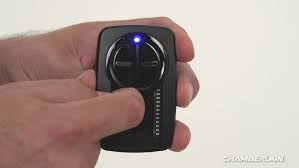
Many homeowners face issues with compatibility and syncing, so following the correct procedure ensures your opener works smoothly and safely.
Why Programming Is Important
- Compatibility: Ensures your universal opener communicates properly with your garage door.
- Security: Prevents unauthorized access by resetting codes during setup.
- Convenience: Eliminates trial-and-error and reduces frustration.
Experts recommend reprogramming universal openers whenever replacing remotes or garage door systems for optimal performance.
Tools and Materials Needed
- Chamberlain universal garage door opener
- Original remote or wall button
- Ladder (if needed to reach the opener)
- Screwdriver (for panel access if required)
Read too: How Do You Change Code On Garage Door Keypad Fast?
Step-By-Step Instructions: How To Program A Chamberlain Universal Garage Door Opener
1. Prepare Your Garage Door Opener
- Make sure your garage door is closed and the opener is powered.
- Remove the light cover if needed to access the “Learn” button.
2. Locate the Learn Button
- On Chamberlain models, the Learn button is usually on the back or side of the opener motor.
- It may be red, purple, or yellow depending on your model.
- For universal openers, check the included manual or the Wikipedia entry on garage door openers for reference.
3. Press the Learn Button
- Press and release the Learn button.
- An LED indicator will light up, signaling the opener is ready to receive a signal from the remote.
4. Program the Remote
- Within 30 seconds of pressing the Learn button, press and hold the button on your remote that you want to use for this opener.
- Release the remote button when the opener lights blink or you hear a click, confirming successful programming.
5. Test Your Opener
- Press the remote to check if the garage door opens and closes correctly.
- Repeat the process if the door does not respond or if you have additional remotes to program.
6. Program the Wall Button (Optional)
- If your system includes a wall-mounted button, press the Learn button on the opener, then press the wall button to sync it.
- Test functionality to ensure proper operation.
Tips for Successful Programming
- Distance matters: Stand within 5–10 feet of the opener when programming.
- Check batteries: Ensure remotes have fresh batteries.
- Clear interference: Keep metal objects or other remotes away during programming.
- Multiple remotes: Program all remotes within 30 seconds of pressing the Learn button to avoid repeating steps.
Common Errors and How to Fix Them
| Issue | Cause | Solution |
|---|---|---|
| Opener does not respond | Remote out of range | Move closer and retry |
| LED does not light | Incorrect Learn button | Check model manual for correct button |
| Door reverses or stops | Safety sensors misaligned | Adjust sensors so LEDs are steady |
| Remote programs but door moves erratically | Interference or old code | Clear old codes and reprogram |
FAQ: How To Program A Chamberlain Universal Garage Door Opener
1. Can I program a universal opener myself?
Yes, following step-by-step instructions makes it safe and easy.
2. How long does programming take?
Typically 5–10 minutes per remote.
3. Do I need a professional?
Only if your garage door uses a complex system with multiple remotes or smart integrations.
4. Can I program multiple remotes?
Yes, you can program up to 3–4 remotes depending on your model.
5. What if the opener still doesn’t work?
Check battery levels, distance, and ensure the correct Learn button is used. Reset codes if necessary.
6. Is there a way to reset my opener before programming?
Yes, press and hold the Learn button for 10 seconds until the LED turns off. This clears old codes.
Conclusion
Knowing how to program a Chamberlain universal garage door opener ensures your garage operates efficiently, safely, and securely. By following these steps, you can quickly sync your remote or wall button with your garage door opener.
Leave a Reply