Struggling to get your garage door remote working? You’re not alone. Many homeowners search for How To Program A Chamberlain Remote Control Garage Door Opener when setting up a new remote or fixing a connection issue.
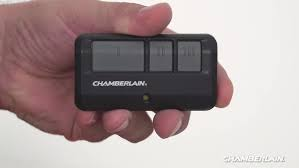
The good news is that programming a Chamberlain remote is quick and simple once you know the exact steps.
Read too: Tc1 Tricode Garage Door Opener Remote W/ Clip Chamberlain: Complete Guide
What Is A Chamberlain Garage Door Opener?
Chamberlain is one of the most trusted brands in garage door automation. Their systems use rolling code technology, which changes the access code each time you use the remote—enhancing security and preventing unauthorized access.
👉 Learn more about how garage door openers work:
https://en.wikipedia.org/wiki/Garage_door_opener
How To Program A Chamberlain Remote Control Garage Door Opener
Let’s go step-by-step so you can program your remote in just a few minutes.
Step 1: Locate The “Learn” Button
The Learn button is usually found on the motor unit mounted on your garage ceiling.
Common colors:
- Yellow
- Purple
- Red/Orange
- Green
👉 Tip: The color indicates the frequency and compatibility of your remote.
Step 2: Prepare Your Remote
Make sure:
- The remote has fresh batteries
- You are within 1–3 feet of the opener
Step 3: Press The Learn Button
- Press and release the Learn button
- A small LED light will turn on
- You now have 30 seconds to complete the next step
Step 4: Press The Remote Button
- Press and hold the button on your remote
- Hold for about 3–5 seconds
- Release when the opener light blinks or you hear a click
👉 This confirms successful programming.
Step 5: Test The Remote
Press the remote again to:
- Open the garage door
- Close the garage door
If it works, you’re done!
How To Program Multiple Remotes
Want to add more remotes?
Simply repeat the same process:
- Press Learn button
- Press new remote button
👉 Most Chamberlain openers can store up to 5–7 remotes.
How To Program A Chamberlain Keypad
If you have a wireless keypad, follow these steps:
- Press the Learn button
- Enter a 4-digit PIN on the keypad
- Press and hold the Enter button
- Wait for the light to blink
👉 Your keypad is now synced.
Troubleshooting: Why Isn’t My Remote Working?
If programming fails, check these common issues.
🔧 Common Problems & Fixes:
- Dead battery: Replace with a new CR2032 or equivalent
- Out of range: Stay within 3 feet during setup
- Memory full: Reset opener and reprogram
- Interference: Move away from LED lights or electronics
How To Reset Chamberlain Garage Door Opener
If nothing works, try a full reset.
Steps:
- Press and hold the Learn button for 6–10 seconds
- Release when the LED turns off
- All remotes are erased
- Reprogram from scratch
⚠️ This removes all connected devices.
Compatibility Guide (Important)
Not all remotes work with all models.
Match by Learn Button Color:
| Learn Button Color | Frequency | Compatible Remotes |
|---|---|---|
| Yellow | 310/315/390 MHz | Security+ 2.0 |
| Purple | 315 MHz | Security+ |
| Red/Orange | 390 MHz | Older models |
| Green | 390 MHz | Billion code |
👉 Always check your opener model before buying a new remote.
Benefits Of Programming Your Own Remote
✅ Advantages:
- Saves $50–$150 in service fees
- Quick setup (under 5 minutes)
- Easy to repeat for multiple remotes
- Improves home security
❌ Limitations:
- May require ladder access
- Not beginner-friendly for older systems
- Resetting removes all devices
Real-Life Example
A homeowner recently upgraded to a new Chamberlain remote but couldn’t connect it. After locating the yellow Learn button and following the correct steps, the remote was programmed in under 2 minutes—no technician needed.
👉 Lesson: Most issues come from incorrect timing or button sequence.
Safety Tips When Programming
- Always use a stable ladder
- Keep children away during setup
- Avoid pressing buttons randomly
- Disconnect power if performing deeper repairs
FAQ: How To Program A Chamberlain Remote Control Garage Door Opener
1. How long does it take to program a Chamberlain remote?
Usually 1–3 minutes if done correctly.
2. Why won’t my Chamberlain remote sync?
It could be due to dead batteries, wrong frequency, or missed timing during setup.
3. Can I program a remote without the Learn button?
No, the Learn button is essential for syncing the remote with the opener.
4. How many remotes can I program?
Most models support 5–7 remotes.
5. Do I need a professional to program it?
No, most homeowners can do it themselves easily.
6. Will resetting erase all remotes?
Yes, resetting clears all programmed devices.
Conclusion
Learning How To Program A Chamberlain Remote Control Garage Door Opener is a simple yet valuable skill for any homeowner. With just a few steps, you can set up your remote, improve convenience, and enhance your garage security.
Whether you’re adding a new remote or troubleshooting an old one, this guide gives you everything you need to get the job done quickly and safely.
Leave a Reply