If you’re tired of juggling a handheld remote every time you enter or leave your garage, you’re not alone. Many drivers want a seamless way to control their garage door directly from their vehicle. This guide on How To Pair LiftMaster Garage Door Opener To Car will walk you through the exact steps to connect your system safely and quickly—even if you’re a beginner.
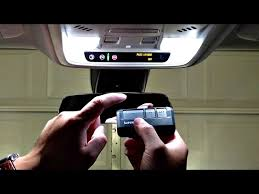
How To Pair LiftMaster Garage Door Opener To Car (Quick Overview)
Pairing your car with a LiftMaster garage door opener usually involves syncing your vehicle’s built-in system—commonly HomeLink or Car2U—with your opener.
Read too: How Do You Change Code On Garage Door Keypad Fast?
👉 In most cases, the process takes 3–5 minutes and requires:
- Access to your garage opener
- Your car parked nearby
- A working remote (for initial programming)
What Is HomeLink and How Does It Work?
HomeLink is a wireless control system built into many modern vehicles that allows you to operate garage doors, gates, and even home lighting.
Key Features:
- Built into your car’s overhead console or visor
- Can control up to 3 devices
- Uses radio frequency signals similar to remotes
According to industry data, over 80 million vehicles worldwide are equipped with HomeLink technology.
You can learn more here:
https://en.wikipedia.org/wiki/HomeLink
What You Need Before Pairing
Before starting, make sure you have:
Checklist
- A LiftMaster garage door opener
- Your car with HomeLink or Car2U system
- A ladder (if needed to access the opener)
- A working handheld remote (recommended)
💡 Tip: Clear previous settings in your car system to avoid interference.
Step-by-Step: How To Pair LiftMaster Garage Door Opener To Car
Follow these steps carefully:
Step 1: Clear Existing Codes in Your Car
- Press and hold the two outer HomeLink buttons
- Hold for 10–20 seconds until the indicator light flashes
👉 This resets the system.
Step 2: Program the Car Using Your Remote
- Hold your LiftMaster remote 1–3 inches from the HomeLink buttons
- Press and hold both:
- The remote button
- The desired HomeLink button
- Wait until the indicator light changes from slow blink to rapid flash
✅ This means the signal is captured.
Step 3: Locate the “Learn” Button on the Opener
- Go to your garage door opener unit
- Find the Learn button (usually yellow, purple, red/orange, or green)
Step 4: Press the Learn Button
- Press and release it
- You now have 30 seconds to complete the next step
Step 5: Sync the Car with the Opener
- Return to your car
- Press the programmed HomeLink button 2–3 times
- Hold each press for about 2 seconds
👉 The garage door should activate.
Step 6: Test the Connection
- Press the HomeLink button again
- Ensure the door opens and closes properly
How Long Does Pairing Take?
Most users complete the process in under 5 minutes. First-time users may take slightly longer, especially when locating the Learn button.
Common Problems and How to Fix Them
1. HomeLink Not Connecting
Cause:
- Missing Learn button step
Fix:
- Repeat syncing after pressing Learn button
2. Weak Signal
Cause:
- Low remote battery
Fix:
- Replace battery and retry
3. Door Doesn’t Respond
Cause:
- Incompatible frequency
Fix:
- Check compatibility with your opener model
Compatibility Guide: LiftMaster and Vehicles
| System Type | Compatibility |
|---|---|
| HomeLink | ✅ Fully compatible |
| Car2U | ✅ Compatible |
| Older cars | ⚠️ May require adapter |
💡 Tip: Most vehicles made after 2007 support rolling code systems.
Advantages vs Disadvantages of Pairing Your Car
Advantages
- No need for handheld remote
- Cleaner, clutter-free interior
- Faster access
- Increased convenience
Disadvantages
- Initial setup required
- May need reprogramming after battery reset
- Compatibility issues with older systems
Expert Tips for Faster Pairing
- Keep the remote close (1–3 inches)
- Perform setup in a well-lit area
- Press buttons firmly and steadily
- Complete Learn button step within 30 seconds
Is Pairing Safe?
Yes. Modern LiftMaster systems use rolling code technology, which changes the signal every time you use it.
👉 This prevents unauthorized access and enhances security.
When Should You Reset and Reprogram?
You may need to reprogram if:
- You replaced your car battery
- You changed garage door opener
- The system stops responding
Real-Life Example
A homeowner upgraded from a handheld remote to HomeLink and reduced garage entry time by over 50% during daily commutes. The convenience of not searching for a remote significantly improved their routine.
FAQ: How To Pair LiftMaster Garage Door Opener To Car
1. Can I pair without a remote?
Yes, but it’s harder. A remote simplifies the process significantly.
2. How many doors can I control?
Most HomeLink systems support up to 3 devices.
3. Why is my HomeLink blinking slowly?
It means it hasn’t captured the signal yet.
4. Do all cars support LiftMaster pairing?
Most modern cars do, but older models may require adapters.
5. How do I know if pairing is successful?
The garage door will respond (open/close) when pressing the button.
6. Can I reprogram a used car system?
Yes. Simply reset the HomeLink system and follow the steps again.
Conclusion
Now you know exactly How To Pair LiftMaster Garage Door Opener To Car quickly and efficiently. With just a few simple steps, you can eliminate the need for a remote and enjoy a smoother, more convenient daily routine.
Pairing your car not only saves time but also enhances security and ease of use. If you found this guide helpful, share it with friends or family who might want to upgrade their garage experience too!
Leave a Reply