Losing or breaking your remote can be frustrating—especially when you rely on it daily. If you’re wondering How To Get A New Garage Door Opener Remote, you’re in the right place. The process is simpler than most people think, and you can often get a replacement and set it up in under 30 minutes.
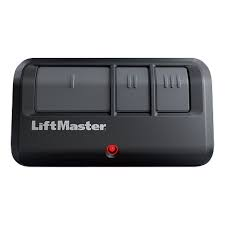
How To Get A New Garage Door Opener Remote (Step-by-Step Overview)
Getting a new remote involves three main steps: identifying your opener, buying the right remote, and programming it.
Let’s break each one down.
Read too: Tc1 Tricode Garage Door Opener Remote W/ Clip Chamberlain: Complete Guide
What Type of Garage Door Opener Do You Have?
Before buying anything, you need to identify your opener model.
Where to Find the Information
- On the motor unit (ceiling-mounted opener)
- Inside the light cover panel
- On the original remote (if available)
Key Details to Note
- Brand (e.g., Chamberlain, LiftMaster, Genie)
- Model number
- Frequency (e.g., 315 MHz, 390 MHz)
👉 This step is critical—buying the wrong remote is the most common mistake.
Where Can You Buy a Replacement Remote?
You have several reliable options.
1. Manufacturer (Best Compatibility)
Buying directly from the brand ensures full compatibility.
Pros:
- Guaranteed to work
- Easy programming
Cons:
- Slightly more expensive
2. Online Retailers (Best Value)
Platforms like Amazon or Home Depot offer many options.
Average Price Range:
- $15 – $50
3. Universal Remotes (Flexible Option)
Universal remotes can work with multiple brands.
Best for:
- Older systems
- Mixed garage setups
👉 Over 60% of replacement remotes sold today are universal models, due to convenience and affordability.
Original vs Universal Remote: Which Should You Choose?
| Feature | Original Remote | Universal Remote |
|---|---|---|
| Compatibility | Guaranteed | Varies by model |
| Price | Higher | Lower |
| Setup | Easy | Moderate |
| Flexibility | Limited | High |
💡 If you want simplicity, choose original. If you want flexibility, go universal.
How to Program a New Garage Door Remote
Once you have your new remote, programming is straightforward.
Step-by-Step Programming Guide
Step 1: Locate the “Learn” Button
- Found on the opener motor
- Usually yellow, red, purple, or green
Step 2: Press the Learn Button
- Press once (don’t hold too long)
- LED light will turn on
Step 3: Press the Remote Button
- Hold the button for 2–3 seconds
- Release when the opener light blinks
Step 4: Test the Remote
- Press the button again
- Ensure the door opens/closes smoothly
👉 Total time: 5–10 minutes
What If Your Remote Won’t Program?
Don’t worry—this is a common issue.
Possible Causes
- Dead battery
- Incompatible remote
- Memory full in opener
Quick Fix
- Replace battery
- Clear opener memory (hold Learn button for 6–10 seconds)
- Reprogram again
Can You Use Your Smartphone Instead?
Yes! Many modern openers support mobile apps.
Benefits of Smart Control
- Open/close from anywhere
- Receive activity alerts
- No physical remote needed
👉 Smart garage systems have grown rapidly, with over 40% of U.S. households adopting some form of smart home technology.
How Much Does a New Garage Door Remote Cost?
Typical Price Range
- Basic remote: $15–$30
- Brand-specific remote: $30–$60
- Smart controller upgrade: $50–$150
💡 Most homeowners spend around $25–$40.
How to Ensure Compatibility Before Buying
Follow this checklist:
Compatibility Checklist
- Match brand and model number
- Check frequency (MHz)
- Verify rolling code support
- Confirm product description
👉 Skipping this step leads to over 25% of returns in online purchases.
How Garage Door Remotes Work (Quick Insight)
Garage door remotes send radio signals to the opener using coded frequencies. Modern systems use rolling codes for security, changing the signal each time.
Learn more here:
https://en.wikipedia.org/wiki/Garage_door_opener
Tips to Avoid Losing Your Remote Again
Prevention saves time and money.
Smart Habits
- Keep a spare remote at home
- Use a keychain remote
- Store remotes in a consistent place
- Install a keypad entry system
Common Mistakes to Avoid
Avoid these pitfalls:
- ❌ Buying the wrong frequency
- ❌ Ignoring compatibility lists
- ❌ Holding the Learn button too long (resets memory)
- ❌ Forgetting to test after setup
FAQ: How To Get A New Garage Door Opener Remote
1. Can I use any remote for my garage door?
No. It must match your opener’s frequency and technology.
2. How long does it take to program a remote?
Usually 5–10 minutes.
3. What if I lost all my remotes?
You can still program a new one using the opener’s Learn button.
4. Are universal remotes reliable?
Yes, if compatible with your system.
5. Can I control my garage door without a remote?
Yes. Use a wall switch, keypad, or smartphone app.
6. How many remotes can I program?
Most systems support 3–7 remotes.
Conclusion
Learning How To Get A New Garage Door Opener Remote is easier than it seems. By identifying your opener, choosing the right remote, and following simple programming steps, you can restore full access to your garage in minutes.
Whether you go with an original remote or a universal option, the key is compatibility and proper setup. With the right approach, you’ll save time, avoid frustration, and keep your garage secure.
If this guide helped you, share it on social media—someone else might be searching for the same solution right now!
Leave a Reply