Struggling to open your garage door unless you’re right in front of it? You’re not alone. Many homeowners ask How To Extend The Range Of A Garage Door Opener when their remote suddenly loses distance.
The good news is that most range issues are easy to fix. With a few simple adjustments and upgrades, you can significantly improve your opener’s signal performance.
Read too: Tc1 Tricode Garage Door Opener Remote W/ Clip Chamberlain: Complete Guide
How To Extend The Range Of A Garage Door Opener (Quick Answer)
To extend the range of your garage door opener:
- Replace the remote batteries
- Reposition or extend the antenna
- Eliminate signal interference
- Upgrade to a stronger receiver or remote
Now let’s explore each solution in detail.
Why Is My Garage Door Opener Range So Short?
Understanding the cause helps you fix it faster.
Common Reasons
- Weak batteries
- Signal interference
- Antenna damage or misalignment
- Obstructions (walls, metal, vehicles)
- Outdated opener technology
Key Insight
Most garage door openers operate on 300–400 MHz frequencies, which can be affected by nearby electronics.
To learn more about radio frequencies, see:
https://en.wikipedia.org/wiki/Radio_frequency
How Does a Garage Door Opener Signal Work?
Garage door remotes send a radio signal to a receiver inside the opener.
Signal Flow
- You press the remote button
- Signal transmits via radio waves
- Receiver processes the code
- Door opens or closes
Important Note
Anything that blocks or interferes with this signal can reduce range.
Step-by-Step: How To Extend The Range Of A Garage Door Opener
Follow these proven steps to improve performance.
Step 1: Replace Remote Batteries
This is the easiest fix.
- Use fresh, high-quality batteries
- Replace every 12–18 months
- Ensure correct battery orientation
Result: Can improve range by up to 20–30%
Step 2: Adjust the Antenna Position
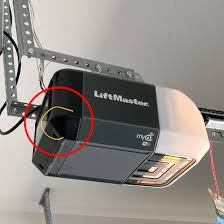
Your opener has a small antenna wire.
What to Do
- Ensure it hangs straight down
- Avoid wrapping or bending it
- Keep it away from metal surfaces
Tip: Even a small adjustment can boost signal strength.
Step 3: Extend the Antenna
For better range, you can extend it.
How to Extend
- Attach a 16–18 gauge wire
- Extend length to about 8–12 inches (20–30 cm)
- Secure it safely away from moving parts
Important: Do not exceed recommended length—it may reduce efficiency.
Step 4: Remove Signal Interference
Electronic devices can block signals.
Common Interference Sources
- Wi-Fi routers
- LED light bulbs
- Baby monitors
- Security systems
Fixes
- Move devices away from the opener
- Replace LED bulbs with garage-compatible ones
- Turn off nearby electronics temporarily to test
Step 5: Check for Obstructions
Physical barriers reduce signal strength.
Examples
- Thick walls
- Metal garage doors
- Parked vehicles
Solution
- Try operating from different angles
- Install a signal repeater if needed
Step 6: Upgrade Your Remote or Receiver
Older systems may have limited range.
Upgrade Options
- High-range remotes
- Universal receivers
- Smart garage door openers (Wi-Fi enabled)
How Far Should a Garage Door Opener Work?
Typical Range
- Standard: 50–100 feet
- High-quality systems: 150–300 feet
If your range is under 20 feet, there’s likely an issue.
Best Solutions Compared
Quick Comparison Table
| Solution | Cost | Difficulty | Effectiveness |
|---|---|---|---|
| Battery replacement | Low | Easy | Medium |
| Antenna adjustment | Free | Easy | Medium |
| Antenna extension | Low | Moderate | High |
| Remove interference | Free | Easy | High |
| Upgrade system | High | Moderate | Very High |
Common Mistakes to Avoid
1. Ignoring Simple Fixes
Many users skip battery replacement and go straight to upgrades.
2. Using Cheap Batteries
Low-quality batteries reduce signal strength.
3. Overextending the Antenna
Too long can actually reduce performance.
4. Ignoring Interference
LED bulbs are a surprisingly common cause of signal issues.
Advanced Tips for Maximum Range
Pro-Level Improvements
- Install an external antenna kit
- Use a signal repeater/extender
- Upgrade to a dual-frequency system
- Switch to a smart opener app (Wi-Fi control)
Advantages vs Limitations of Extending Range
Advantages
- Convenience (open from farther away)
- Faster access to garage
- Improved daily usability
Limitations
- May require upgrades
- Interference can persist
- Not all systems support modifications
Maintenance Tips to Keep Range Strong
Routine Checklist
- Replace batteries annually
- Inspect antenna every 6 months
- Keep opener clean and dust-free
- Test range periodically
FAQ Section
Frequently Asked Questions About How To Extend The Range Of A Garage Door Opener
1. Why does my garage door remote only work up close?
This is usually caused by weak batteries, interference, or antenna issues.
2. Can I increase the range without replacing the opener?
Yes. Adjusting the antenna and removing interference often solves the problem.
3. Do LED lights affect garage door remotes?
Yes. Some LED bulbs emit radio interference that reduces signal range.
4. What is the best way to extend range?
A combination of antenna adjustment and interference reduction works best.
5. Is it safe to modify the antenna?
Yes, as long as you follow recommended lengths and avoid electrical components.
6. Should I upgrade to a smart garage opener?
If range issues persist, a smart opener provides remote access via smartphone, eliminating range limits.
Conclusion
Understanding How To Extend The Range Of A Garage Door Opener can make your daily routine smoother and more convenient. From simple fixes like replacing batteries to advanced upgrades like antenna extensions, there are multiple ways to improve your system’s performance.
Start with the basics, then move to advanced solutions if needed. With the right approach, you can restore and even enhance your garage door’s range.
Leave a Reply