Struggling with figuring out how to connect my garage door opener to my car? You’re not alone—many homeowners want the convenience of opening their garage without a separate remote. The good news is that connecting your car to your garage door opener is easier than it sounds, and this guide will walk you through it step by step.
What Does It Mean to Connect Your Garage Door Opener to Your Car?
Connecting your garage door opener to your car allows you to use your vehicle’s built-in system (often called HomeLink or Car2U) to open and close your garage.
Read too: How Do You Change Code On Garage Door Keypad Fast?
Benefits:
- No need for a separate remote
- Cleaner car interior
- Faster access to your garage
- Increased convenience and security
Modern vehicles come equipped with integrated systems based on radio frequency communication, similar to those explained in Wikipedia.
How To Connect My Garage Door Opener To My Car (Step-by-Step)
This is the most important section if you want a quick solution.
Step 1: Clear Existing Codes
Before starting, reset your car’s system.
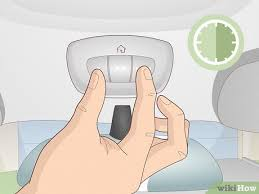
- Press and hold the first and third buttons on your car’s console
- Hold for 10–20 seconds until the light flashes rapidly
- This clears old codes
Step 2: Locate Your Garage Door Remote
You’ll need your existing handheld remote.
- Ensure the battery is working
- Stand inside your car
Step 3: Sync Remote With Car
Now pair the remote with your car.
- Hold your garage remote 1–3 inches from the car buttons
- Press and hold both buttons simultaneously
- Wait for the car indicator light to flash rapidly (about 15–30 seconds)
👉 This means your car has learned the signal.
Step 4: Find the “Learn” Button on the Opener
Go to your garage door motor unit.
- Look for a Learn or Program button
- Usually located near the antenna wire
- Color may be red, yellow, purple, or green
Step 5: Link the Car to the Opener
This step finalizes the connection.
- Press the Learn button (you have ~30 seconds)
- Return to your car
- Press the programmed button for 2 seconds, release
- Repeat 2–3 times until the door moves
Step 6: Test the Connection
Press the button once.
- Door should open/close smoothly
- If not, repeat steps
Why Won’t My Garage Door Opener Connect to My Car?
This is a common issue and usually easy to fix.
Common Causes:
- Dead remote battery
- Wrong programming sequence
- Incompatible system (older openers)
- Interference from nearby devices
Troubleshooting Tips That Actually Work
Quick Fix Checklist:
- Replace remote batteries
- Reprogram from scratch
- Check opener compatibility
- Ensure you pressed “Learn” within 30 seconds
Compatibility: Which Cars Work With Garage Door Openers?
Most modern vehicles support integration.
Common Systems:
- HomeLink (most popular)
- Car2U (found in Ford, Chrysler models)
Compatibility Table
| System | Supported Brands | Ease of Setup |
|---|---|---|
| HomeLink | Toyota, Honda, BMW | Easy |
| Car2U | Ford, Chrysler | Moderate |
Do All Garage Door Openers Work With Cars?
Not always. Compatibility depends on frequency and technology.
Supported Types:
- Rolling code openers (newer models)
- Fixed code openers (older models)
👉 Some older openers may require an adapter.
Advantages vs Disadvantages of Connecting Your Car
Advantages
- ✅ Convenience
- ✅ Less clutter
- ✅ Faster access
Disadvantages
- ❌ Initial setup required
- ❌ Compatibility issues
- ❌ May need reprogramming
How Long Does It Take to Connect?
On average:
- First-time setup: 10–15 minutes
- Reprogramming: 5 minutes
Real-Life Example
A homeowner with a 2020 SUV struggled to sync their opener. After resetting the car system and correctly timing the “Learn” button step, the connection was completed in under 10 minutes—eliminating the need for a handheld remote.
Safety Tips When Connecting Your Garage Door Opener
- Always test the door after setup
- Keep children away during programming
- Ensure door path is clear
- Never stand under a moving door
Maintenance Tips After Connection
- Test connection monthly
- Replace remote batteries annually
- Reprogram after power outages
- Keep opener sensors clean
FAQ: How To Connect My Garage Door Opener To My Car
1. Do I need a remote to connect my car?
Yes, in most cases you need the original remote for initial programming.
2. Why is my car not learning the signal?
It could be due to low battery, interference, or incorrect steps.
3. Where is the Learn button located?
Usually on the motor unit in your garage, near the antenna wire.
4. Can I connect multiple cars to one opener?
Yes, most systems support multiple devices.
5. Will disconnecting the battery reset my settings?
Sometimes yes—reprogramming may be required.
6. Is it safe to use a car garage opener?
Yes, modern systems use secure rolling codes.
Conclusion
Now you know exactly how to connect my garage door opener to my car with confidence. By following the simple step-by-step process, you can eliminate the need for a separate remote and enjoy seamless access every day.
This small upgrade adds convenience, improves security, and simplifies your routine. If you found this guide helpful, share it on social media so others can easily connect their garage door openers too! 🚗🔧
Leave a Reply