Tired of fumbling for your garage remote every time you pull into your driveway? You’re not alone. Many drivers want a smoother, built-in solution—and that’s exactly what this guide on How To Connect Liftmaster Garage Door Opener To Car will help you achieve. With just a few simple steps, you can control your garage door directly from your vehicle.
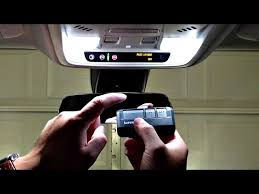
How To Connect LiftMaster Garage Door Opener To Car (Quick Answer)
To connect your LiftMaster garage door opener to your car, you typically need to sync your vehicle’s built-in system—such as HomeLink or Car2U—with your opener.
Read too: How Do You Change Code On Garage Door Keypad Fast?
👉 The process usually involves:
- Resetting your car’s system
- Programming it using your remote
- Syncing it with the opener via the Learn button
Most setups take 3–5 minutes.
What Is HomeLink and How Does It Work?
HomeLink is a built-in wireless control system in many vehicles that allows you to operate garage doors, gates, and more.
Key Features
- Built into your car (visor, mirror, or dashboard)
- Can control up to 3 devices
- Uses radio frequency signals similar to remotes
According to industry data, over 80 million vehicles globally are equipped with HomeLink technology.
Learn more here:
https://en.wikipedia.org/wiki/HomeLink
What You Need Before Connecting
Before starting, prepare the following:
Checklist
- LiftMaster garage door opener
- Your car with HomeLink or Car2U
- A ladder (if needed)
- A working remote (recommended)
💡 Tip: Make sure your garage opener is powered on and functioning properly.
Step-by-Step: How To Connect LiftMaster Garage Door Opener To Car
Follow these detailed steps carefully:
Step 1: Reset Your Car’s HomeLink System
- Press and hold the two outer HomeLink buttons
- Hold for 10–20 seconds
- Wait until the indicator light flashes rapidly
👉 This clears previous programming.
Step 2: Program Using Your Remote
- Hold your LiftMaster remote 1–3 inches from the HomeLink buttons
- Press and hold:
- The remote button
- The desired HomeLink button
- Continue until the light changes from slow blink to rapid flash
✅ This means the signal has been learned.
Step 3: Locate the Learn Button on the Opener
- Go to your garage opener unit
- Find the Learn button (color may vary: yellow, purple, red/orange, green)
Step 4: Activate the Learn Mode
- Press and release the Learn button
- You now have 30 seconds to complete the next step
Step 5: Sync the Car to the Opener
- Return to your car
- Press the programmed HomeLink button 2–3 times
- Hold each press for 2 seconds
👉 The garage door should respond.
Step 6: Test the System
- Press the HomeLink button
- Confirm the door opens and closes smoothly
How Long Does It Take?
- Total setup time: 3–5 minutes
- First-time users: up to 10 minutes
Common Problems and How to Fix Them
1. HomeLink Not Connecting
Cause: Learn button step skipped
Fix: Repeat the process after pressing Learn
2. Weak Signal
Cause: Low remote battery
Fix: Replace battery
3. Door Not Responding
Cause: Compatibility issue
Fix: Check your opener model
4. Indicator Light Not Flashing
Cause: Improper button timing
Fix: Hold buttons longer (15–20 seconds)
Compatibility Guide
| System Type | Compatibility |
|---|---|
| HomeLink | ✅ Fully compatible |
| Car2U | ✅ Compatible |
| Older vehicles | ⚠️ May need adapter |
💡 Tip: Vehicles made after 2007 usually support rolling code systems.
Advantages vs Disadvantages of Connecting Your Car
Advantages
- No need for handheld remote
- Cleaner car interior
- Faster garage access
- Increased convenience
Disadvantages
- Initial setup required
- May need reprogramming
- Limited compatibility with older systems
Expert Tips for a Smooth Setup
- Keep the remote close (1–3 inches)
- Perform setup in a shaded area
- Press buttons firmly
- Complete Learn step quickly
👉 These small details can improve success rate significantly.
Is It Safe to Connect Your Garage Door to Your Car?
Yes. LiftMaster systems use rolling code technology, which changes the signal every time you use it.
Benefits of Rolling Code
- Prevents hacking
- Enhances security
- Protects your home
When Should You Reprogram the System?
You may need to reconnect if:
- You replace your car battery
- You reset the opener
- The system stops responding
Real-Life Example
A commuter replaced their garage remote with HomeLink integration and reduced entry time by over 50% during daily routines. The convenience of automatic access improved both efficiency and comfort.
FAQ: How To Connect LiftMaster Garage Door Opener To Car
1. Can I connect without a remote?
Yes, but it’s more difficult. A remote simplifies the process.
2. How many devices can HomeLink control?
Up to 3 devices.
3. Why isn’t my car connecting to the opener?
You may have skipped the Learn button step or need to reset the system.
4. Do all cars support LiftMaster connection?
Most modern cars do, but older ones may require adapters.
5. How do I know if it’s connected?
The garage door will open or close when you press the button.
6. Can I reprogram a used car system?
Yes. Simply reset the HomeLink system and repeat the steps.
Conclusion
Now you know exactly How To Connect Liftmaster Garage Door Opener To Car quickly and efficiently. With just a few simple steps, you can eliminate the need for a remote and enjoy seamless, built-in control every day.
This small upgrade adds convenience, improves security, and enhances your daily routine. If you found this guide helpful, consider sharing it with friends or family—it might make their lives easier too!
Leave a Reply