If you’ve recently moved, lost a code, or want better security, you’re probably wondering How To Change The Code On The Garage Door Keypad quickly and safely.
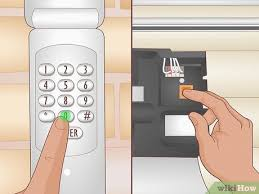
The good news? Most garage keypad codes can be updated in just a few minutes—even if you’re a beginner.
Read too: Tc1 Tricode Garage Door Opener Remote W/ Clip Chamberlain: Complete Guide
How To Change The Code On The Garage Door Keypad (Quick Answer)
To change your garage door keypad code:
- Press the “Learn” button on the opener
- Enter a new 4-digit code on the keypad
- Press “Enter”
- Wait for confirmation (light or click sound)
👉 That’s it—your new code is now active.
Why Should You Change Your Garage Door Keypad Code?
Changing your code isn’t just about convenience—it’s about security.
🔒 Common Reasons:
- You moved into a new home
- You shared the code with someone
- You suspect unauthorized access
- The keypad is malfunctioning
👉 Regular updates reduce the risk of unauthorized entry.
How Garage Door Keypads Work
Garage door keypads use radio frequency signals to communicate with the opener.
👉 Learn more about the technology here:
https://en.wikipedia.org/wiki/Remote_control
Key Components:
- Keypad (mounted outside)
- Garage door opener unit
- Receiver system
👉 When you enter a code, the keypad sends a signal to open or close the door.
Step-by-Step: How To Change The Code On The Garage Door Keypad
This method works for most brands like LiftMaster, Chamberlain, and Genie.
Step 1: Locate The “Learn” Button
- Found on the back or side of the opener motor
- Usually near the antenna wire
Button Colors May Include:
- Yellow
- Purple
- Red/orange
- Green
👉 The color can indicate compatibility and frequency.
Step 2: Press The Learn Button
- Press and release the button
- A light will turn on (or LED will blink)
- You have 30 seconds to complete the next step
Step 3: Enter New Code On Keypad
- Go to the keypad outside
- Enter your new 4-digit code
- Press “Enter”
👉 Choose a code that’s easy to remember but hard to guess.
Step 4: Test The New Code
- Wait for confirmation (light blink or click)
- Enter the new code again
- Ensure the door opens and closes properly
Alternative Method: Reset Without Learn Button
Some older models use a different method.
Steps:
- Enter the current code
- Press and hold the “#” or “Program” button
- Enter new code
- Press “Enter”
👉 Check your manual for model-specific instructions.
How Long Does It Take?
- Basic code change: 2–5 minutes
- Full reset: 5–10 minutes
👉 It’s one of the fastest DIY home security upgrades.
Choosing a Secure Garage Door Code
✅ Best Practices:
- Avoid simple codes (1234, 0000)
- Use random combinations
- Change codes every 6–12 months
❌ Avoid:
- Birthdays
- Repeated numbers
- Easy patterns
Common Problems & Fixes
Problem 1: Keypad Not Responding
Solution:
- Replace batteries
- Check wiring
- Clean keypad surface
Problem 2: Code Not Saving
Solution:
- Ensure you pressed “Enter”
- Repeat process within 30 seconds
Problem 3: Door Doesn’t Open
Solution:
- Re-sync with opener
- Check signal interference
- Verify Learn button activation
Pros vs Cons of Changing Your Code Regularly
✅ Advantages:
- Improved home security
- Prevents unauthorized access
- Keeps system updated
❌ Disadvantages:
- Need to remember new code
- Requires occasional reprogramming
Real-Life Example
A homeowner changed their keypad code after moving into a new house. Within minutes, they secured their garage without needing professional help—saving both time and money.
👉 Simple steps can prevent serious security risks.
Tips for Maintaining Your Garage Keypad
🔧 Maintenance Checklist:
- Replace batteries every 6–12 months
- Clean keypad regularly
- Protect from extreme weather
- Test functionality monthly
When Should You Reset Everything?
Consider full reset if:
- You forgot the current code
- Multiple users had access
- System behaves erratically
👉 A full reset clears all stored codes.
FAQ: How To Change The Code On The Garage Door Keypad
1. How do I reset my garage door keypad without the code?
Press the Learn button on the opener, then enter a new code.
2. How often should I change my garage code?
Every 6–12 months or after sharing access.
3. Can I use any 4-digit code?
Yes, but avoid predictable combinations.
4. Why is my keypad not working after changing the code?
It may not have synced properly—repeat the process.
5. Do all garage openers have a Learn button?
Most modern models do, but older ones may differ.
6. Can I program multiple keypads?
Yes, most systems allow multiple devices.
Conclusion
Learning How To Change The Code On The Garage Door Keypad is a simple yet powerful way to improve your home’s security. With just a few steps—locating the Learn button, entering a new code, and testing—you can update your system in minutes.
Regularly changing your code, choosing secure combinations, and maintaining your keypad will ensure long-term reliability and safety.
👉 If this guide helped you, share it on social media so others can secure their homes quickly and easily!
Leave a Reply