If you’re concerned about security or your keypad isn’t working properly, you might be wondering: How To Change The Code On Chamberlain Garage Door Opener? This is a common task for homeowners—especially after moving into a new house or losing a remote. The good news is that changing your garage door code is simple and can be done in just a few minutes.
Why Should You Change Your Garage Door Code?
Changing your code isn’t just about convenience—it’s about protecting your home.
Top Reasons to Update Your Code
- You recently moved into a new home
- You lost a remote or keypad access
- You suspect unauthorized access
- Your current code is too simple
Read too: Tc1 Tricode Garage Door Opener Remote W/ Clip Chamberlain: Complete Guide
According to general system security concepts explained in Garage Door Opener, modern systems use rolling codes to enhance protection, but manual code updates are still essential for safety.
How To Change The Code On Chamberlain Garage Door Opener (Step-by-Step)
Follow these simple steps to reset and program a new code.
Step 1: Locate the “Learn” Button
- Found on the garage door opener motor unit
- Usually behind a light cover
- Colors may include yellow, purple, red, or green
Step 2: Press the Learn Button
- Press and release the button
- An LED light will turn on
- You now have 30 seconds to complete the next step
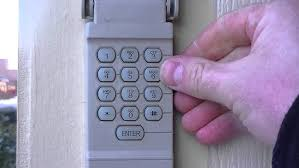
Step 3: Enter a New Code on the Keypad
- Go to your outdoor keypad
- Enter your desired 4-digit code
- Press and hold the Enter button
Step 4: Wait for Confirmation
- The opener light will blink or click
- This confirms the new code is saved
Step 5: Test the New Code
- Enter the new code again
- Press Enter
- Ensure the door opens and closes properly
How To Reset the Entire System (Erase All Codes)
If you want maximum security, perform a full reset.
Steps
- Press and hold the Learn button for 6–10 seconds
- Wait until the LED turns off
- All remotes and keypads are erased
⚠️ Important: You must reprogram all devices after this step.
Common Problems When Changing the Code (And Fixes)
1. Keypad Not Responding
Cause: Dead battery
Fix: Replace battery and try again
2. Code Not Saving
Cause: Timing issue
Fix: Complete steps within 30 seconds
3. Door Doesn’t Open After Code Entry
Cause: Incorrect programming
Fix: Repeat the process carefully
4. LED Light Doesn’t Turn On
Cause: Power issue
Fix: Check outlet and circuit breaker
How Long Does It Take to Change the Code?
- Average time: 2–5 minutes
- Skill level: Beginner
👉 No special tools required.
Chamberlain Keypad vs Remote Programming
| Feature | Keypad Code Change | Remote Programming |
|---|---|---|
| Input Method | PIN code | Button press |
| Security Level | High | Medium |
| Ease of Use | Easy | Very Easy |
| Best Use Case | Outdoor access | In-car access |
Best Practices for Choosing a Secure Code
Do:
- Use a random 4-digit combination
- Avoid patterns like 1234 or 0000
- Change code every 6–12 months
Don’t:
- Use your birth year
- Share code with too many people
- Write it in visible places
💡 Security Tip: Treat your garage code like a password—it protects access to your home.
DIY vs Professional Help
DIY Code Change
Pros:
- Free
- Fast and easy
Cons:
- Requires following instructions carefully
Professional Service
Pros:
- Guaranteed setup
- Includes inspection
Cons:
- Costs $50–$150
Real-Life Example
A homeowner changed their garage code after losing a remote. A week later, they discovered the old remote had been found by someone else—but it no longer worked.
👉 This simple action prevented potential unauthorized access.
How Often Should You Change Your Garage Door Code?
Experts recommend:
- Every 6–12 months
- Immediately after losing a remote
- After moving into a new home
📊 Security Insight:
Regular updates significantly reduce the risk of unauthorized entry.
FAQ: How To Change The Code On Chamberlain Garage Door Opener
1. Where is the Learn button located?
It’s usually on the motor unit, behind the light cover or on the back panel.
2. Can I change the code without the Learn button?
No. The Learn button is required to sync a new code.
3. What if I forget my current code?
You can reset the system using the Learn button and create a new code.
4. How many digits should my code be?
Most Chamberlain systems use a 4-digit code.
5. Can multiple users have different codes?
Some advanced systems allow multiple codes, but most standard models use one primary code.
6. Why does my keypad blink but not work?
This usually indicates a low battery or incomplete programming.
Conclusion
Learning How To Change The Code On Chamberlain Garage Door Opener is one of the simplest ways to improve your home’s security. With just a few quick steps, you can reset your system, prevent unauthorized access, and ensure smooth operation.
By updating your code regularly and following best practices, you’ll keep your garage—and your home—safe and secure.
If you found this guide helpful, share it on social media to help others protect their homes too! 🚪
Leave a Reply