If your garage door suddenly stops working or responds inconsistently, the battery might be the problem. Knowing How To Change The Battery In My Garage Door Opener can save you time, money, and frustration. The good news? It’s a quick and beginner-friendly task you can complete in just minutes.
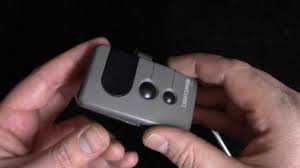
What Does the Battery Do in a Garage Door Opener?
Your garage door opener relies on a battery for backup power and remote operation.
According to general information like Garage Door Opener systems, modern units include battery backups to ensure operation during power outages.
Key Functions of the Battery
- Power remote controls
- Support backup operation during outages
- Maintain system memory in some models
Read too: Tc1 Tricode Garage Door Opener Remote W/ Clip Chamberlain: Complete Guide
How Do You Know the Battery Needs Replacing?
Common Signs
- Garage door opens slowly
- Remote range decreases
- Opener beeps or flashes
- Door doesn’t respond at all
📊 Stat Insight: Most garage door opener batteries last 1–3 years, depending on usage.
What Type of Battery Does a Garage Door Opener Use?
Different parts use different batteries.
1. Remote Control Batteries
- Usually: CR2032 or CR2025 coin batteries
2. Keypad Batteries
- Typically: 9V or AA batteries
3. Backup Battery (Main Unit)
- Usually: 12V rechargeable battery
👉 Always check your opener manual for exact specifications.
Tools You’ll Need
Before starting, gather:
- Replacement battery
- Screwdriver (Phillips or flathead)
- Clean cloth
How To Change The Battery In My Garage Door Opener (Step-by-Step)
Step 1: Identify the Battery Location
There are three possible locations:
- Inside the remote
- Inside the wall keypad
- Inside the motor unit (ceiling-mounted opener)
Step 2: Turn Off Power (For Safety)
- Unplug the opener
- Or turn off the circuit breaker
👉 This step is especially important for main unit batteries.
Step 3: Open the Battery Compartment
For Remote
- Slide open the back cover
- Or use a small screwdriver
For Keypad
- Open front panel
- Remove battery cover
For Main Unit
- Locate battery compartment (usually side or back)
- Remove screws if needed
Step 4: Remove the Old Battery
- Take out the battery carefully
- Note the positive (+) and negative (–) orientation
Step 5: Insert the New Battery
- Match polarity correctly
- Press firmly into place
💡 Tip: Incorrect placement is one of the most common mistakes.
Step 6: Close the Compartment
- Secure cover or screws
- Ensure everything is tight
Step 7: Restore Power and Test
- Plug the opener back in
- Test remote and door operation
👉 The door should respond instantly.
Quick Battery Replacement Guide
| Component | Battery Type | Time Required |
|---|---|---|
| Remote | Coin cell | 2–5 minutes |
| Keypad | 9V/AA | 5–10 minutes |
| Main unit | 12V battery | 10–15 minutes |
Common Mistakes to Avoid
- ❌ Installing battery backwards
- ❌ Using the wrong battery type
- ❌ Skipping power shutdown
- ❌ Not testing after replacement
How Often Should You Replace the Battery?
Recommended Schedule
- Remote: Every 1–2 years
- Keypad: Every 1–2 years
- Backup battery: Every 2–3 years
Battery vs Other Issues: How to Tell the Difference
| Problem | Likely Cause | Solution |
|---|---|---|
| No response | Dead battery | Replace battery |
| Intermittent use | Weak battery | Replace battery |
| Loud noise | Mechanical issue | Inspect hardware |
| Door stuck | Track problem | Check alignment |
Pro Tips for Better Performance
- Use high-quality batteries (e.g., lithium)
- Keep spare batteries at home
- Clean battery contacts periodically
- Replace all batteries at the same time
Real-Life Example
A homeowner noticed their garage door remote only worked at close range. After replacing a CR2032 battery, the range improved instantly.
👉 Small fixes can make a big difference.
When Should You Call a Professional?
Seek help if:
- Battery replacement doesn’t fix the issue
- Opener still beeps or flashes
- Wiring or internal components are damaged
FAQ: How To Change The Battery In My Garage Door Opener
1. How long does it take to change the battery?
Usually 2–10 minutes, depending on the device.
2. Do I need to reprogram the opener after changing the battery?
In most cases, no. Settings are retained.
3. What happens if I don’t replace the battery?
The remote or backup system may stop working completely.
4. Can I use any battery brand?
Yes, but high-quality brands last longer.
5. Why is my opener still not working after replacing the battery?
The issue may be with sensors, wiring, or the opener itself.
6. Is it safe to replace the battery myself?
Yes, as long as you follow basic safety steps.
Conclusion
Learning How To Change The Battery In My Garage Door Opener is a simple yet essential skill for every homeowner. With just a few tools and minutes, you can restore your garage door’s performance and avoid unnecessary repair costs.
Regular battery maintenance ensures smooth operation, better reliability, and peace of mind.
If you found this guide helpful, share it on social media to help others keep their garage doors working perfectly! 🔋🚪
Leave a Reply