If your garage door keypad stops responding or the light dims, it’s often a sign that the battery needs replacement. Knowing how to change the battery in a garage door keypad is essential for maintaining smooth access to your garage.
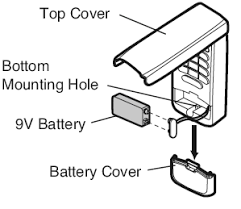
This guide will walk you through the process step by step, ensuring your keypad works reliably and safely. You’ll also learn tips for battery maintenance and troubleshooting common issues.
Read too: Tc1 Tricode Garage Door Opener Remote W/ Clip Chamberlain: Complete Guide
Understanding Garage Door Keypads
Garage door keypads come in different models, but most operate on standard 9V or AA/AAA batteries. Some modern models use rechargeable lithium batteries.
Knowing your keypad type helps you choose the right battery and avoid damage during replacement.
- Wired keypads: Powered directly by the garage door opener; no battery needed.
- Wireless keypads: Require batteries; common models include Genie, LiftMaster, and Chamberlain.
According to consumer electronics experts, replacing batteries every 12–18 months prevents unexpected failures and extends keypad life.
Step-by-Step Guide to Changing the Battery
Step 1: Locate the Keypad
- Find your keypad near the garage door entry.
- Remove any protective cover or screws, if present.
Step 2: Remove the Old Battery
- Open the battery compartment.
- Note the battery type and orientation (positive/negative).
- Carefully remove the old battery.
Step 3: Insert the New Battery
- Use the exact battery type specified in your keypad manual.
- Ensure proper alignment of positive (+) and negative (–) terminals.
Step 4: Test the Keypad
- Replace the cover.
- Press a few buttons to check the response.
- Ensure the LED light or display activates properly.
Tips for Battery Maintenance
- Use quality batteries: Alkaline or lithium for best longevity.
- Avoid mixing old and new batteries: This can cause leaks or malfunction.
- Check regularly: Replace batteries if the keypad response slows or LED dims.
- Remove batteries during extended absences: Prevent leakage when not in use.
Many users report keypad issues stem from low battery rather than faulty hardware, saving time and repair costs.
Troubleshooting Common Issues
| Issue | Possible Cause | Solution |
|---|---|---|
| Keypad not responding | Dead battery | Replace with new battery, check polarity |
| LED flickers | Low battery or poor contact | Clean battery contacts, reinsert battery |
| Buttons sticking | Dirt or moisture | Clean keypad with dry cloth, avoid water |
| Keypad loses code | Battery removed for long | Reprogram keypad according to manual |
Extra Tip: If your keypad requires reprogramming after battery replacement, follow your model’s specific steps. Most manufacturers provide clear instructions in the manual.
When to Replace the Entire Keypad
- Persistent malfunctions after battery replacement.
- Cracked housing or damaged buttons.
- Incompatibility with updated garage door opener systems.
Replacing the keypad can cost between $30–$70 depending on the model, but ensures secure and reliable operation.
FAQ: How To Change The Battery In A Garage Door Keypad
Q1: Can I use rechargeable batteries in my garage keypad?
A: Yes, if the keypad supports rechargeable types. Check the manual for voltage and battery size requirements.
Q2: How often should I change the keypad battery?
A: Typically every 12–18 months, or sooner if LED dims or keypad responds slowly.
Q3: What if the keypad doesn’t work after battery replacement?
A: Ensure proper battery orientation, clean contacts, and reprogram if needed.
Q4: Can I replace the battery without removing the keypad from the wall?
A: Yes, most wireless keypads allow battery replacement without full removal.
Q5: Do all garage keypads use the same battery type?
A: No, battery type varies by brand and model. Always check the manual before replacement.
Q6: Will removing the battery erase my garage door code?
A: Some models do require reprogramming after battery removal; consult your keypad manual.
Conclusion
Replacing the battery in a garage door keypad is a simple yet essential task for smooth and secure garage access. By following this guide, you can ensure your keypad responds reliably, prevents unexpected lockouts, and prolongs the device’s life.
Regular maintenance, proper battery selection, and timely replacement keep your garage system running efficiently.
Share this guide with friends and family to help them maintain their garage door keypads without hassle.
Leave a Reply